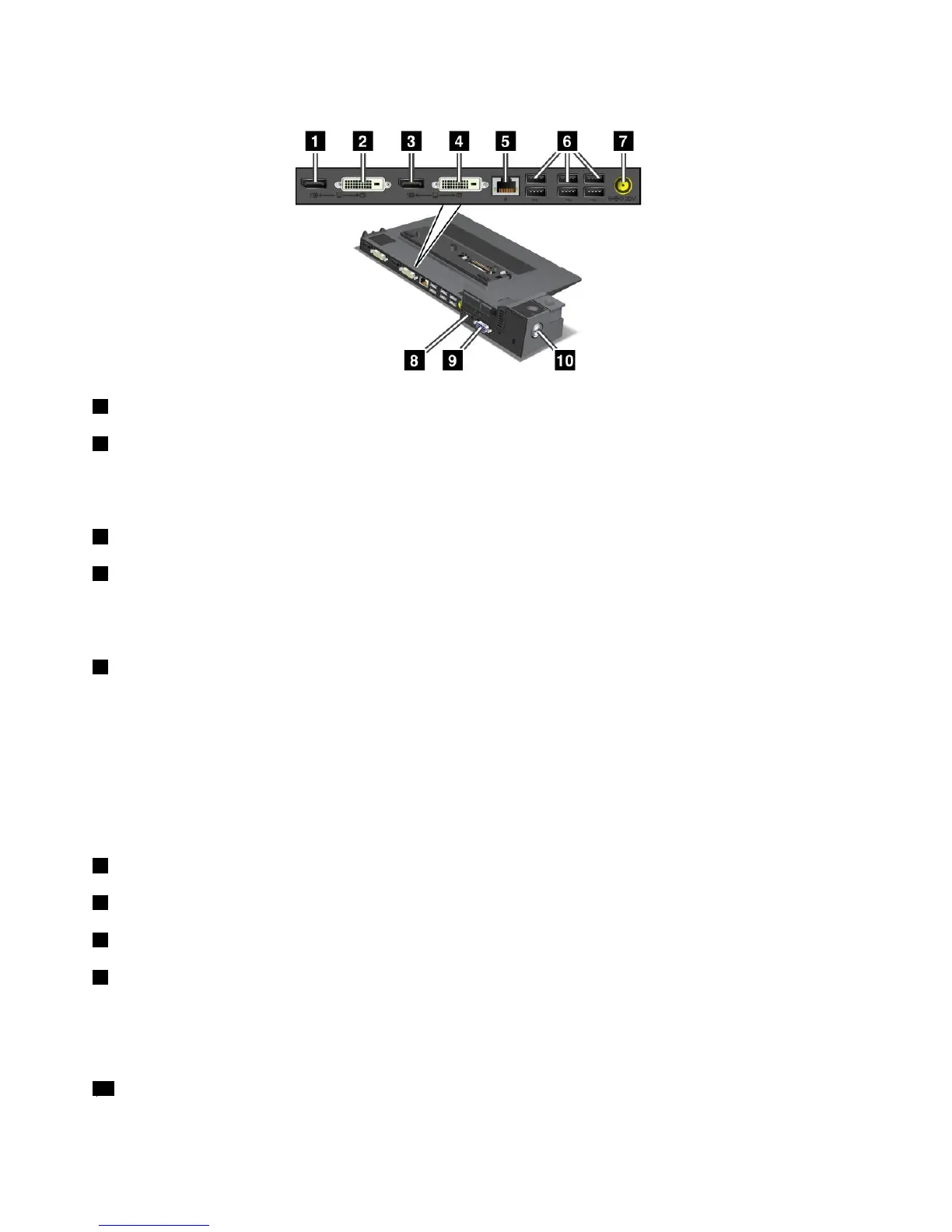
ThinkPadMiniDockPlusSeries3
1TheDisplayPortisforconnectingadisplaydevice.
2ThedigitalvisualinterfaceconnectorisforconnectingamonitorthatsupportsSingle-LinkDVI.
Note:TheDVIconnectorprovidesadigitalinterfaceonly.Thisconnectorcanbeusedwithacomputerthat
supportsDVIviadockingonly.
3TheDisplayPortisforconnectingadisplaydevice.
4ThedigitalvisualinterfaceconnectorisforconnectingamonitorthatsupportsSingle-LinkDVI.
Note:TheDVIconnectorprovidesadigitalinterfaceonly.Thisconnectorcanbeusedwithacomputerthat
supportsDVIviadockingonly.
5TheEthernetconnectorisforconnectingtheThinkPadMiniDockPlusSeries3toanEthernetLAN.
Theindicatorontheconnectoristhesameasthatonthecomputer.
Notes:
•YoucannotusetheTokenRingcableforthisconnector.
•Youcanusethisconnectorfora10BASE-T/100BASE-TX/1000BASE-TEthernet.
Note:IfyouattachyourcomputertotheThinkPadMiniDockPlusSeries3anduseanEthernetconnector,
usetheEthernetconnectorontheThinkPadMiniDockPlusSeries3,nottheoneonthecomputer.
6TheUniversalSerialBusconnectorsareforconnectingUSB1.1andUSB2.0devices.
7Thepowerjackisforconnectingtheacpoweradapter.
8TheeSATAisforconnectingtheeSATA.
9Theexternalmonitorconnectorisforconnectinganexternalmonitor.
Note:IfyouattachyourcomputertotheThinkPadMiniDockPlusSeries3anduseanexternalmonitor
connector,usetheexternalmonitorconnectorontheThinkPadMiniDockPlusSeries3,nottheoneonthe
computer.
10Whenyouattachamechanicallocktothesecuritykeyhole,theejectbuttonislockedsothatthe
computercannotberemovedfromtheThinkPadMiniDockPlusSeries3.
124UserGuide















 To Next Page