swipingyourngeroverthereader,withouttypingapassword.Thusngerprintauthenticationcanreplace
passwordsandenablesimpleandsecureuseraccess.
Enrollingyourngerprint
Tousetheintegratedngerprintreader,beginbyenrollingyourngerprintasfollows.
1.Turnonyourcomputer.
2.StartThinkVantageFingerprintsoftware.SeeFingerprintSoftware.
3.Followtheinstructionsonthescreentoenrollyourngerprint.Fordetails,refertotheHelpforthe
program.
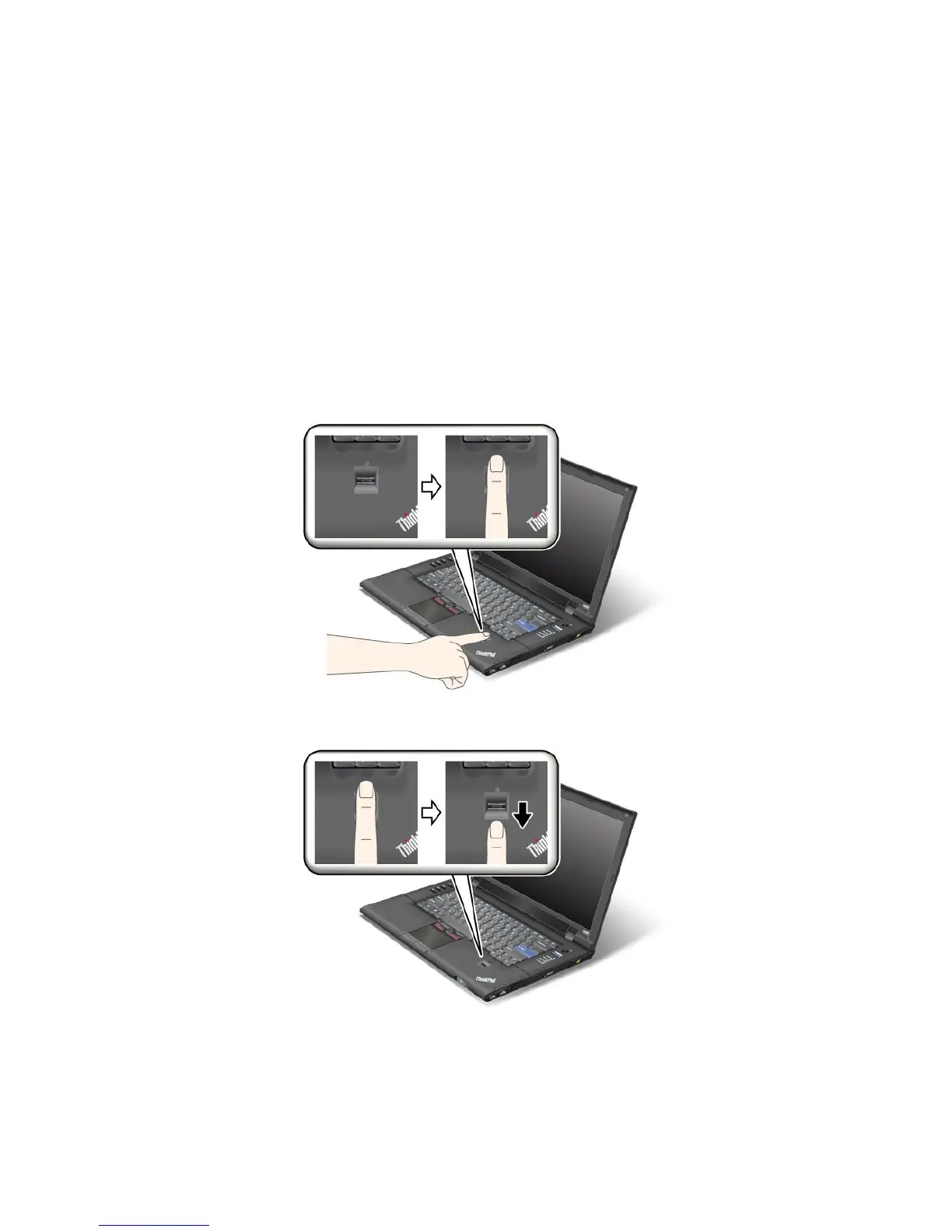
Swipingyourngeroverthereader
Toswipeyourngeroverthereader,doasfollows:
1.Placetheballofyournger,thatis,thecentralpartofthengerprint,onthesmallcircleabovethe
reader.Makesurethattheentiretopjointofthengerisonthereader.
2.Applylightpressureandswipeyourngeracrossthereaderinonesmoothmotion.
Loggingontothesystem
Afteryouenrollyourngerprint,logontothesystemasfollows:
1.Turnyourcomputeroffandthenonagain.
Chapter4.Security77















 To Next Page