27
4.6 Web Data Access Settings
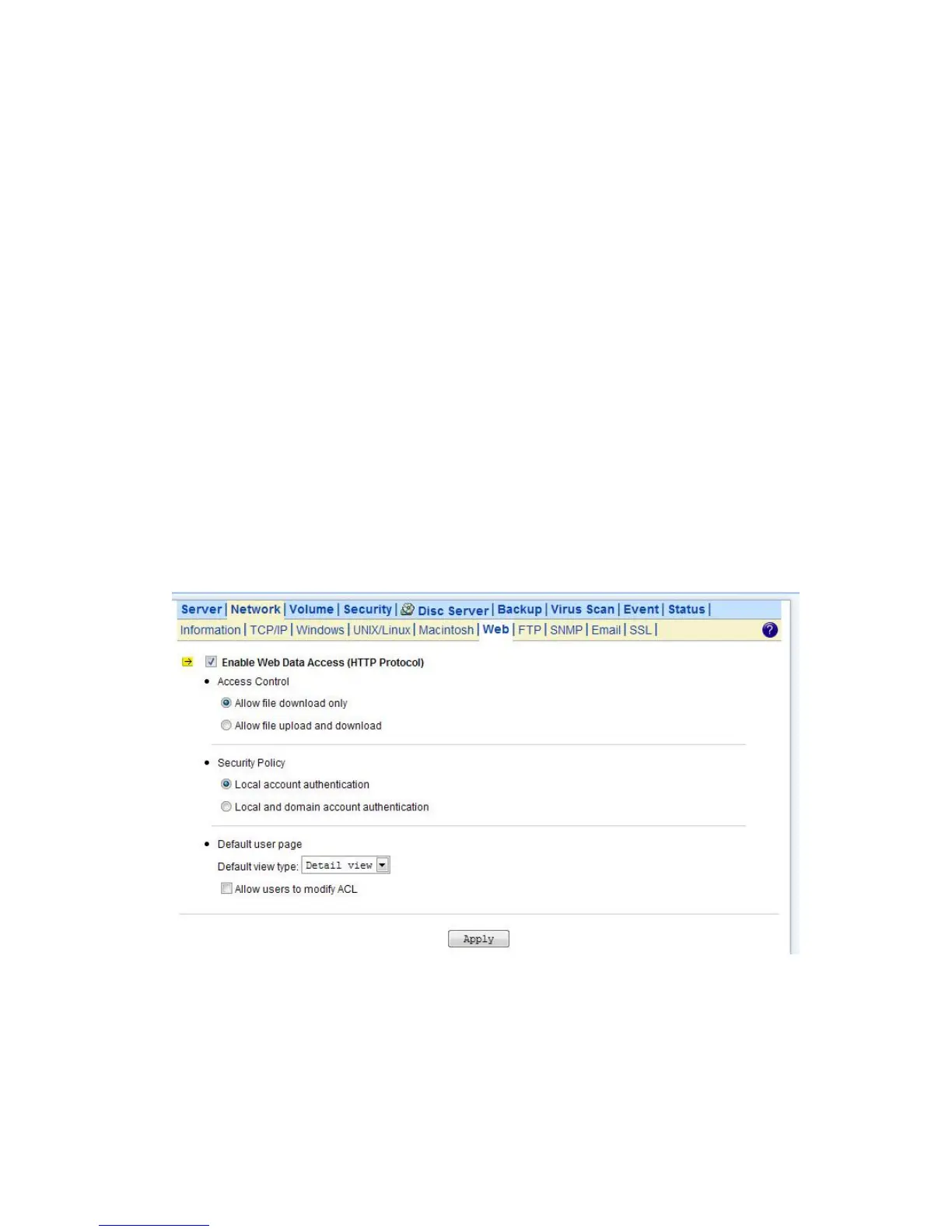
This section shows the parameters that you can set up for user to access NAS system user’s home
page. You can configure the user access constraint, authentication policy and default setting by
defining the Access Control, Security Policy and Default User Page settings.
Configuring Web Data Access
1. Click the Enable Web Data Access (HTTP Protocol) checkbox to enable Web data accessing.
2. Choose Allow file download only or Allow file upload and download.
3. Click the Local account authentication radio button to authenticate user using the server’s local
user database.
4. Or, click the Local and domain account authentication radio button to use both local account
and Microsoft domain security authentication.
5. Select the default type of the folder display on the user page. You can choose from Detail View,
Large Icons or Small Icons.
6. Click the checkbox beside the Allow users to modify ACL to give users the privilege to modify the
ACL table entries.
7. Click Apply to save the setting.



 To Next Page