26
4.5 Macintosh Settings
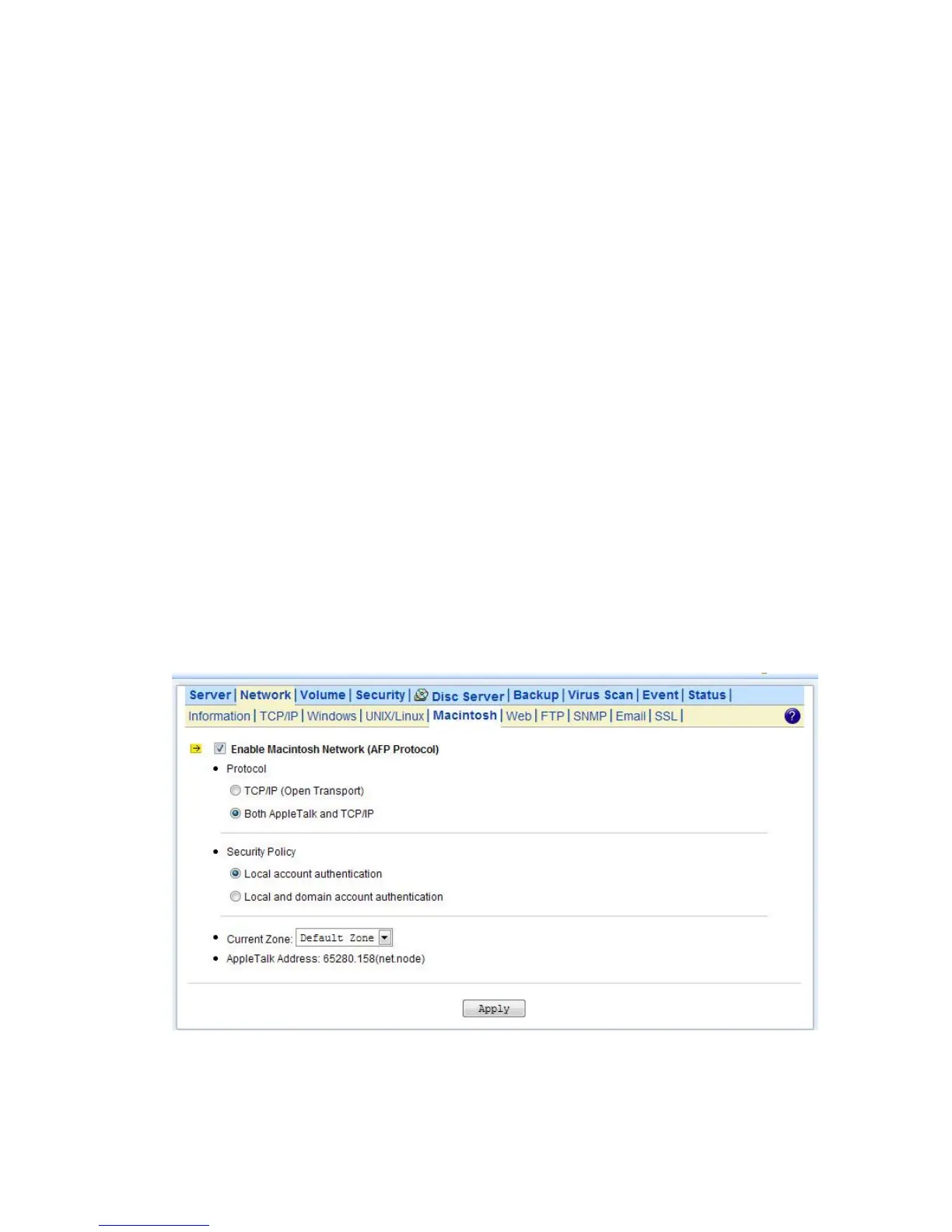
NAS server supports two kinds of protocols used for Mac OS clients –TCP/IP (Open Transport) and
Both AppleTalk and TCP/IP. Also, NAS server provides two kinds of security polices for Macintosh
Network AFP client.
Local account authentication: Authenticate user using NAS server’s internal user database.
Local and domain authentication: If Windows Network is enabled, you can enable both local and
domain authentication for AFP client.
Current Zone: A division between groups of machines when viewed using AppleTalk. AppleTalk
Zones can be seen in the Chooser, the AppleTalk Control Panel, and the Network Browser.
AppleTalk Address: It is a unique number that identify the server on the network. The number to the
left of the dot is the network number. The number to the right of the dot is the node number.
Configuring Macintosh Network Settings
1. Click the Enable Macintosh Network (AFP Protocol) checkbox to enable access for AFP client.
2. Select a protocol and click the radio button beside it.
3. Click the Local account authentication radio button to authenticate user using the server’s local
user database.
4. Or, click the Local and domain account authentication radio button to use both local account
and Microsoft domain security authentication.
5. Select the Current Zone from the pull down menu or Default Zone is assigned by default.
6. Click Apply to save the setting.



 To Next Page