22 iGrowSeries 100 Installation Manual 960-0001-20
1.1 Temperature Setpoint
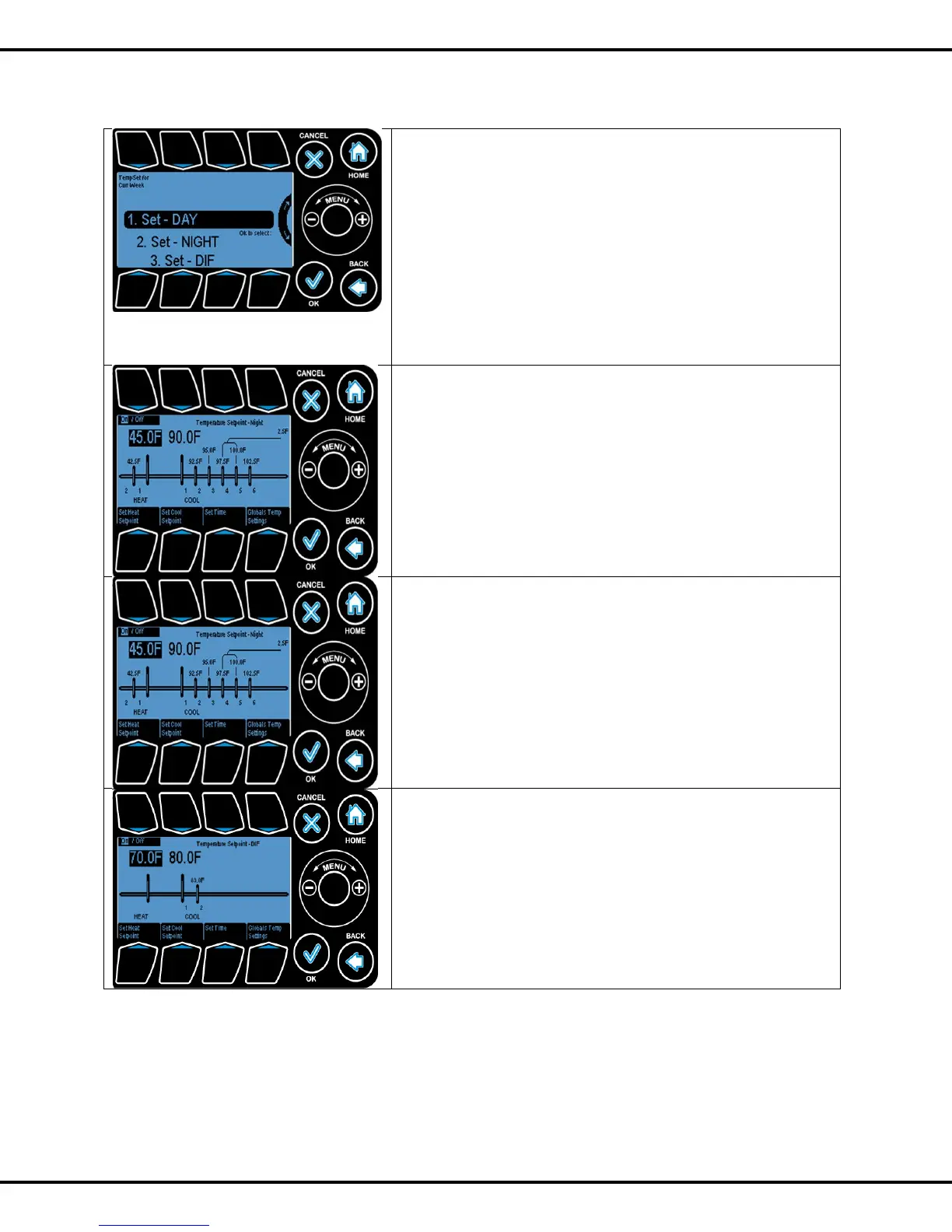
There are three set points provided for the user.
DAY
NIGHT
DIF
DAY and NIGHT are active by default. DIF can be turned on if
desired.
To select Day, Wheel or Button #1 can be used to highlight
Day option
Day and Night options are the same.
This shows the temperature setpoints for all the heating and
cooling stages.
The user can modify the Heat Setpoint and Cool Setpoint by
pressing #5, #6 respectively. The temperature is adjusted by
turning the Wheel.
Pressing the Set Time button (#7) will allow the start time for
the Day Time Setpoint to be set.
Night Settings
The only difference between the Day and Night screens is Tab
#1 which is used to activate the Night setpoint option (ON) or
to deactivate it (OFF).
The DIF screen is identical to the Night setting screen. It will
simply enable a 3
rd
setpoint option.
Corresponding Diagram shows when day, night and DIF
options are activated.
Note that there are now three start times being displayed,
which can be modified as needed.



 To Next Page