52 iGrowSeries 100 Installation Manual 960-0001-20
4.8 Location Setup
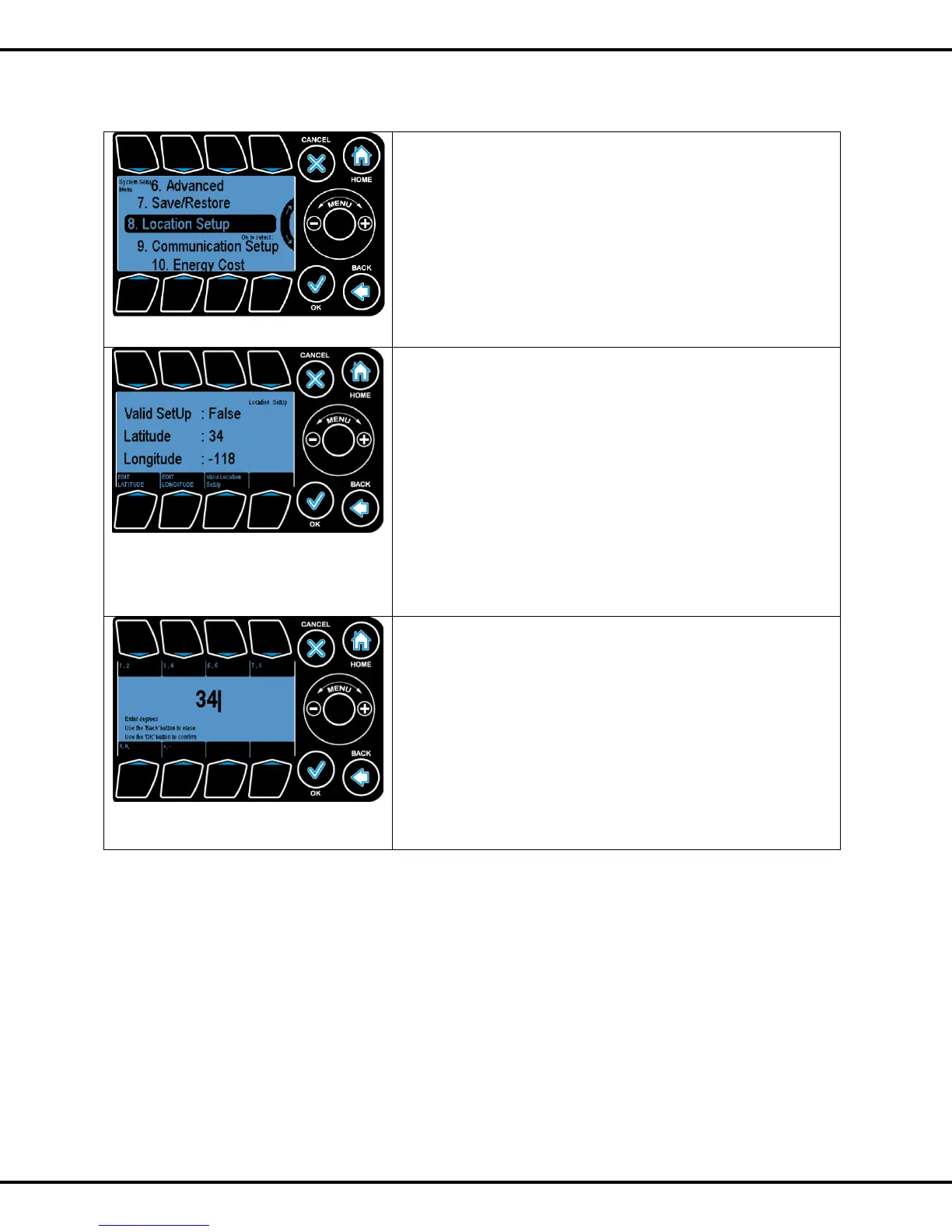
Location setup allows the user to setup the latitude and
longitude values. The iPonic controllers have an internal
astronomical clock and can calculate the precise sunrise and
sunset times once the location of the unit is entered.
Location setup menu can be found under system setup menu.
Wheel or Button #8 can be used to go to highlight this option
and OK to select this option
EDIT LATITUDE: Allows the user to edit the latitude value.
EDIT LONGITUDE: Allows the user to edit the longitude
value.
Valid Location SetUp: If set to False, indicates that the latitude
and longitude values are incorrect and should be ignored. If
set to true indicates that the coordinates are valid/correct and
can be used for sunrise and sunset time calculations.
Buttons 5, 6, 7 can be used to go to the corresponding
options.
On selecting the edit option, the user is presented with the
following screen.
For latitude:
“-“: Means South
“+“: Means North
For longitude:
“-”: Means West
“+”: Means East
Note that if no sign is indicated it means +



 To Next Page