4.3. Sensor Setup
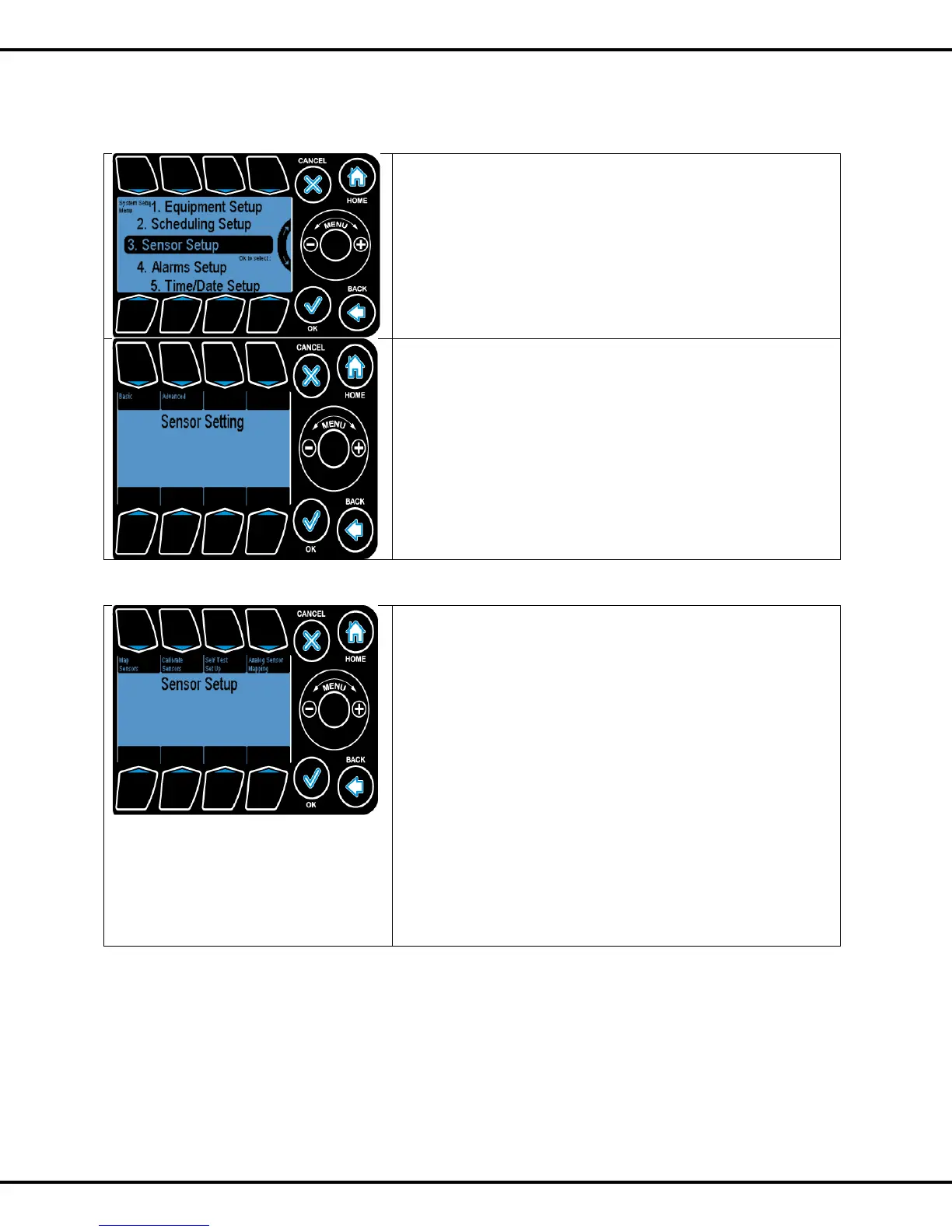
The Sensor Setup menu can be found under the System
Setup menu.
Scroll to the appropriate line using the Wheel or quickly
navigate by pressing Button #3 and then OK.
In Sensor Setting you have two options
Basic: In this option you can select sensor module or an
outdoor sensor.
Press #1 followed by selection of the option which you want to
choose using Wheel. Press OK
Advanced setup: This takes you to another screen. Press #2
to go to advanced settings
The Sensor Setup page is where the user can map the sensor
that is used for inside temperature readings.
Sensors can also be calibrated and averaged in this section.
Map Sensors: This is where the user can set up the system
according to the various sensors available.
Calibrate Sensor: The sensors can be calibrated to adjust for
offsets/software setup here.
Self-Test Setup: This is where the diagnostic mode test setup
for digital sensor is done.
Analog Sensor Mapping: This option allows the user to
average the data from separate analog sensors.
Buttons #1 - #4 are used to go to the corresponding options.



 To Next Page