960-0001-20 iGrowSeries 100 Installation and User Manual 31
3.0 REPORTS
The third main section of the iPonic 600 controller is the Reports
section. This section provides a brief overview of the options
available.
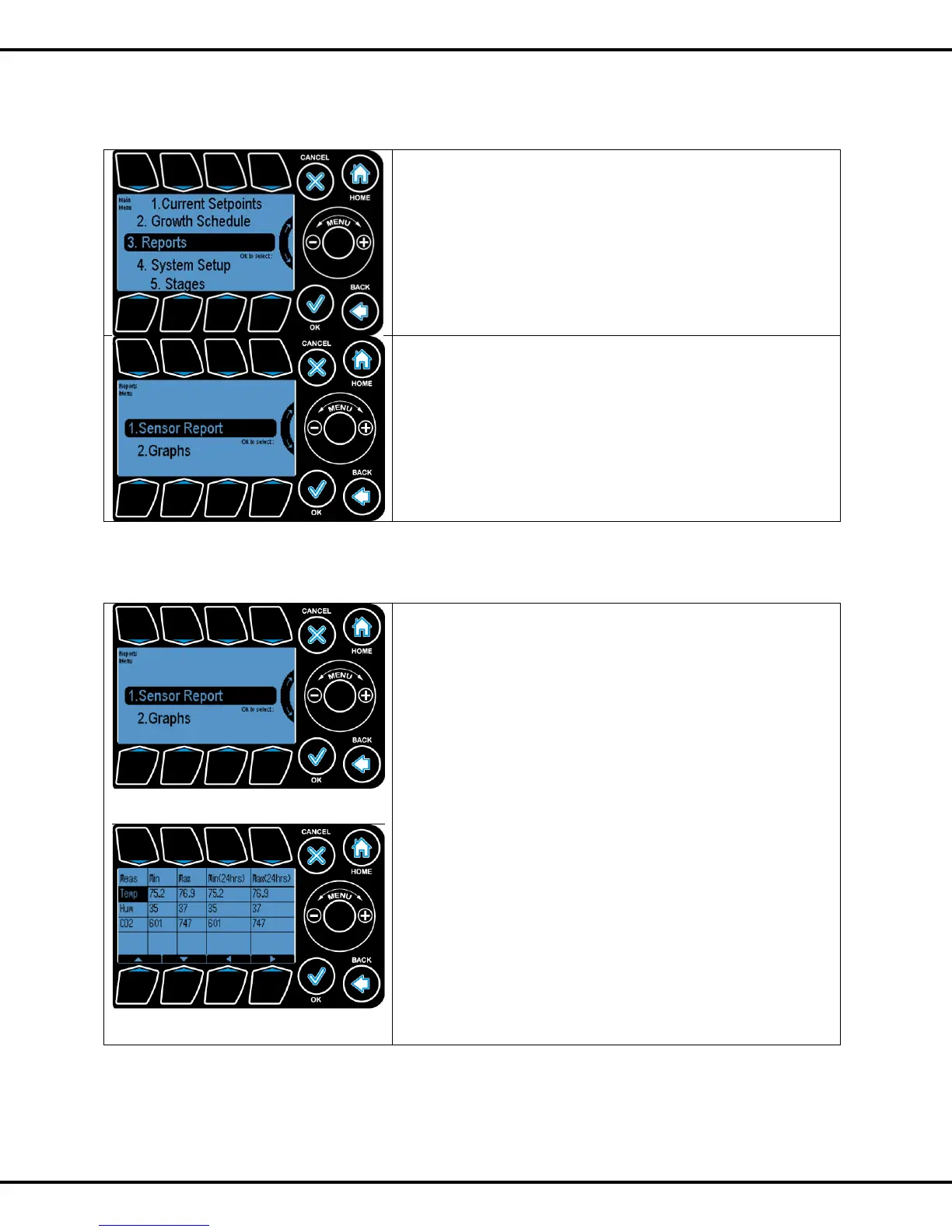
This section gives the reports and graphs and equipment
usage as well as operational costs. User can go to reports
submenu by pressing OK
There are 2 subsections under Reports:
1. Sensor Reports
2. Graphs
To highlight the sub options Wheel or Buttons #1, #2 can be
used to go to the corresponding options. Pressing OK will let
user select the options
3.1 Sensor Reports
This Section allows the you to see the minimum and maximum
temperature, humidity and CO2 readings recorded in past 24
hrs and from the time you pressed reset button.
Press #1 and OK to go to the next screen.
This report gives you the minimum and maximum
temperature, humidity and CO2 readings recorded in past 24
hrs and from the time you pressed reset button.
3.2 Graphing



 To Next Page