48 iGrowSeries 100 Installation Manual 960-0001-20
4.6 Advanced
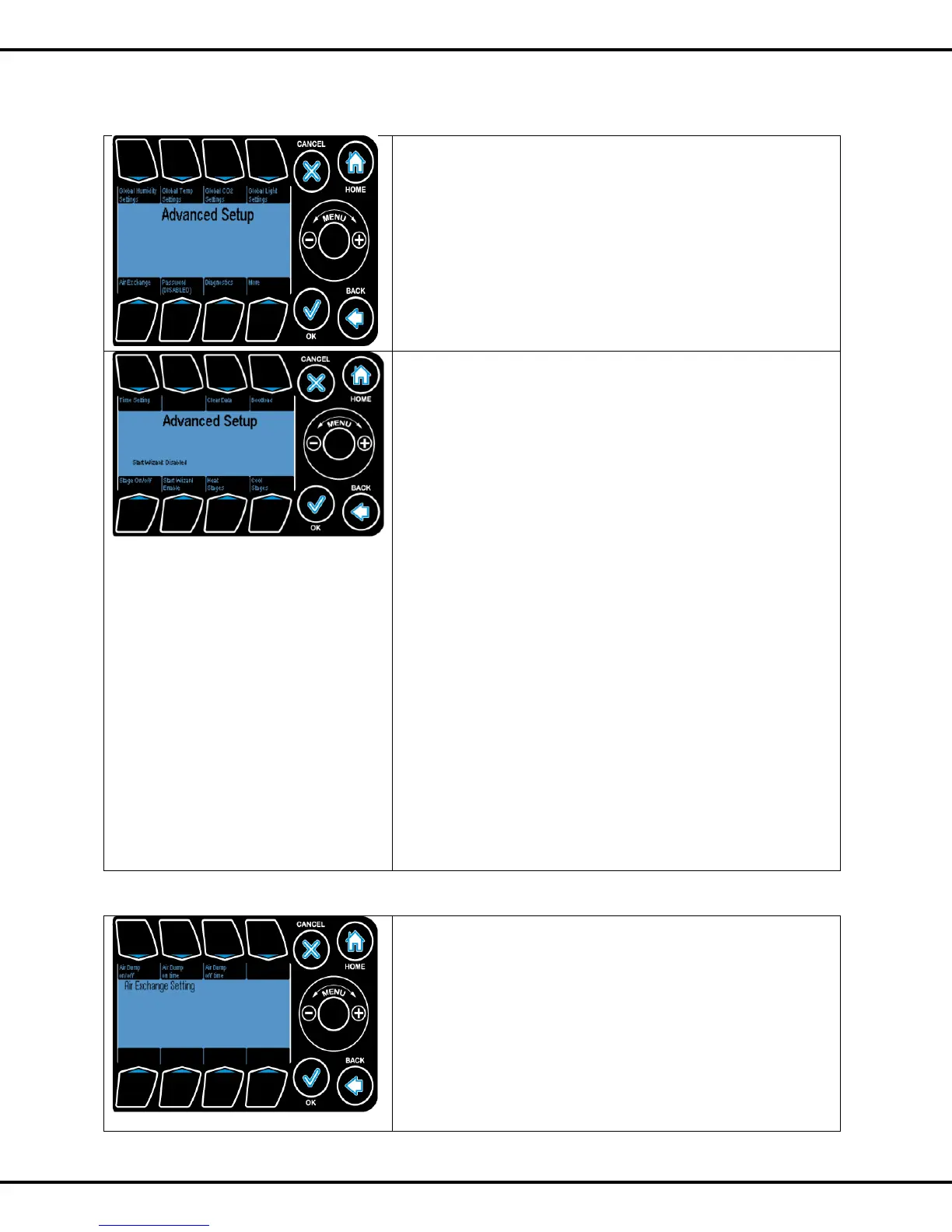
Press #1 to go to Global Humidity setting
Press #2 to go to Global Temp setting
Press #3 to go to Global CO2 setting
Press #4 to go to Global Light setting
Press #5 to go to Air Exchange
Press #6 to change Password
Press #7 to run diagnostics
Button #8 takes you to more options in Advanced setup
Ref Page No: 23 for global settings
Press #1 to go to Time setting
Press #3 to Clear Data
Bootload is used for firmware upgrade options. Please go to
iponic.link4corp.com to upgrade your controller to the latest
firmware.
Use a USB stick to upload the binary into the controller. Press
#4 to Bootload
Stage On/Off enables/ disables the stage option.
Press #5 to go to Stage On/Off
Start Wizard Enable: This option lets you enable the startup
wizard i.e., when you reset the controller you will have to set
up time, date, equipment and growth start date.
Press #6 to toggle between enable/disable option
Heat Stages: This gives the total number of heat stages you
want to consider.
Press #7 followed by wheel to change the value. Press OK to
confirm
Cool Stages: This gives the total number of cool stages you
want to consider.
Press #8 followed by wheel to change the value. Press OK to
confirm
Ref Page No: 49 for time settings
4.6.1 Air Exchange Settings
In this setting you can override the stages and open the air
pump for air flow.
Air Dump On/Off option switches on/off this option. Press #1
for this option.
Air Dump On time is the amount of time when the air pump is
switched on. Press #2 followed by wheel to change this value.
Air Dump Off time is the amount of time when the air pump is
switched off. . Press #2 followed by wheel to change this
value.



 To Next Page