46 iGrowSeries 100 Installation Manual 960-0001-20
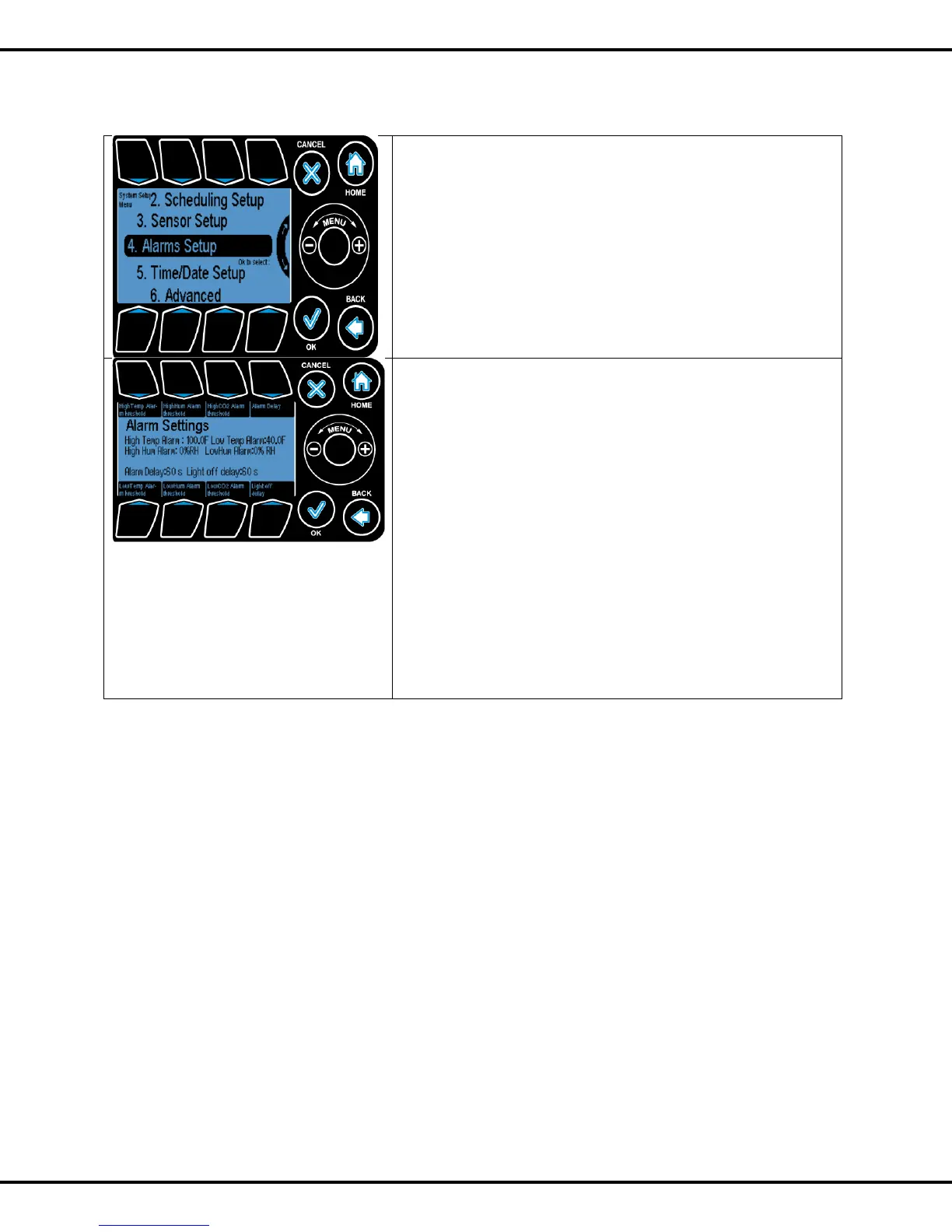
4.4 Alarms Setup
Selecting this option takes you to the Alarm Settings screen.
When an alarm condition occurs, an indication of the alarm will
be displayed on the main screen of the controller. If you want
the alarm to trigger an external device, such as a
“Sensaphone”, you will need to have programmed a channel
which you designated as an “Alarm” output. See page 35.
Use the alarm output to turn an output on depending upon
crossing a temperature level. This is normally connected to a
telephone dialer such as the Sensaphone.
High Temp Alarm Threshold is the maximum temp above
which the alarm is triggered. Press #1 followed by wheel to
change the value.
Low Temp Alarm Threshold is the minimum temp below
which the alarm is triggered. Press #5 followed by wheel to
change the respective value.
Similarly, you can set high and low value for Humidity and
CO2. Press #2, #3, #6, #7 followed by wheel to change the
respective value.
Alarm delay lets you set a wait time before the alarm is
triggered. Press #4 followed by wheel to change the time.
Light Off Delay is the amount of time required for the light
banks to cool off.



 To Next Page