25
User Manual
or a data storage cartridge. A chart cartridge, called C-CARD, contains detailed charts
of the area covered. A data storage cartridge, called User C-CARD can be used to
permanently store your routes, Waypoints, Marks, Events and tracks.
Note
During normal operations the C-CARD should not be removed since the chart plotter may lock
up.
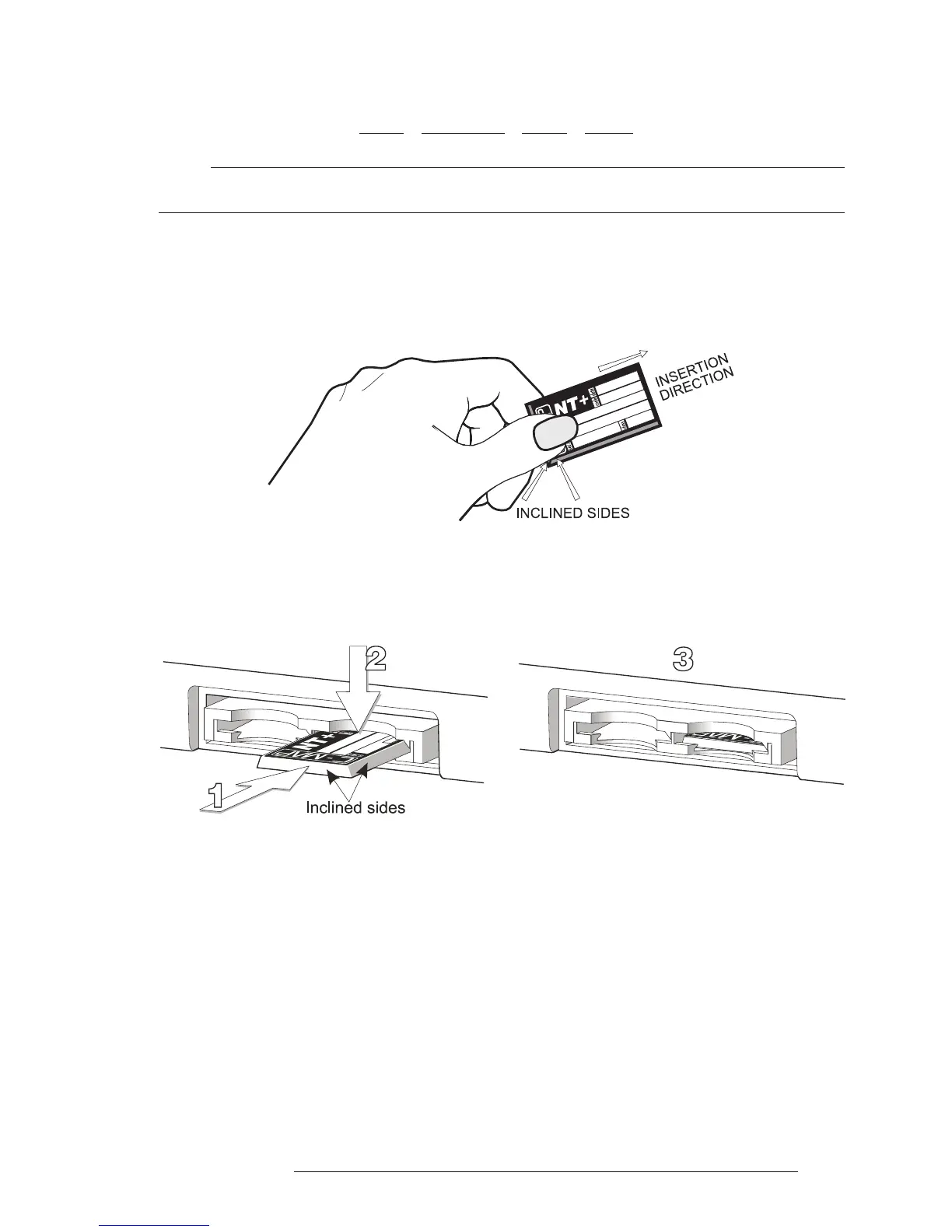
2.6.1 INSERTING C-CARD
Hold the C-CARD by the short inclined side so that you can see the C-MAP
label.
Fig. 2.6.1 - Inserting C-CARD (I)
Gently push the C-CARD into one of the two slots (1); push the C-CARD
in as far as it will go, then move it to the bottom (2) to hold fixed into the slot (3).
Fig. 2.6.1a - Inserting C-CARD (II)
2.6.2 REMOVING C-CARD
Press lightly the C-CARD you wish to remove (1) and move it to the top (2)
until you hear a click: the C-CARD will ejected out of the slot (3).



 To Next Page