30 User Manual
On the right side of the screen (see Fig. 3.1.3), there is a polar representation of the
azimuth and elevation of each satellites. The circle contains a number indicating the PRN of the
satellite and it is filled when it is used for the fix solution. On the left side there are histograms
indicating the S/N ratio (SNR). The bar is filled when the satellite is used for solution. As
example, the satellite with PRN=10 is used for solution with S/N=44, Azimuth=127degree
and Elevation=70degree. When a valid fix is received, the Lat/Lon, Date, Time, Altitude,
VDOP, HDOP, SOG and COG are shown in the page.
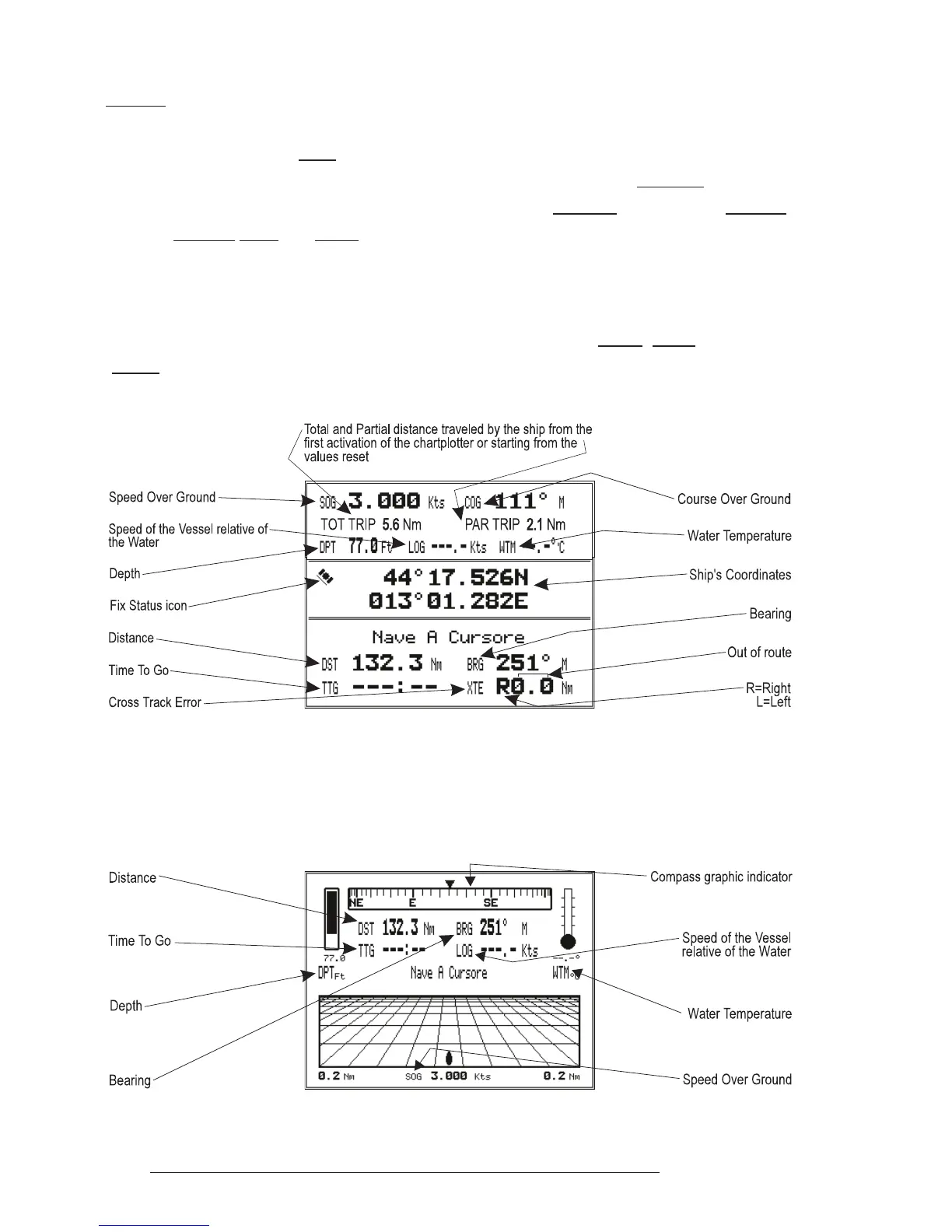
3.1.4 NAVIGATION DATA PAGE
The Navigation Data page shows information about speed (SOG) and course
(COG) of the ship, status of the received signal, ship's coordinate and other general
information.
Fig. 3.1.4 - Navigation Data Page
3.1.5 GRAPHIC DATA (ROLLING ROAD) PAGE
The Graphic Data Page shows in graphic mode navigation data.
Fig. 3.1.5 - Graphic Data Page



 To Next Page