1. Select the serial number of the instrument in the Instruments Browser list.
2. Select Configuration-> New…, choose one of the available template model, assign a name to the setting
(e. g. “Custom”) and press [Ok].
For further information see chapter Operate with the configurations of 3DOM – User manual. The
manual is available as 3DOM online help (Help->User’s manual).
2.2.1 Set instrument code, name and geographical information
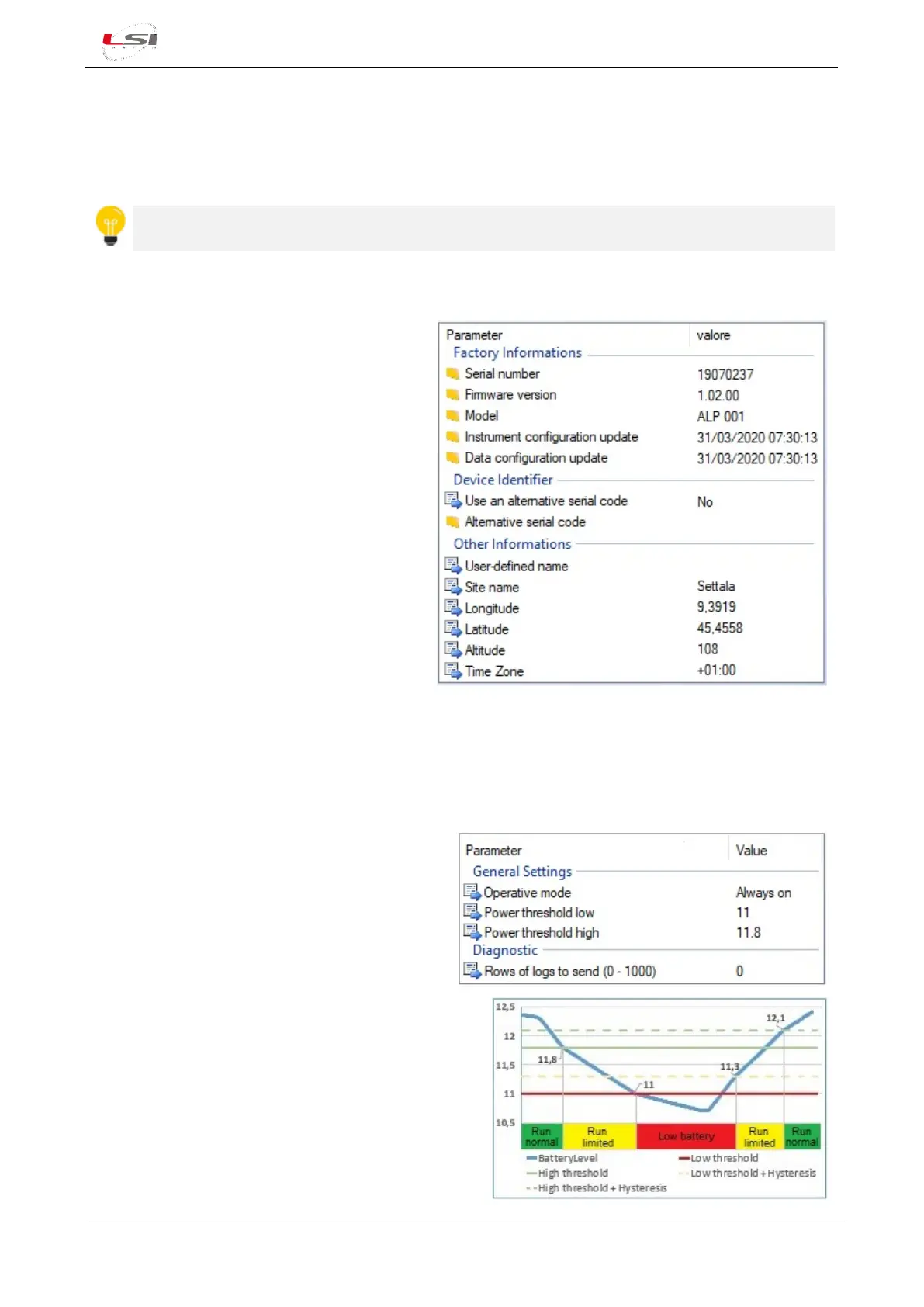
It is possible to set a customize serial number
to Alpha-Log. When Use a substitutive serial
number=YES, this number will be used on the
data file instead of the factory serial number.
It is possible to set the Alpha-Log name and
geographical information. Time zone is needed
to assign the time stamp to the measurements.
Go to Registry-> User and Site information
For more information see §4.1.1.
2.2.2 Setup of the operative mode based on the available energy
Set operating parameters to allow effective management of the available energy. Go to System-> General
settings.
Set the Operative mode:
- Always ON: when main power supply is used.
- Low Power: when power from solar panel is
used.
Set two power thresholds:
- Power threshold high: below this value, Alpha-Log
runs the measurements but stops the data
communication procedure (Run limited).
- Power threshold low: below this value Alpha-Log
stops even the data acquisition procedure (Low
battery). On display the “Power low” information
appears.



 To Next Page