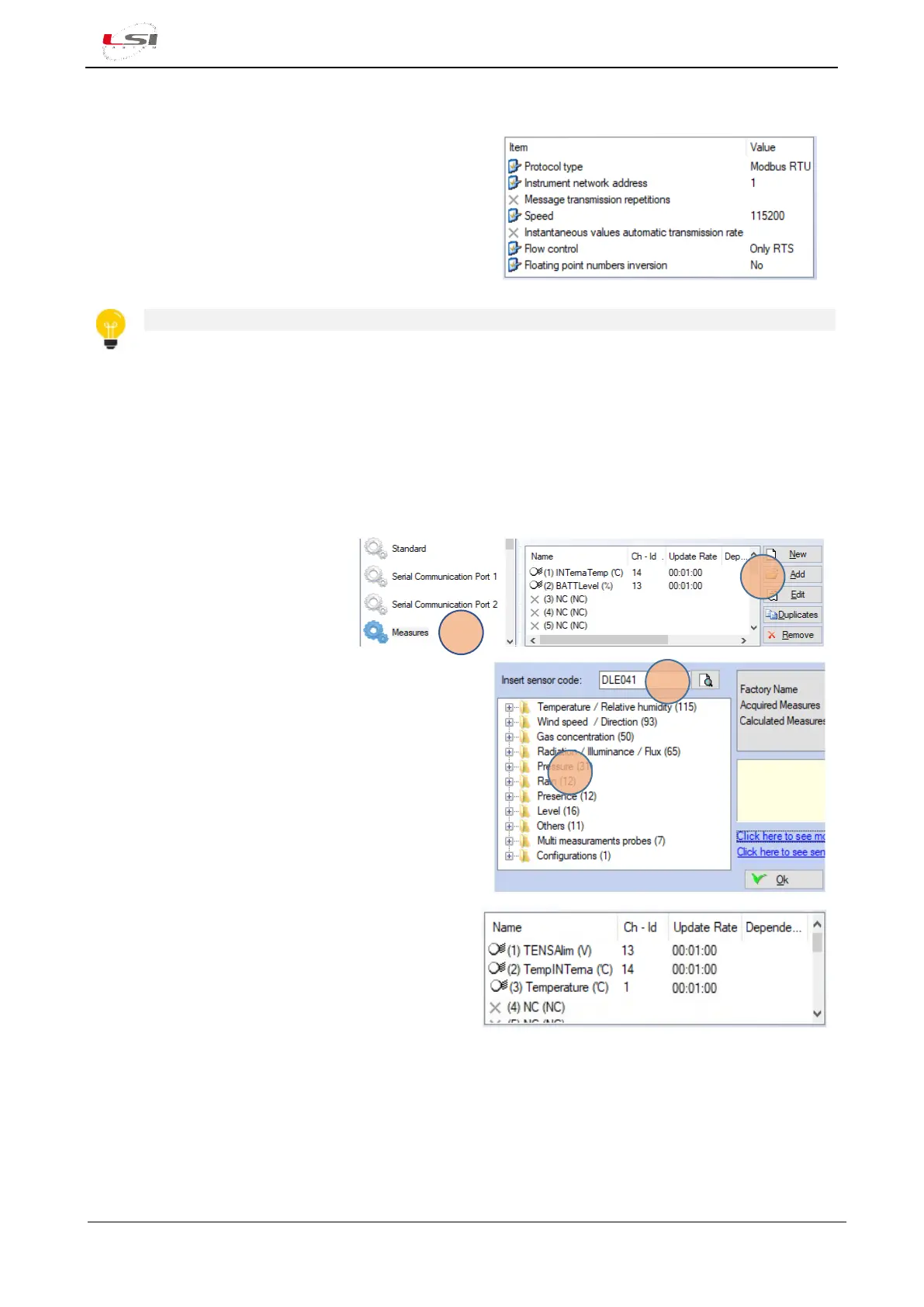
In the Configuration Editor window select Serial Communication port 2 and set:
• Protocol type: Modbus RTU.
• Instrument network address: 1 (if several ALIEM
devices are used on the same bus, set a value able
to identify univocally the instrument).
• Speed: 115200.
For further information see chapter Operate with the configurations of 3DOM – User manual.
Proceed with the sensors configuration.
3.3.1 Configuring ALIEM sensors
3DOM is provided with a library of LSI LASTEM sensors. Each sensor of the library is already appropriately set
to be sampled by ALIEM. Follow the steps below to check if the sensors are available in the library:
1. In General Parameters section,
select Measure (1).
2. Press [Add] (2).
3. Enter the sensor’s commercial code (e.g. DLE041)
and perform search (3), or select it from its own
category (4) and press [Ok].
If the sensor has not been found, see chapter
§3.3.2.
4. Press [Ok] to confirm the measurements.
The new measurements will be added to the
Measures List Panel of 3DOM (e.g. the
Temperature measurement has been added to
DLE041 sensor).
For measurements’ customization, see chapter §3.3.2.
5. Repeat the same procedure for the remaining sensors.
At the end of the procedure, save and send the configuration to the instrument.



 To Next Page