4.2.8.1 How to receive data on a smartphone
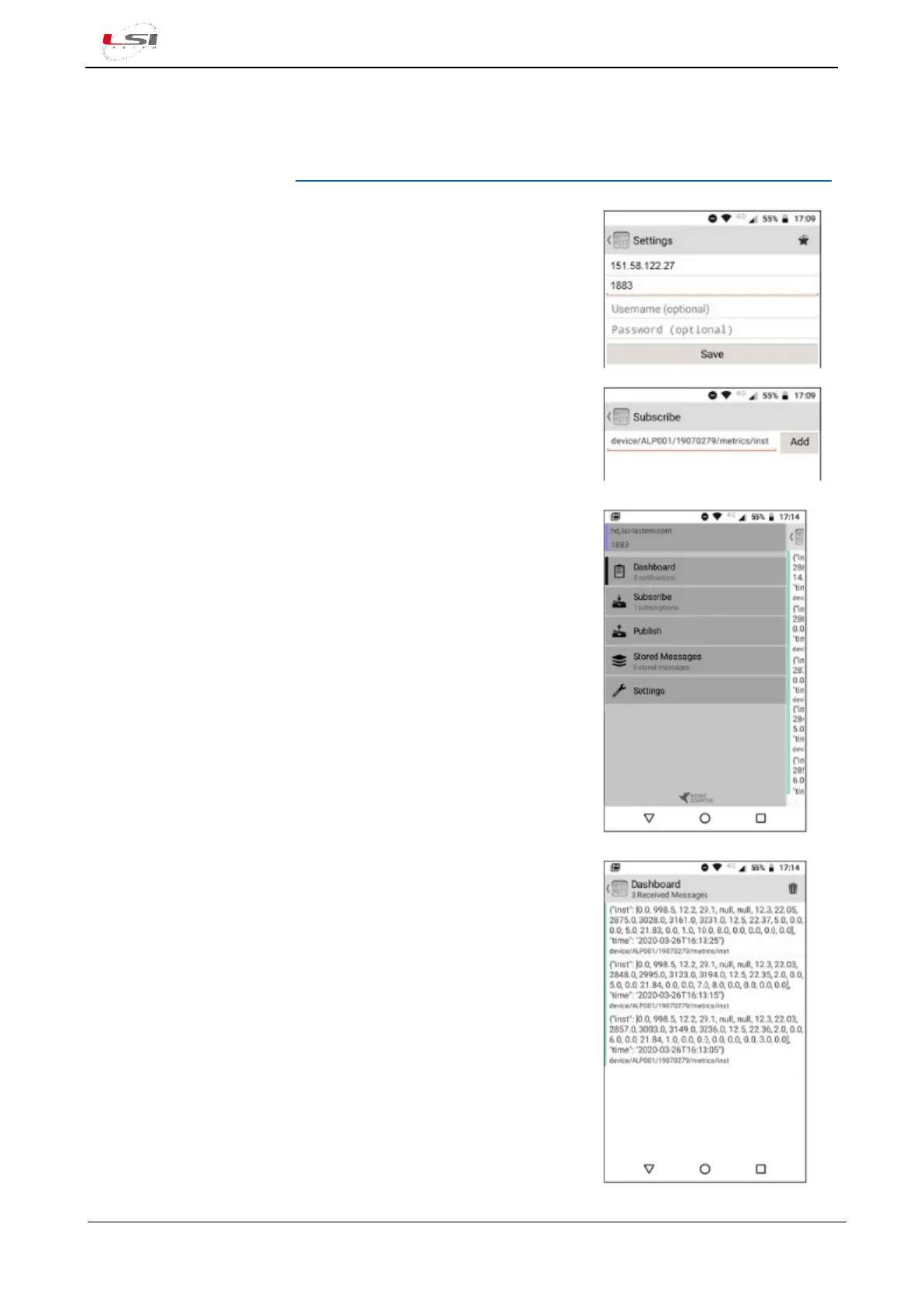
On the market are available several apps to receive an MQTT broker’s topics. Below is an example with the
app MyMQTT for Android.
MyMQTT is downloadable on https://play.google.com/store/apps/details?id=at.tripwire.mqtt.client&hl=en.
On the first start the app warns the user that there are no notifications
(No notifications found… Add a new topic!). Press on the message.
1. Press [Connect].
2. Enter Broker URL and Port (ad es. 151.58.122.27 e 1883,
§2.2.6.4).
3. Press [Save].
4. Press [Settings].
5. Press [Subscribe].
6. Enter Topic (e.g. for instant values:
device/ALP001/19070279/metrics/inst).
7. Press [Add].
Here is the screen with the main menu, where the notifications of
incoming messages (data) appear.
Here the MyMQTT dashboard, where the user can see data coming
(instant values).
The values update depends on MQTT’s parameter Inst. values publishing
time rate (§2.2.6.4).



 To Next Page