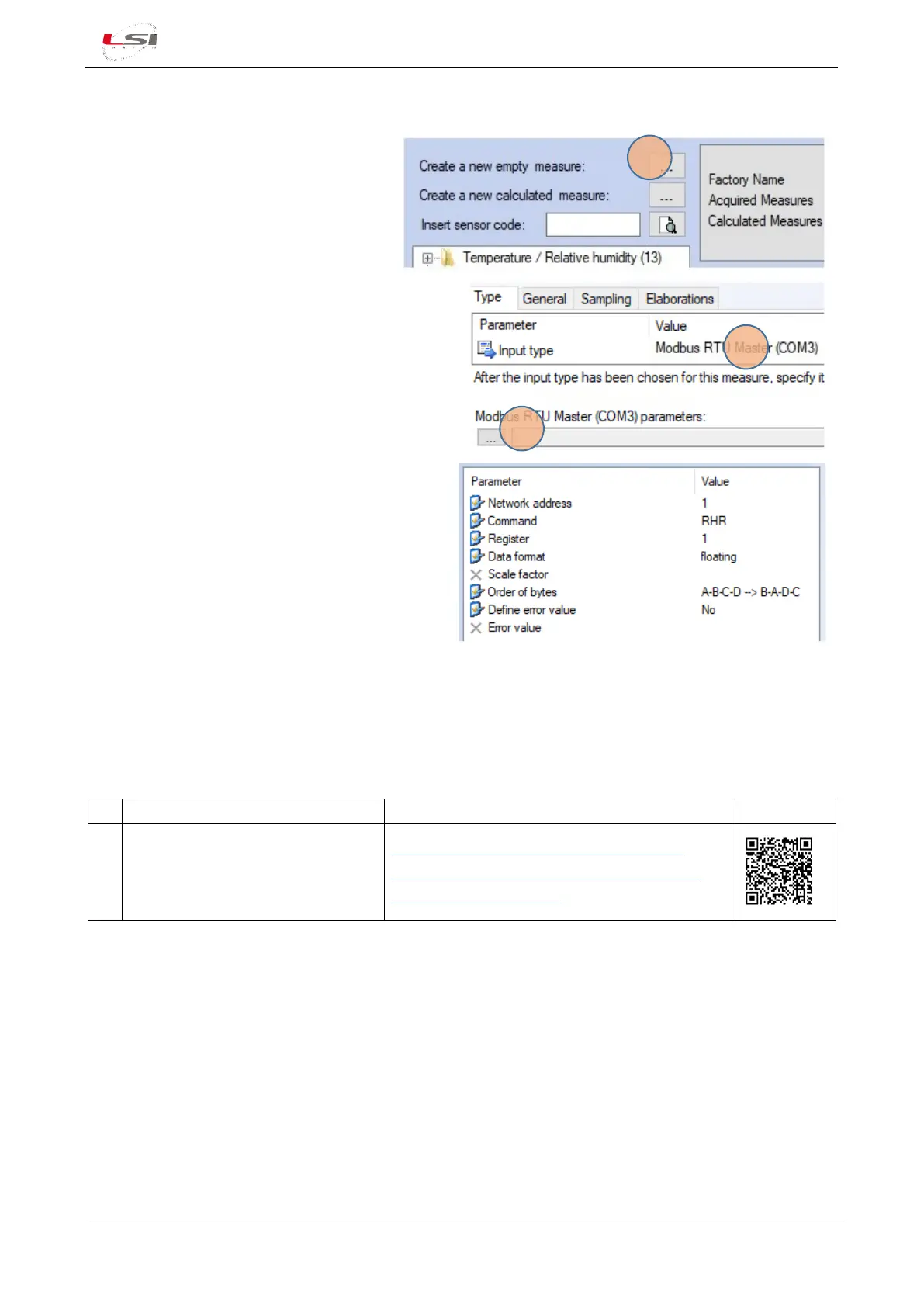
1. Select Measure from Data Logging
section, then press [Add].
2. Press […](1)Create a new empty
measure.
3. In the Input Parameters Editing window set the
Modbus RTU input type(2) just inserted, then
press […](3).
4. Enter the Modbus parameters related to the
sensor measurement.
Configure all sensors, save the configuration and proceed to upload it to the instrument.
2.2.4.2 Importing measurements from ALIEM module
Watch the following video tutorials related to the topics of this chapter.
Alpha-Log – ALIEM: How to import
an existing ALIEM configuration,
inside an Alpha-Log pre-set
configuration
Alpha-Log #14 - How to import an existing
ALIEM configuration inside Alpha-Log preset
configuration - YouTube
Alpha-Log can acquire the measurements coming from the ALIEM module connected to its RS-232-Com2(6)
or RS-485-Com3 port(10). Configuration of each ALIEM module must be imported inside the Alpha-Log
configuration. During this procedure the acquisition and elaboration rates are defined for each quantity. Here
the instructions in case ALIEM (model MDMMB1110) is connected to Alpha-Log RS-232 Com2.
This operation should be performed after completing the inputs configuration of ALIEM module (see §3.3).



 To Next Page