2.2.9 Configuring logics, actuators and alarms
Watch the following video tutorials related to the topics of this chapter.
Alpha-Log: How to set logics and
actions
Alpha-Log #18 - How to set logics and actions -
YouTube
It is possible to set logics that, upon their occurrence (true / false), will activate an action as: triggering local
electrical outputs and messages (SMS, e-mail, MQTT). Alpha-Log is equipped with 3 actuated electrical
outputs for triggering external devices such as sensors, modems or alarm devices. Additionally, it can also
send e-mails, SMS, and MQTT messages. All these actions take place when some specific (logic) conditions
occur. If the used configuration is made starting from one of the 3DOM models, in Actions-Logics you will
find same sample logics already. It is possible to modify them or add new ones.
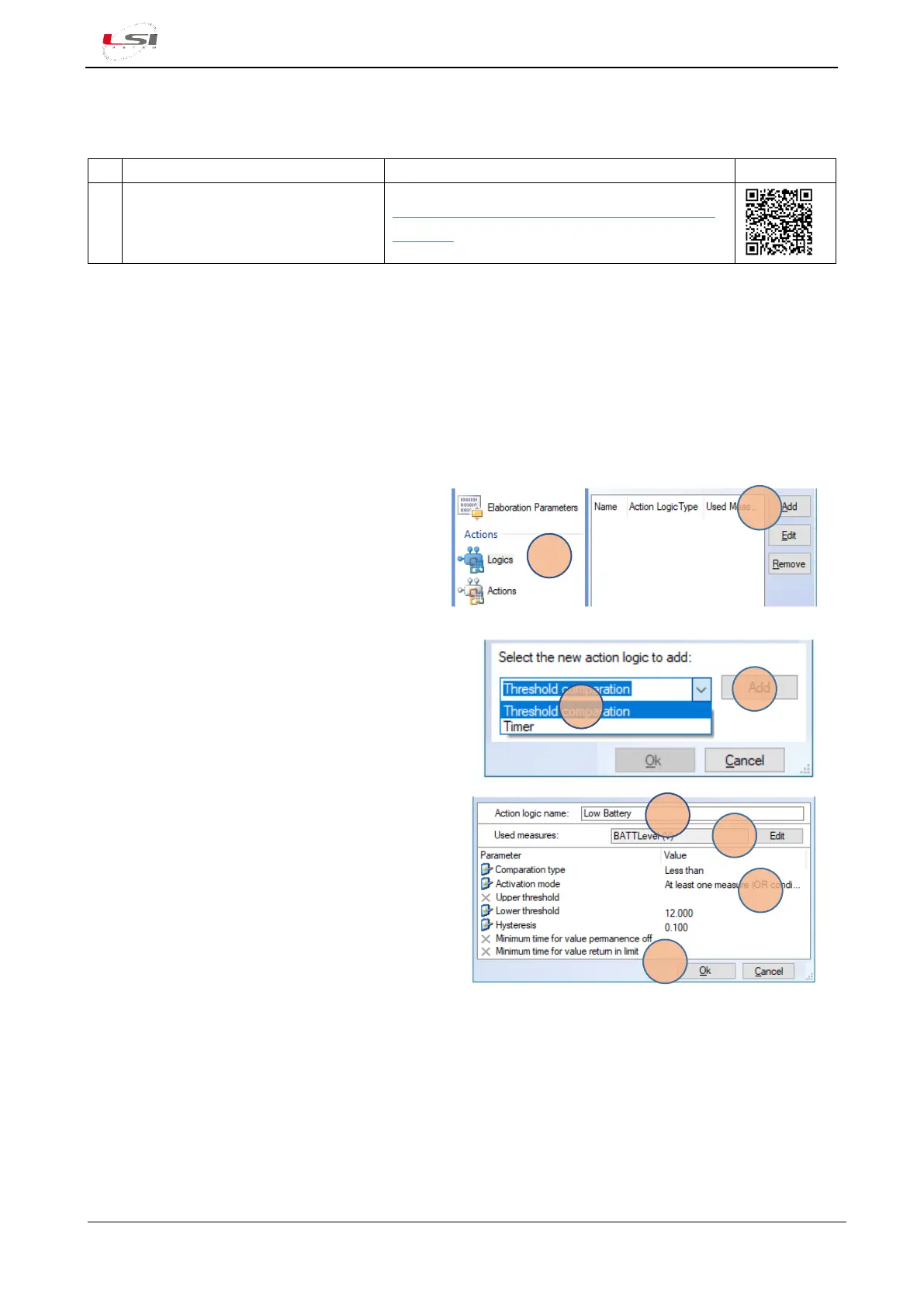
Add actuation logics:
1. Logics-Actions (1).
2. Press [Add] (2).
3. Select the desired type of logics (3) (e.g. “Threshold
comparison”).
4. Press [Add] (4).
5. Assign a name to the logics (5). This name will be
reported on the sms or e-mail messages.
6. Press [Edit] (6) and select the measurement
associated to these logics.
7. Set all the requested parameters (7).
8. Press [Ok] (8).
Joint the new logic to a specific action:



 To Next Page