2.7 Check data reception to PC using 3DOM program
Using 3DOM, it is possible to receive the data elaborations to the PC. Depending on the type of network
interface configured (§2.2.5) and the type of protocol implemented (§2.2.6), it is possible to choose
between a direct connection from the data logger, from an FTP site or from a local or network folder.
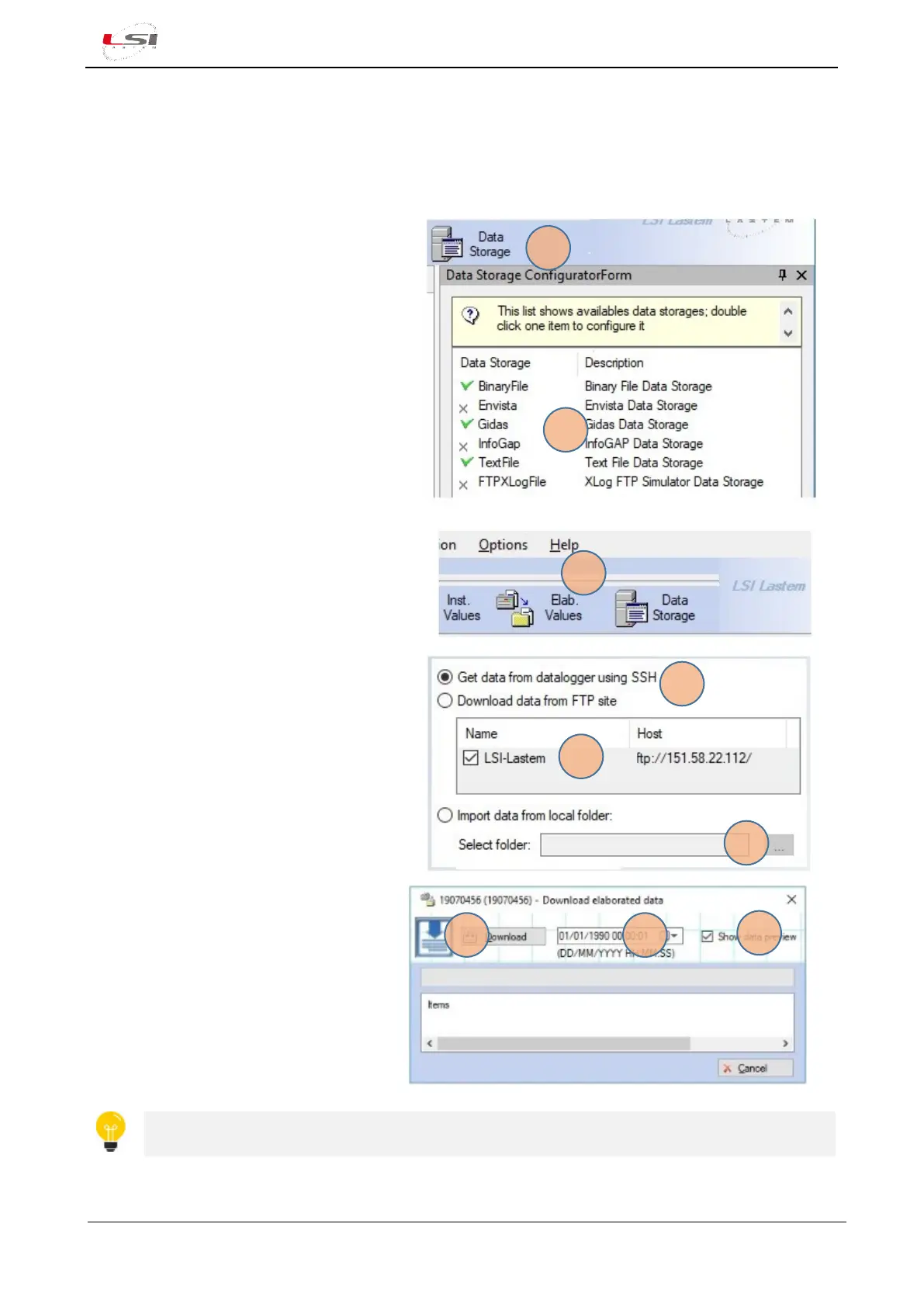
Set the data storage format you want to
receive. This setting will also be kept for next
uses.
1. From the Instruments Browser select the
instrument serial number.
2. Select [Data Storage] (1) from the 3DOM
tool bar.
3. Double click to select the data format
required (2). The green mark advise that
the selection has been activated.
For data download:
1. Select [Elab. Values] (1) from the tool bar.
2. Select the data download modality (2).
➢ From FTP site: select the FTP address
from the proposed list (3).
➢ From local (network) folder: select
the local folder (or network folder)
[…] (4).
3. Select the day/time since the data are
required (5).
4. Select if data preview is required (6).
5. Select [Download] (7) to start receiving
data.
Duration of the process depends by the data
volume Alpha-Log.
Verify that the processed data received on the PC have the type and rate required. In case of
errors, change the configuration.



 To Next Page