p/n 18603-001, Rev. C LTV
®
1200/1150 Ventilator Service Manual Page 8-107
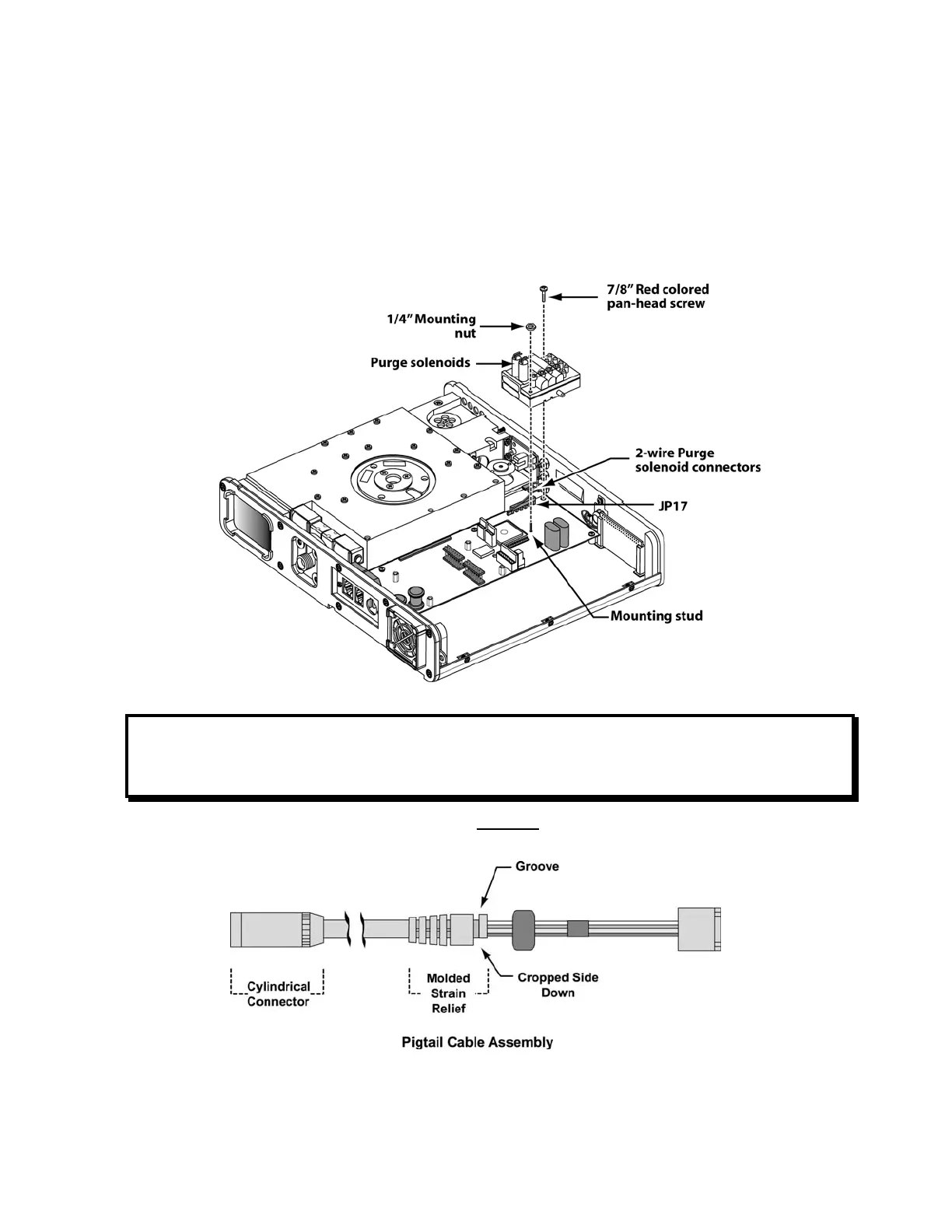
6) Slide the solenoid manifold. over the threaded mounting stud on the power board. Align
the solenoid leads with the JP17 connector on the power board being installed and
press the solenoid manifold into place.
7) Insert a 7/8” red colored pan-head solenoid manifold mounting screw (P/N 10607R), as
shown and torque-tighten to 20 in-oz (0.14 Nm).
8) Thread one 1/4” solenoid manifold mounting nut (P/N 10342) onto the power board
mounting stud protruding through the solenoid manifold as shown in the illustration,
torque-tighten to 20 in-oz (0.14 Nm)
CAUTION
Do not over tighten the mounting screws. Over tightening of the mounting screw or nut
may result in leaks on the solenoid manifold.
9) Orient the pigtail cable assembly so the grooved side of the molded strain relief is facing
up, as shown.



 To Next Page