Note: An ! may be entered any time prompted to abort the form and return to
the state when the form was started.
Note: Fields not specified receive the default value by entering CARRIAGE
RETURN.
(a) Type and enter: sdladd
Response: ttyadd form displayed. Cursor at 1. sdl_name:
(b) Type and enter the following data:
1. sdl_name: enter SDL0
2. port: enter 0
3. SCANS_baud_rate: enter CARRIAGE RETURN
(c) Type and enter: i
(d) The low-level forms will now be added automatically.
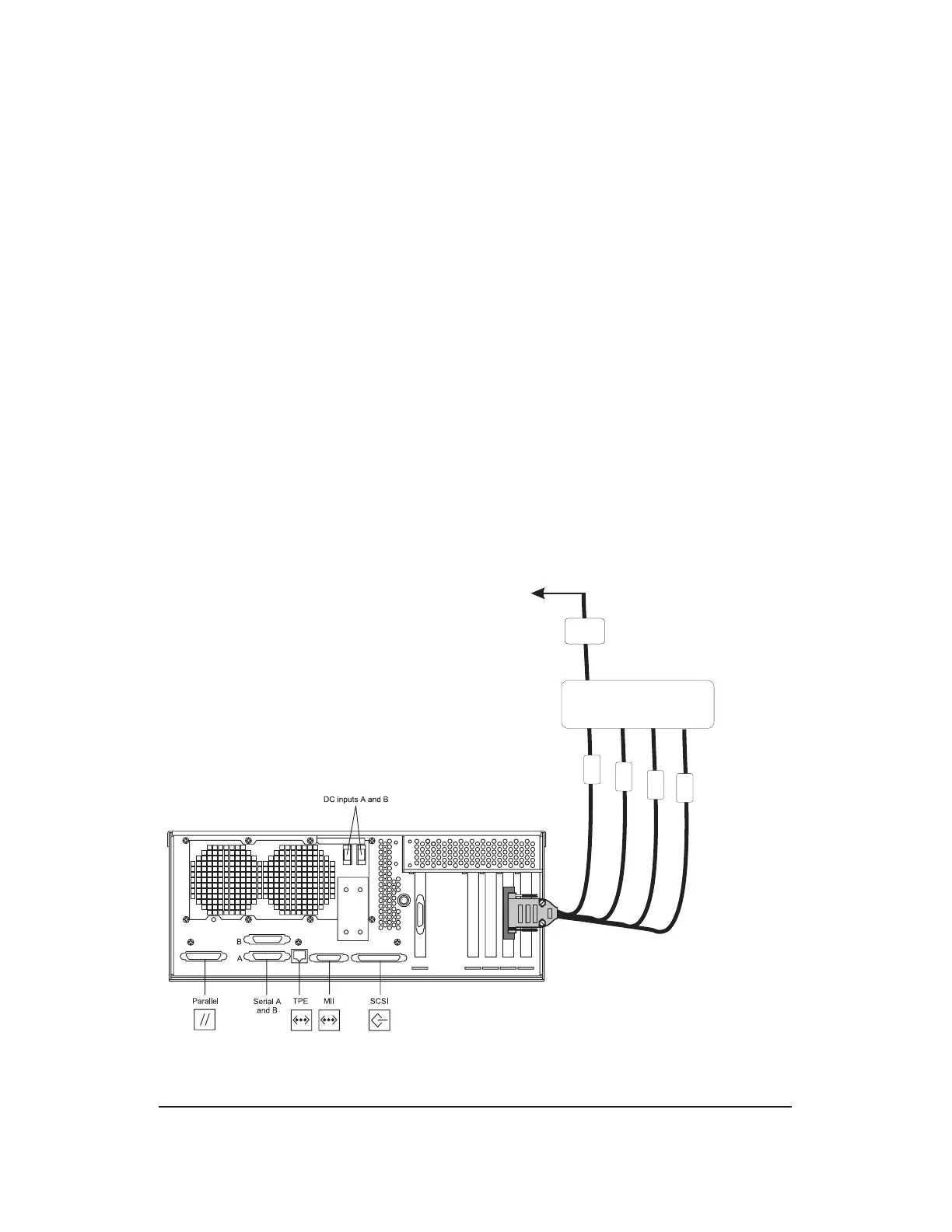
4. Install the SCANS data link. (See Figures 8.7-1 , 8.7-2 and 8.7-3 for hardware
connection information.)
(a) Enter CARRIAGE RETURN
2. Trademark of Sun Microsystems, Inc.
PCI
1
PCI
2
PCI
3
PCI
4
0
1
2
3
Interface C onverter
M odem /
DCE
M odem /
DCE
To SCANS
H S I
Figure 8.7-1 — SCANS Data Link Hardware Installation (
Netra
2
t 1120)
GROWTH AND DEGROWTH
Procedure 8.7
235-200-150
October 2005
Page 8.7-2 Issue 3.00B



 To Next Page