Working with Macromedia Dreamweaver 389
Although you can use earlier versions of Fireworks as external image editors, these versions
offer limited launch-and-edit capabilities. When you work with Roundtrip HTML, Fireworks
MX and Fireworks 4 do not fully support edits made to cell properties in Dreamweaver tables,
nor does it support behaviors applied in Dreamweaver. Fireworks 3 does not fully support
opening and editing placed tables and slices within tables, while Fireworks 2 does not support
opening and editing source PNG files for placed images.
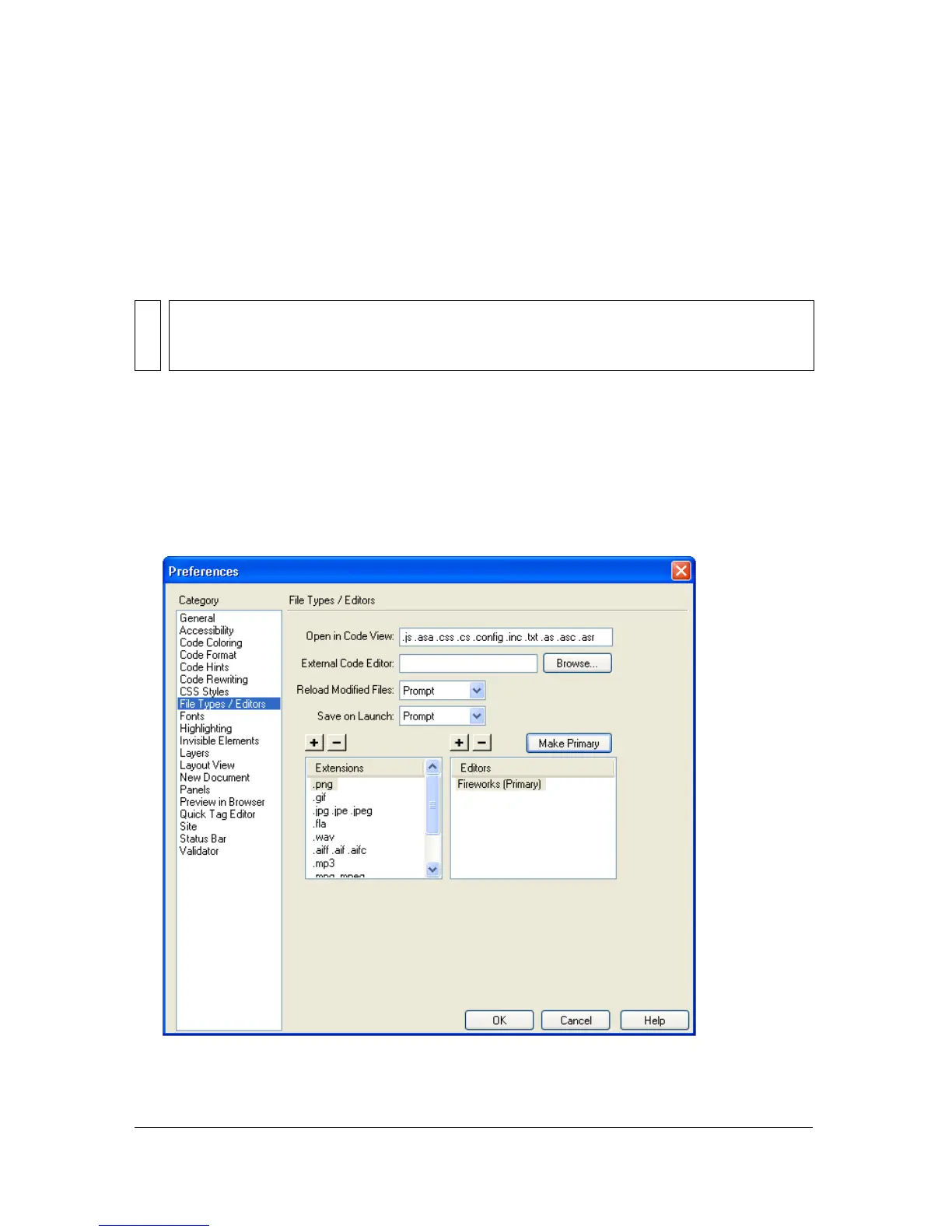
To set Fireworks as the primary external image editor for Dreamweaver:
1. In Dreamweaver, choose Edit > Preferences and then choose File Types/Editors.
2. In the Extensions list, select a web image file extension (.gif, .jpg, or .png).
3. In the Editors list, if Fireworks appears in the list, select it. If Fireworks is not in the list,
click the Plus (+) button, locate the Fireworks application on your hard disk, and click
Open.
NOTE
Since Fireworks is the default external image editor in Dreamweaver, setting this
preference is only necessary if you’re having trouble starting Fireworks 8 from within
Dreamweaver.



 To Next Page