41
Mahr GmbH • Digimar 816 CL
EN
Description / Sequence Symbols / Pictures
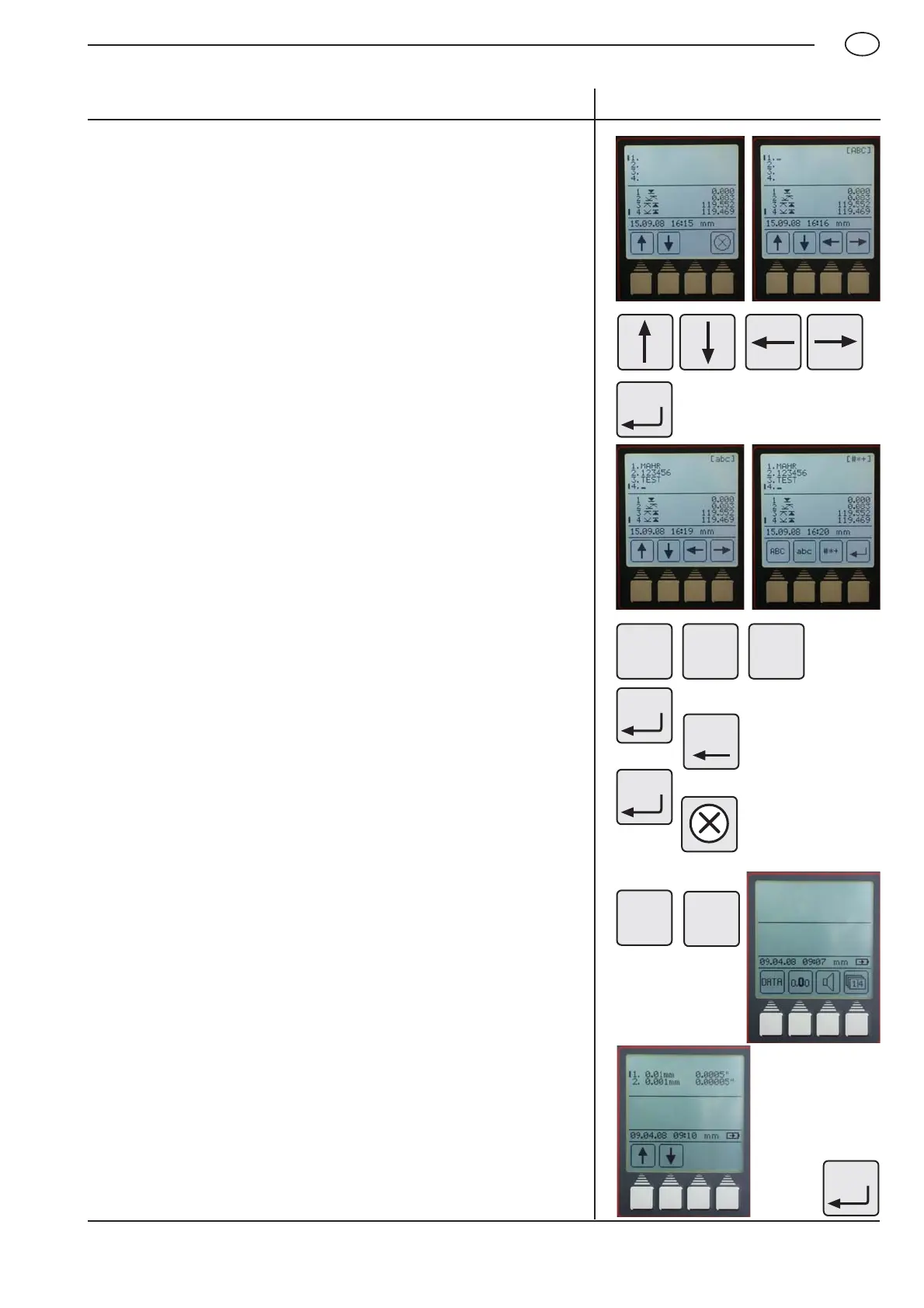
5.2 Resolution
The resolution in which the measured results will be displayed.
Standard setting: Resolution 0.001 mm
– Press the function key „Resolution“
– Select the resolution with the arrow keys
Note:
To change to the unit of measurement from mm to inch,
see Chapter 5.8.
– Confirm by pressing the „Accept“ key
0.
0
0
CE
ABC abc #*+
– To scroll, use the „Cursor“ keys
– To switch between upper and lower case letters as well as
special characters by pressing the „Accept“ key
Upper case letters, press [ ABC ]
Lower case letters, press [ abc ]
Special characters, press [ # *+ ]
– To return to the input menu press the „Accept“ key
– To delete a character or a complete row, press the „CE“ key
– Press the „Accept“ key to confirm
– To exit the text input, press the „Cancel“ key
MENU
9


 To Next Page
 Loading...