Averaging data
Averages can be used to compare different stages of atomisation or look for
consistency between measurements at different times. The average particle size
for selected records can be calculated in two ways:
.
Using the button or Edit-Calculate Average command.
.
Using the Edit-Advanced Average command.
In both cases two types of average can be calculated:
.
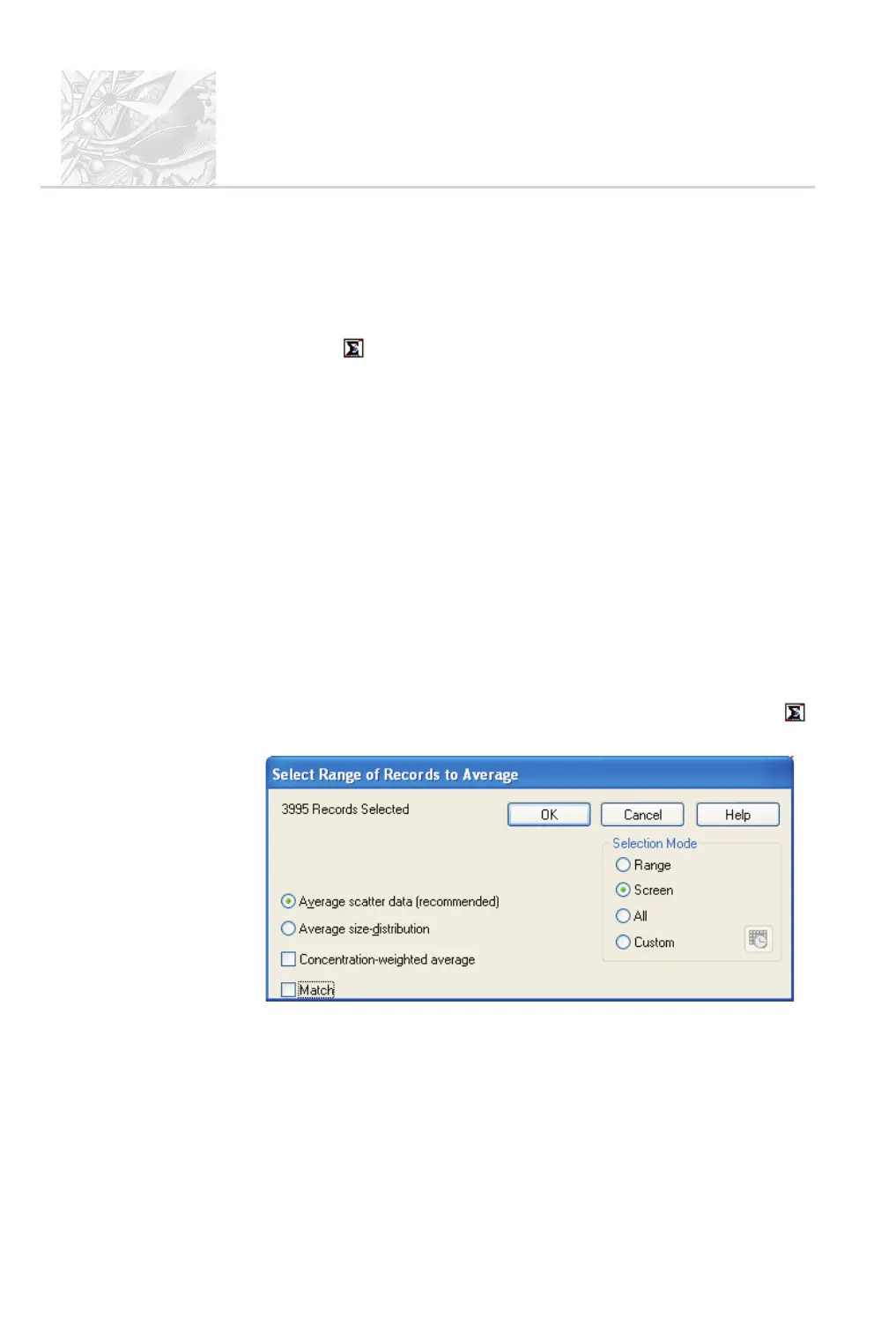
Average scatter data – arranges the scattering data across the selected
range and then calculates the average PSD based on the average data. This is
the preferred method.
.
Average size distribution – averages the size band data for all the records
in the range to derive an average PSD.
There is also a Weighting option. By default all averages are weighted according
to the spray concentration at each point. This provides a true volume-based
average. Selecting Concentration-weighted average causes the averaging
routine to assume that all records relate to the same concentration so are equally
important in calculating the average.
$
To produce an average:
.
Open the Size History and select Edit-Calculate average or click the
button to open this dialogue:
.
If the records are not already selected, use the buttons on the right-hand
side to do this.
.
Specify the average type (see above) and whether it’s to be un-weighted or
not, then click OK.
CHAPTER 6
Spraytec
Page 6.12 MAN 0368



 To Next Page