Using the Data handling options
The Data handling options allow users to specify which of the scattering
detectors to use when calculating the spray size distribution. The detector range
to use can be specified and/or a scattering threshold set to decide whether to
accept the signal received on each detector.
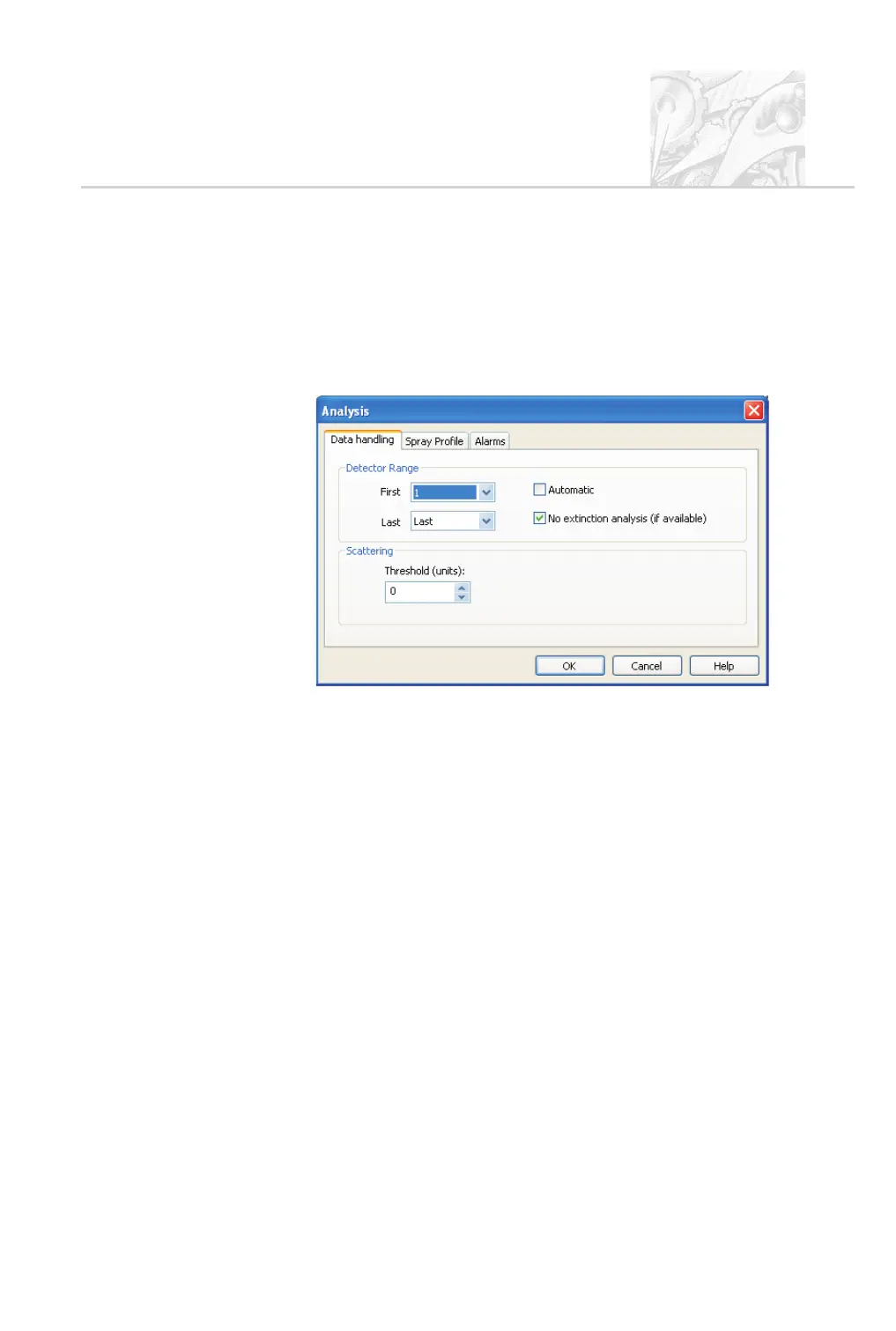
Use the SOP wizard Data handling tab shown below to set up the options:
The options are described in turn below.
Detector Range
If either of the following problems, described in the previous section, is seen it
may be necessary to exclude some detector channels from the analysis:
.
Beam steering – here it may be necessary to exclude the first set of detec
-
tors from the analysis.
.
Vignetting – it may be necessary to exclude the last set of detectors from
the analysis.
Detectors can be included or excluded from the analysis using these options:
.
First – sets the first detector used in the analysis. For instance, if detector 4
is selected then detectors 1-3 will be excluded from the analysis.
.
Last – sets the last detector used in the analysis. Here, the actual detector
number depends on the lens being used. For the 300mm lens 36 detectors
are included in the full analysis whereas for the 750mm lens only 33 detec
-
tors are included. Selecting Last-4 from the list would change the last de
-
tector to 32 for the 300mm and 29 for the 750mm lens.
CHAPTER 6
Spraytec Page 6.23



 To Next Page