.
To create a new profile click the Add button to open the Spray Profile
Editor (described below). Specify values for the parameters as described
there then click Save and Close.
Spray Profile Editor
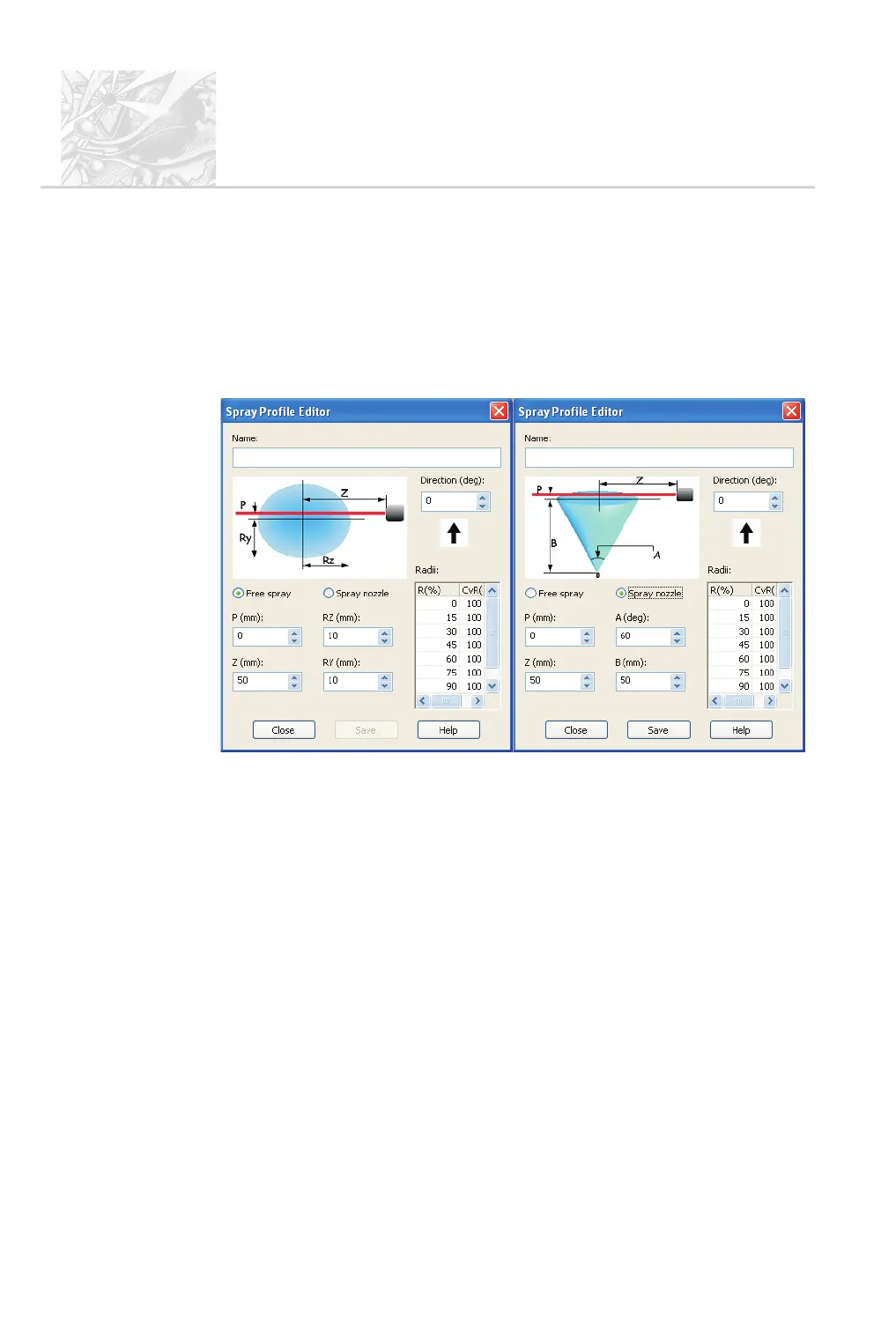
The Spray Profile Editor shows how the profile is defined, with different
versions for free sprays and nozzle sprays:
Begin by selecting the type of spray to profile, Free spray or Spray nozzle.
The parameters for a free spray are:
.
Rz – the horizontal radius of the spray plume. Input fields for both Ry and
Rz are provided as the radius values will be different when measuring an
elliptical plume.
.
Ry – the vertical radius of the plume.
.
Z – the offset of the centre of the plume from the lens.
.
P – the offset of the centre of the plume from the beam.
For a nozzle spray the following two parameters replace Rz and Ry:
.
A – the angle of the spray cone.
.
B – the distance of the nozzle from the laser beam.
The value of the Direction parameter is indicated by the large arrow. This sets
the angle at which the spray enters the measurement zone. In the above examples
CHAPTER 10
Spraytec
Page 10.14 MAN 0368



 To Next Page