Preparing Your Printer for Printing Preliminary Preparations for Printing
Sprinter User's Manual 8-7
13. Relocate the LOCKING PINS.
If you constantly use the same width substrates, you may remove only the
right hand cone every time.
14 Cut off the first meter of the roll to prevent dirt from reaching the P
RINT
HEADS.
15. Join the new or replaced S
UBSTRATE to the existing piece under the
P
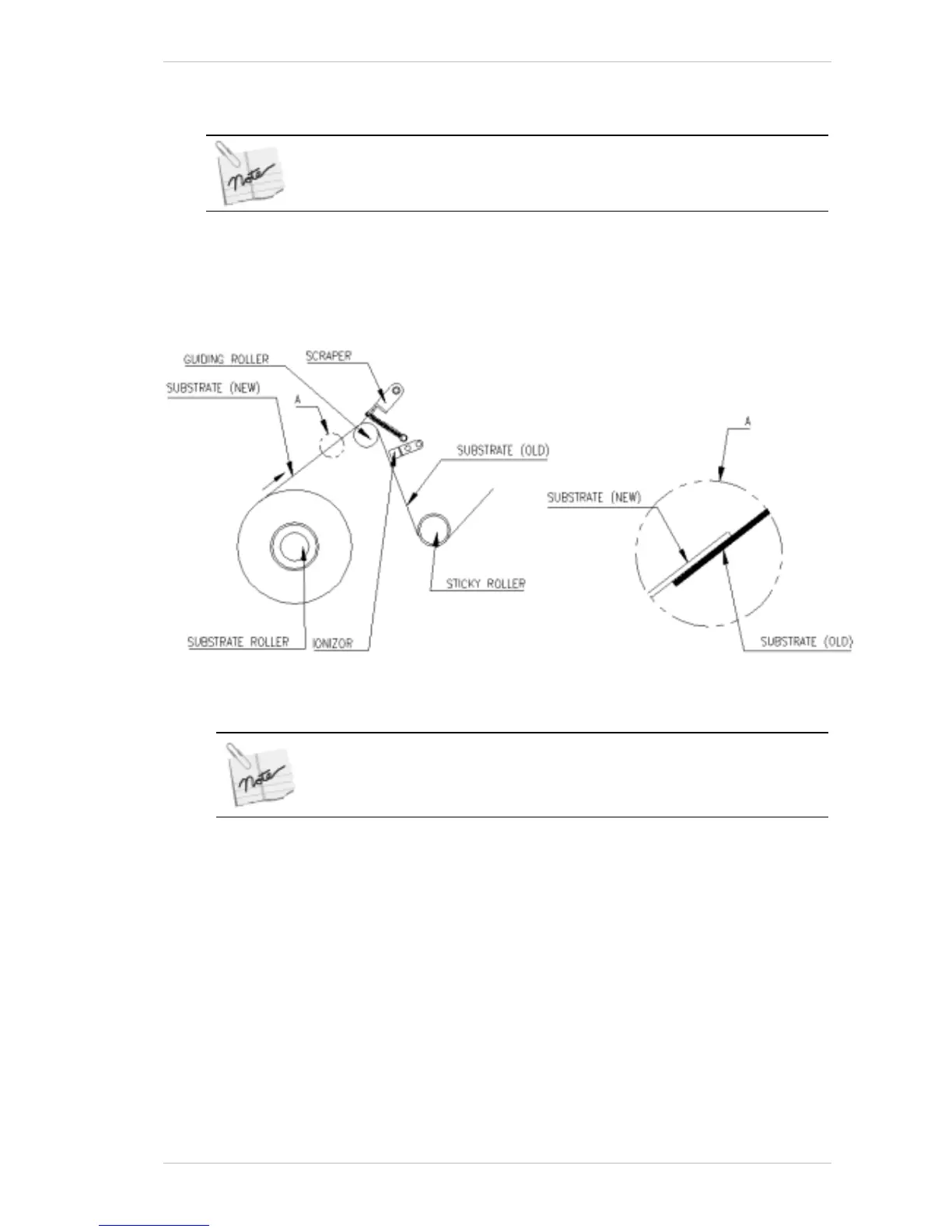
RINT HEADS by using adhesive tape (Figure 8-8).
Figure 8-8: Joining the New substrate to the Existing Piece
The preferred method is to ensure that the new Substrate is placed on
top of the old Substrate. (See Figure 8-8)
16. Lift the S
CRAPER until the join has passed under it.
17. From the M
AIN SCREEN, click FORWARD.
The S
UBSTRATE advances. When the new or replacement SUBSTRATE has
been passed over all four R
OLLER ASSEMBLIES, and the SUBSTRATE
PULLING ROLLER click STOP, in the window that appears.
It should now be resting over the S
UBSTRATE PULLING CYLINDER and
under the P
RESSING ARM.
Leave approximately 50 cms of new or replacement S
UBSTRATE free, or
attach it to the C
OLLECTOR.
18. Close the S
UBSTRATE ROLL COVER.



 To Next Page