18
a n a l y z e r i n s t a l l a t i o n
H
Components
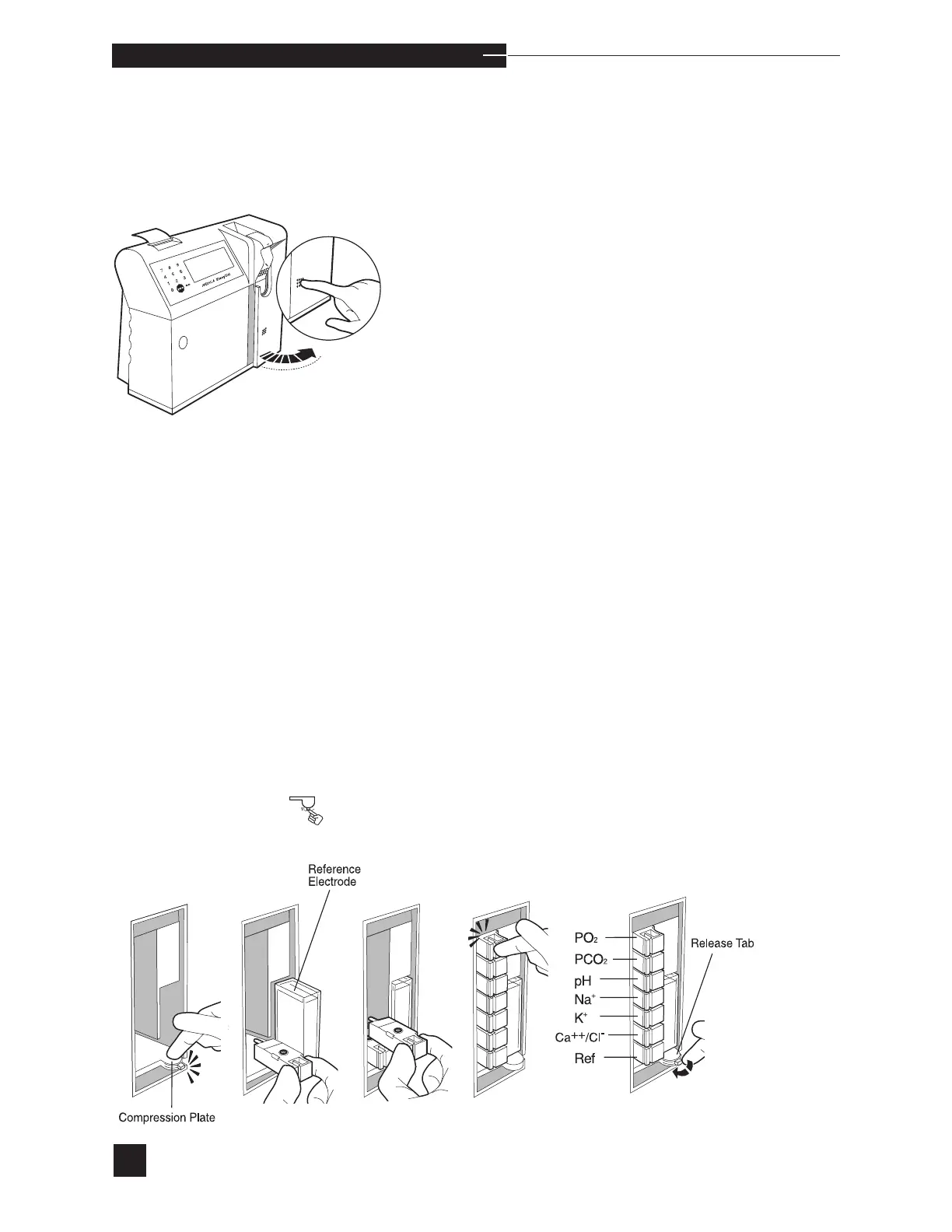
Press the raised dots on the access door to open, and familiarize
yourself with the EasyStat analyzer components. The access door must
remain closed during operation to maintain a temperature of 37.0º
C.
Prior to installing the electrodes, select ELECTRODES under
REPLACE COMPONENTS in the SECOND MENU.
Electrodes
To install the electrodes, push the compression plate down until the
latch locks into the open position.
Install the reference electrode first, pushing it in above the compression
plate. The handle snaps into the sensor module.
Next, install the Ca
++
, K
+
, Na
+
, pH, PCO
2
and PO
2
electrodes,
beginning from the bottom and proceeding upward. Each handle
should snap into the sensor module. The electrodes are keyed to
assure correct placement. DO NOT FORCE. Refer to the illustration
and the access door label for correct electrode order and location.
Release the compression plate to compress the electrodes within the
sensor module.



 To Next Page