4 - COMMANDS AND INSTRUMENTS
4 - 18
• ACTIVATING THE COMMAND SELECTION GRAPHIC BAR
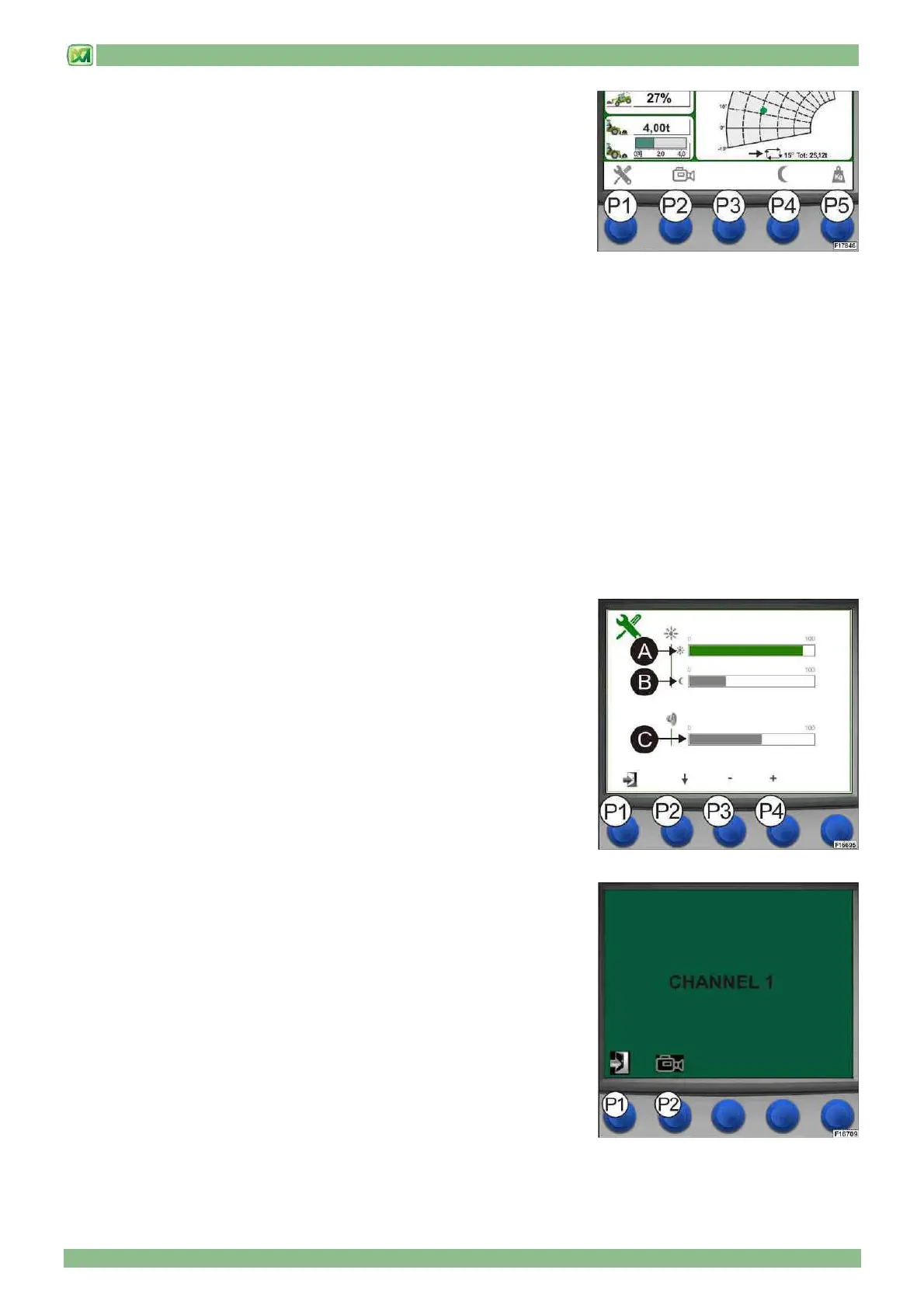
The display (D) of the load control system is equipped with a disappearing
graphics bar which shows the functions of command buttons P1 - P2 - P3 - P4 -
P5. Activation of this graphic bar is regulated by weighing mode selection:
1) In "AUTO WEIGHING" mode (see paragraph WEIGHING SCREEN), on
pressing one of the 5 selection buttons (P1 - P2 - P3 - P4 - P5), the system
activates the graphic bar in the lower part of the display (D) which shows the
functions which can be performed. At this stage, the operator has 5 seconds of
time to press the button for the function intended to be performed. If no selection
button is pressed within 5 seconds, the system de-activates the graphic bar.
2) In "MAN WEIGHING" mode (see paragraph WEIGHING SCREEN), on pressing one of the 4 selection buttons (P1 - P2 - P3
- P4), the system activates the graphic bar in the lower part of the display (D) which shows the functions which can be
performed. At this stage, the operator has 5 seconds of time to press the button for the function intended to be performed. If no
selection button is pressed within 5 seconds, the system de-activates the graphic bar.
Pressing button P5 does not activate the graphic bar but weights the lifted load (see paragraph MANUAL WEIGHING (E)
The functions offered by the selection buttons are:
(P1): press button (P1) to activate the display set-up menu (D) where day/night brightness and speaker volume can be
adjusted.
(P2): press button (P2) to activate the telecamera installed on the machine (optional on request). Every time button (P2) is
pressed, the system cycles through all telecameras that may be mounted on the machine (check whether your machine is
fitted with optional telecameras)
(P3): this button has no machine function
(P4): press button (P4) to activate display (D) day/night brightness modes
(P5): press button (P5) to activate the weighing screen (for additional information, refer to the instructions in paragraph
"WEIGHING SCREEN").
• DISPLAY SET-UP (BUTTON P1)
To adjust the brightness of the display (D) (in day and night modes) and speaker
volume, perform the following operations:
- activate the menu graphic bar
- press button (P1); the brightness and volume adjustment screen opens
- press button (P2) to select the graphic bar for the setting to be modified (in
sequence: day brightness (A), night brightness (B) , volume (C)
- press buttons (P3) and (P4) to set the required brightness and volume values
la adjustment from min. 0 to max. 100)
To leave the display set-up screen (D), press button (P1).
• TELECAMERA SELECTION (BUTTON P2)
To see images from the telecameras installed on the machine on the display
screen (D) (optional on request), perform the following operations:
- activate the menu graphic bar
- press button (P2); the system activates display on CHANNEL 1. Press button
(P2) again to go to CHANNEL 2.
- press button (P1) to return to the main screen



 To Next Page