STARTING&DRIVING
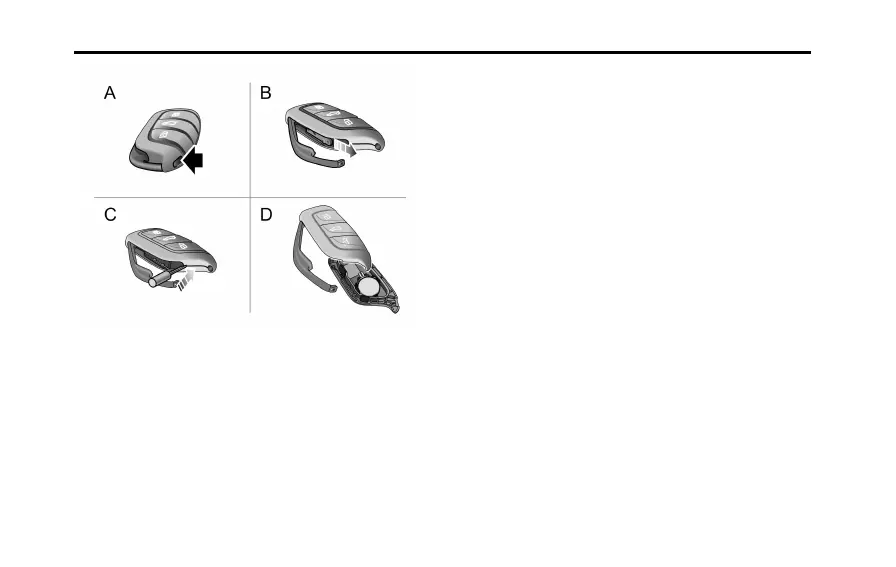
1Pressthebutton(A)onthesmartkeytoejectthe
decorativesheet.
2Removethebackupmechanicalkey(B)inthearrowed
direction.
3Usingasuitableatbladedtool,insertthetoolinto
thesideofthekey(C),carefullypriseoffthebattery
coverandseparatetheupperandlowercasings(D).
Note:Makesurethatthepolarityofbatteryis
correct('+'sidefacingdown).
Note:ItisrecommendedtouseaCR2032battery.
4Removetheoldbatteryfromtheslot.
5Putthenewbatteryintheslot,andmakesureitisin
fullcontactwiththeslot.
6Retthecoverandpresstightly,ensuringthegap
aroundthecoveriseven.
7Retthemechanicalkey,andclosethedecorativetrim.
8Operatethevehiclepowersystemtoresynchronize
thekeywiththevehicle.
156



 To Next Page