74 75
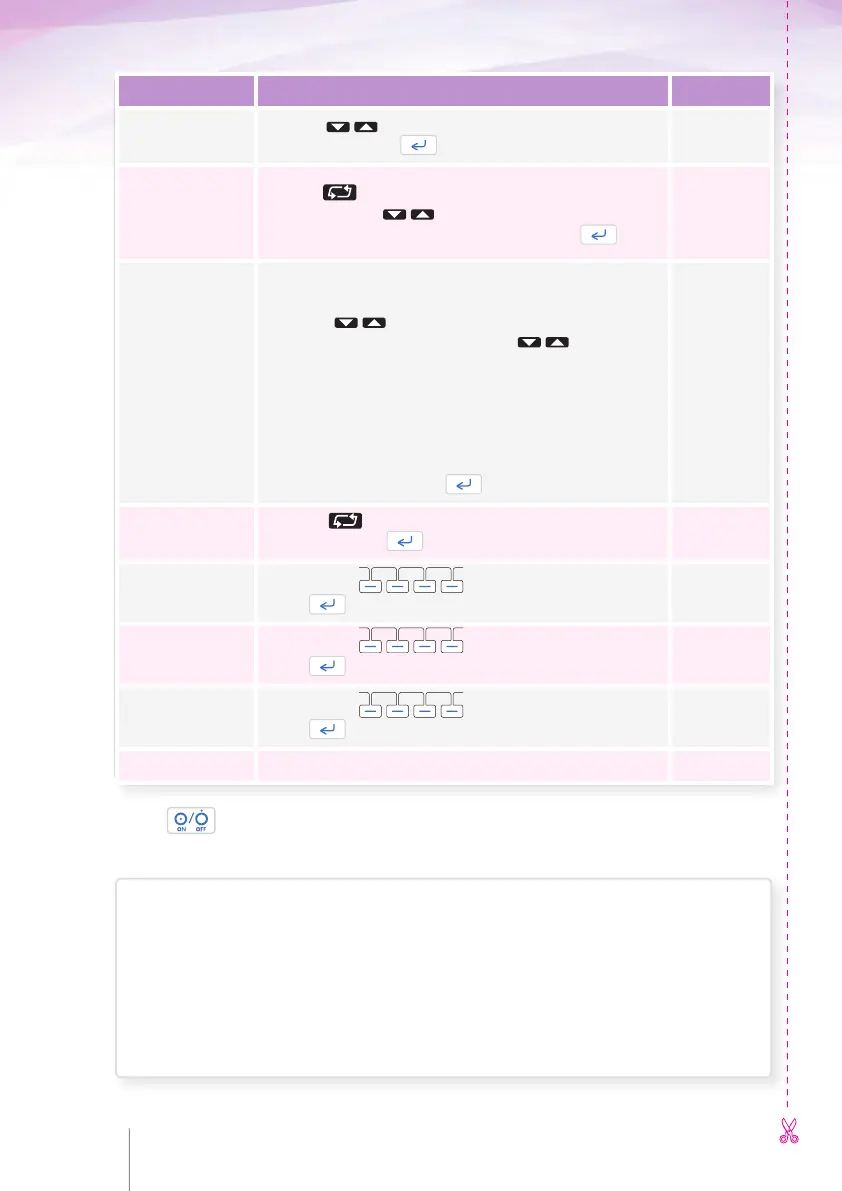
Description How to select values
Your choice
Bolus rate
Use the keys to set the bolus rate from 50.0 ml/h
to 100 ml/h
1
. Press .
Keep Vein Open
KVO rate
Use the key to select
to enable
1
or to disable this
function. Use the key to set the KVO rate. KVO rate
can’t be activated if there is no basal rate. Press .
Time/Volume to
warn before
End Of Infusion
Use the left key to select which parameter you choose for the
warning: Time or Volume
1
. If the warning is set to Volume:
Press the keys to set from 1 to 10 ml.
If the warning is set to Time: Press the keys to set
from 5 to 180 min. Or you can choose OFF to disable this
function.
Note: In Bolus Only mode the Time to warn before End Of Infusion
cannot be used. In case pump is configured with Time to warn before
End Of Infusion and a Bolus Only mode is selected then the pump will
automatically enable the Volume to warn before End Of Infusion at the
default value (3 ml).
Press .
Prime
Use the key to select No warning, Warning
1
or
Mandatory. Press .
New patient –
program code
Use the keys to enter your personal code
.
Press .
New bag code
Use the keys to enter your personal code
.
Press .
Resume after
power off code
Use the keys to enter your personal code
.
Press .
Save and exit Press Yes if your settings are correct.
Press to switch the pump OFF. Turn the pump ON and enter the programming code to
review your settings.
Configured by: ...............................................................................................................
according to the prescription of: .......................................................................................
Date: ......... / ......... / .........
Pump SN: ................................................... to ..................................................
CONFIGURATION MENU CONFIGURATION MENU CONFIGURATION MENU



 To Next Page