64
WIDTH
CAL
FLOW
CAL
MIN
FLOW
A
DJUST
RATE
TARGET
RATE
SPEED
CAL
INLINE
BYPASS
TEST
SPEED
V
OLUME /
MINUTE
DISTANCE
AREA /
HOUR
VOLUME
(1) (2) (3)
RATE
SPEED
AREA
(1) (2) (3)
TANK
CAL
AUTO
MAN
RESET
MANAUTO
CALHOLD
_
____
_____
H
OLD
1
S
pray
M
ate
II
This procedure is used to verify and fine-tune the
flowmeter calibration. Every flowmeter is calibrated with
water at the factory and stamped with a calibration value.Enter that
value as a starting point and use this procedure to fine-tune that
value for your specific installation and NH3 application (please refer
to Entering Flowmeter Calibration Value, page 26).
PROCEDURE:
1. Start with a full nurse tank. Make certain that you have an
accurate scaled weight of the full tank.You will want to apply a
minimum of 1,000 pounds of NH3 for this procedure.The larger
the volume of NH3 used, the more accurate the calibration will
be.
2. With Boom 1 switch turned OFF, turn the rotary selector to the
VOLUME (1) (2) (3) position. Select which pair of VOLUME/AREA
counters (1, 2, or 3) that you want to use by using the "+"
button ONLY to select the pair of counters as identified by the
small number in the lower right area of the left-hand display. If
you attempt to use the "-" button, it will clear the selected
counter pair (CLEAr will be displayed before the counters are
cleared). After you have selected the counter pair number,
press and hold the RESET button until the display reads 0.0.
3. Proceed to the field and perform actual application (turn Boom
1 switch to ON) until at least 1,000 pounds of NH3 has been
applied. (One nurse tank is preferred).The larger the volume of
NH3 applied, the more accurate the calibration will be. Obtain
an accurate scaled weight of the partially used nurse tank. The
difference between the starting and ending weight is your
calibration weight.
4. Put Boom 1 switch in the OFF position. Compare the console’s
VOLUME reading with the known amount of NH3 run. If the
two amounts are within one or two percent, no fine tuning is
required. If the two amounts are more than two or three
p
ercent different, continue with the next step.
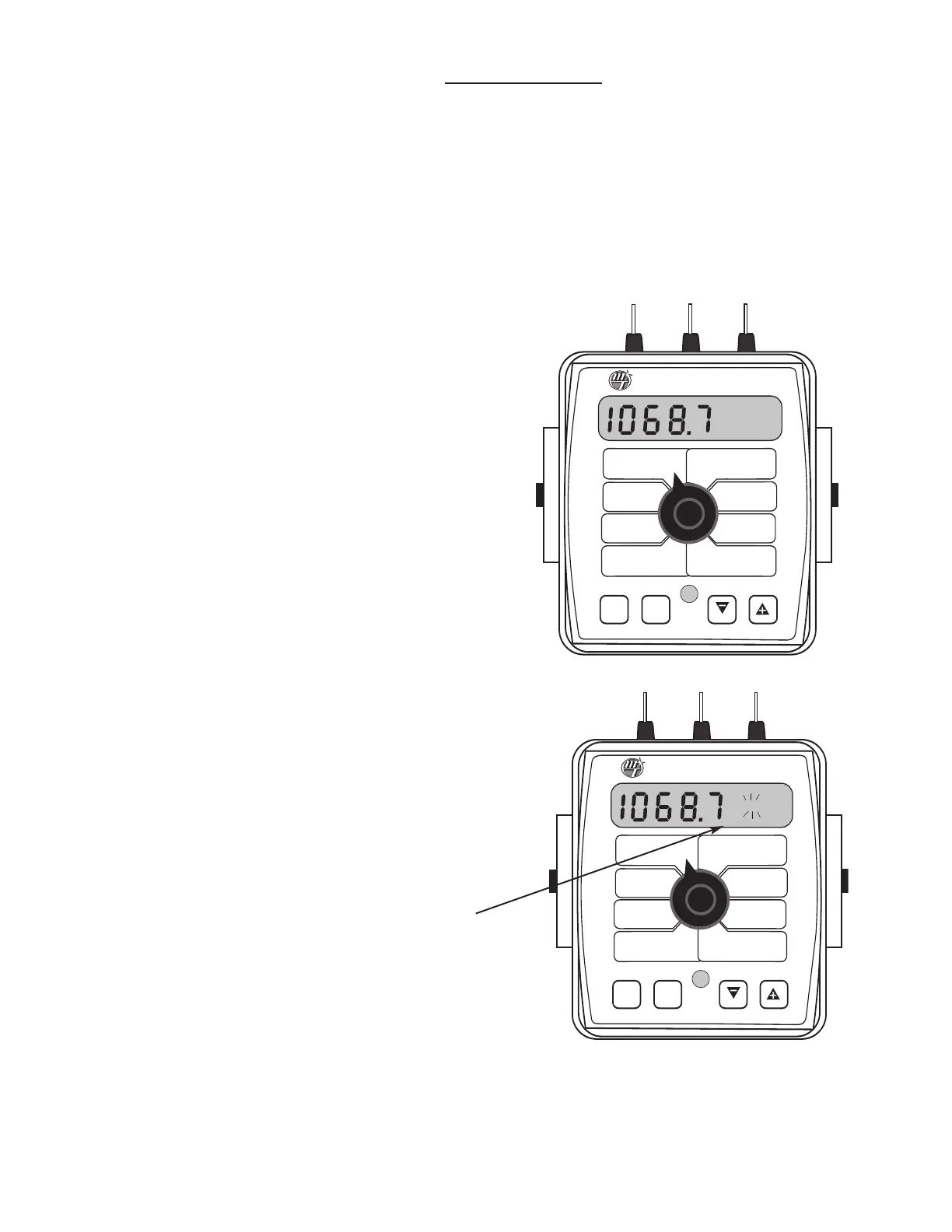
5. With the console still in the VOLUME position, enter calibration,
hold the CAL button until red warning light comes on; about
one second. The display will show the flowmeter calibration
value and the CAL icon.
6. Momentarily press the CAL button. The CAL icon will begin to
flash and the t
otal volume will be displayed.
S
ee Illustration.
7.
W
hen the
TOTAL FLOW value is displayed, use the “+” or
“-”button to adjust the value to match the amount of NH3 run.
8.
M
omen
tar
ily pr
ess the CAL button. The CAL icon and the
flowmeter calibration number will be displayed. You will notice
that the flowmeter calibration value has changed. Write down
the new flo
wmet
er c
alibr
a
tion value. This is your “fine tuned”
calibration value, keep it for future reference.
9. Exit calibration by holding the “CAL” button until the red
w
ar
ning ligh
t go
es out (ab
out one sec
ond).
WIDTH
CAL
FLOW
CAL
MIN
FLOW
ADJUST
RATE
TARGET
RATE
SPEED
CAL
INLINE
BYPASS
TEST
SPEED
VOLUME /
MINUTE
DISTANCE
AREA /
HOUR
VOLUME
(1) (2) (3)
RATE
SPEED
AREA
(1) (2) (3)
TANK
CAL
AUTO
MAN
RESET
_____
_____
CAL HOLD
1
S
pray
M
ate
II
Appendix G: SprayMate II - NH3 Specific
Fine Tuning Flow Calibration Value - NH3



 To Next Page