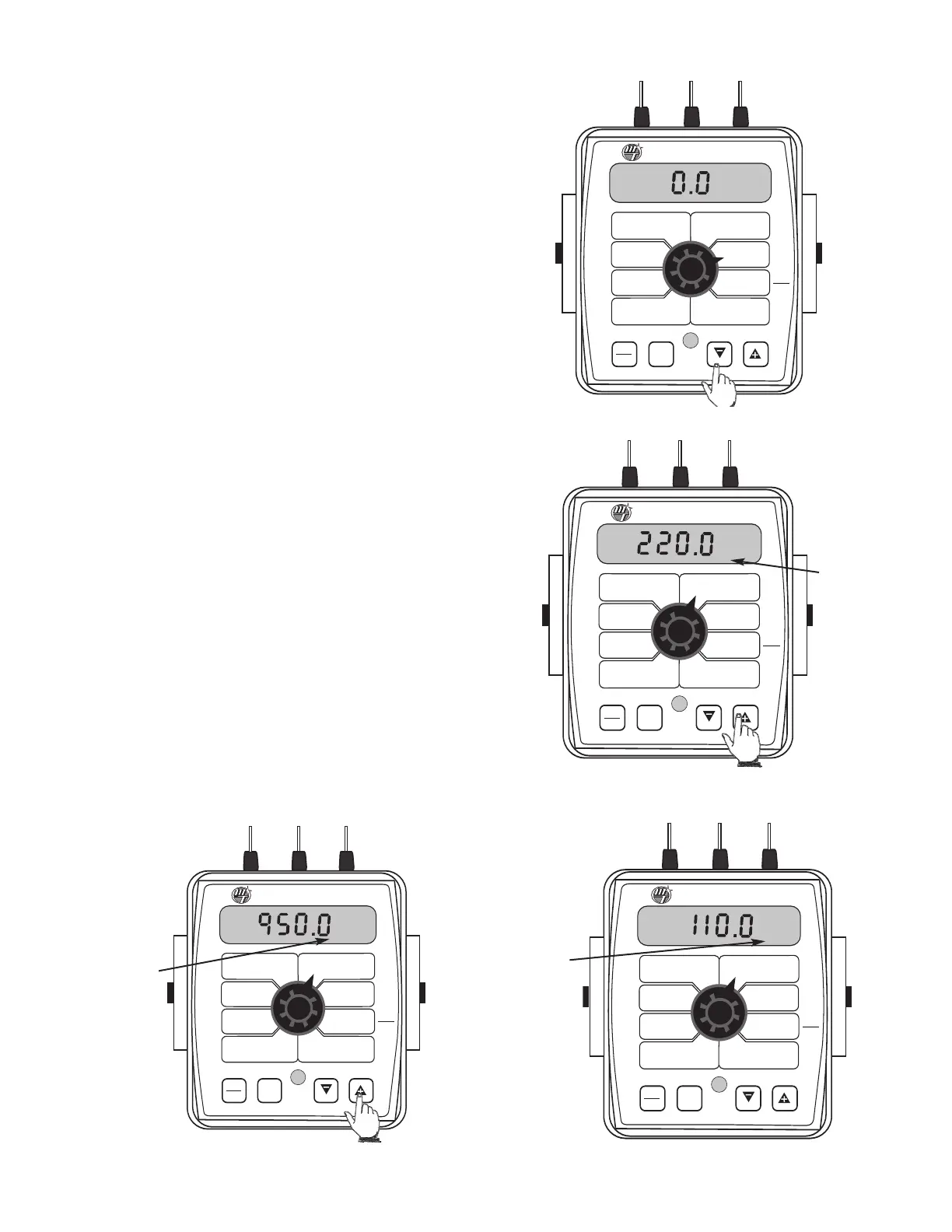
The AREA, DISTANCE and VOLUME counters maintain a running
count during operation regardless of the position of the rotary
switch. When any of these counters reach their maximum
capacity, or when you want to start a new count, the value may
be reset to zero by performing the following routine. Counters
may be reset independently of each other.
1. Turn the booms OFF or put the system in HOLD.
2. Turn the rotary switch to the counter to be reset.
3. To reset distance turn the rotary switch to DISTANCE and
simply press and hold the RESET button until the display
reads zero. The display will show the word "CLEAr" during
this process, and will show 0.0 when reset to zero is
complete.
4.
To reset the volume and area counters; there are three
independent AREA counters, paired with three VOLUME
counters. The active pair of counters is indicated by the
small numbers in the lower right area of the display (1,2, or
3) when the rotary switch is in the AREA or VOLUME position.
Select the pair of counters you want to use by pressing the
"+" button. The small number will increment each time the
"+" button is pressed (from 1 to 3, then rolls back to 1). DO
NOT attempt to select the counter number by using the "-"
button, because that will clear the active pair of counters if
held for 2 seconds. If the "-" button is accidentally pressed,
the console will display "CLEAr" to alert the user that the
counters will be cleared. If the user continues to hold the "-"
button for 2 seconds "CLEAr" will disappear and be replaced
by 0.0, indicating that the selected pair of counters has been
cleared.
To select a pair of AREA and VOLUME counters:
Verify that the
desir
ed c
ount
er pair is selec
ted, or use the "+" button to select -
Resetting System Counters
WIDTH
C
AL
FLOW
C
AL
M
IN
FLOW
ADJUST
RATE
TARGET
RATE
SPEED
CAL
INLINE
BYPASS
TEST
SPEED
VOLUME
/
M
INUTE
DISTANCE
AREA /
H
OUR
V
OLUME
(
1) (2) (3)
R
ATE
SPEED
AREA
(1) (2) (3)
T
ANK
C
AL
AUTO
MAN
RESET
M
ANAUTO
CALHOLD
1 2 3 4 5
™
S
pray
M
ate
II
31
WIDTH
CAL
FLOW
CAL
MIN
FLOW
ADJUST
RATE
TARGET
RATE
SPEED
CAL
INLINE
BYPASS
TEST
SPEED
VOLUME
/
MINUTE
DISTANCE
AREA /
HOUR
VOLUME
(1) (2) (3)
RATE
SPEED
AREA
(1) (2) (3)
TANK
CAL
AUTO
MAN
RESET
MAN HOLD
CALHOLD
1
S
pray
M
ate
II
WIDTH
C
AL
FLOW
C
AL
MIN
F
LOW
A
DJUST
RATE
TARGET
R
ATE
S
PEED
CAL
INLINE
B
YPASS
T
EST
SPEED
VOLUME
/
MINUTE
DISTANCE
AREA /
H
OUR
VOLUME
(
1) (2) (3)
RATE
SPEED
AREA
(1) (2) (3)
TANK
CAL
AUTO
MAN
R
ESET
MAN HOLD
CALHOLD
2
S
pray
M
ate
II
™
Display
indicates
that
counter
pair #1 is
selected
Display
indicates
tha
t
c
oun
t
er
pair #3 is
selec
t
ed
Display
indicates
counter
pair #2 is
selected
WIDTH
CAL
FLOW
CAL
MIN
FLOW
ADJUST
RATE
TARGET
RATE
SPEED
CAL
INLINE
BYPASS
TEST
SPEED
VOLUME
/
MINUTE
DISTANCE
AREA /
HOUR
VOLUME
(1) (2) (3)
RATE
SPEED
AREA
(1) (2) (3)
TANK
CAL
AUTO
MAN
RESET
MAN HOLD
CALHOLD
3
S
pray
M
ate
II
™



 To Next Page