Version 1.9 Page 77 of 170
Test List
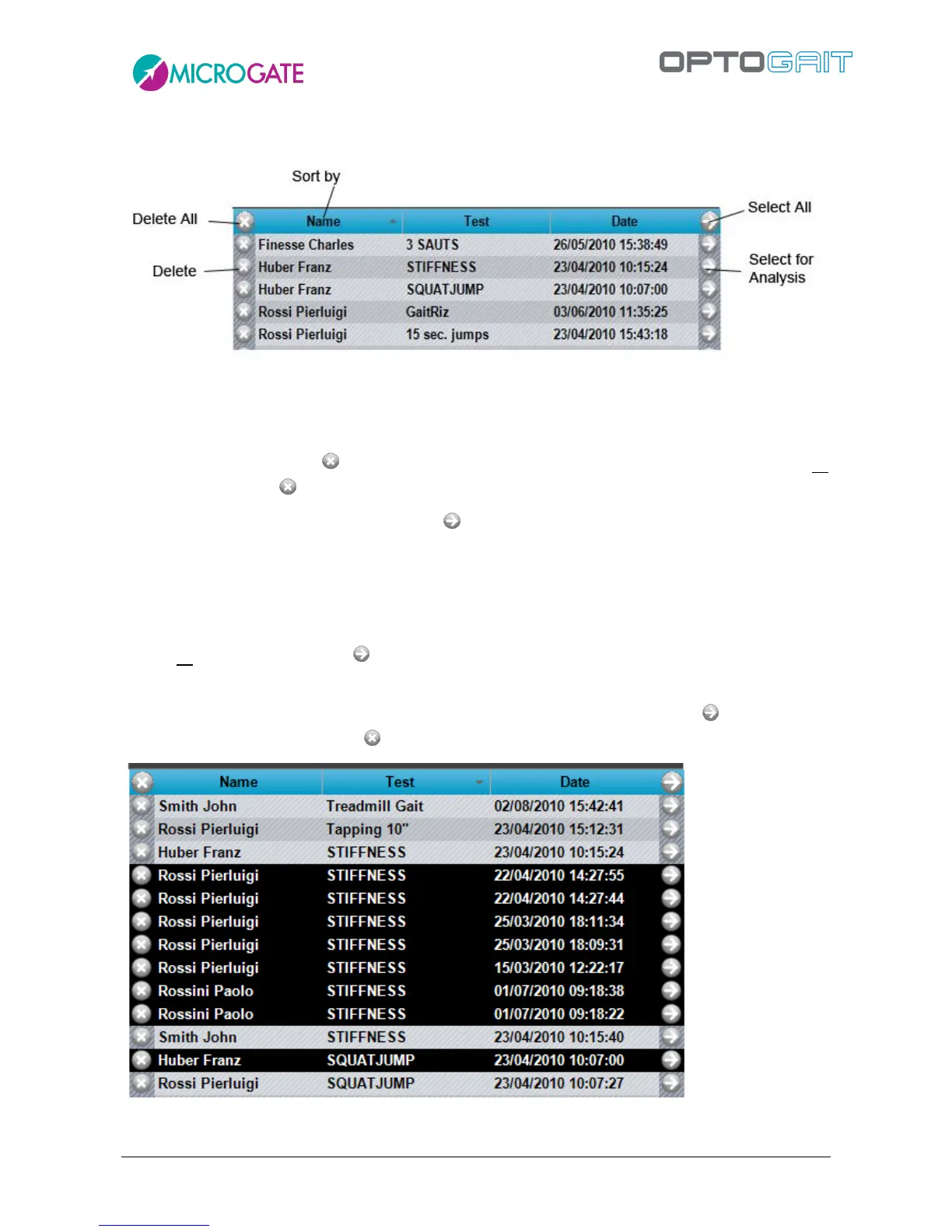
Figure 58 – Test List Components
Click on the column names (Patient, Test, Data) to display the list in order according to that field.
Press again to reverse the order (A…Z, Z…A).
To delete a test, press the symbol on the corresponding line of the chosen test; to delete all
displayed tests press on the table heading.
To select a test to analyse, press the symbol on the corresponding line (or double-click with the
mouse): the test will be moved from the LIST table to the ANALYSIS table and a filter will
automatically be set on the type of test (e.g., if a ‘Squatjump’ test is chosen, the Test List is filtered
in order to contain only ‘Jump tests’; this allows you to choose only tests of the same type to submit
to ‘Comparison’).
To add all displayed tests, press on the table heading.
To make multiple selections, use the SHIFT key to select a range of patients (from… to…) or the CTRL
key for selections that are not adjacent, as explained in section. 4.1.2. Pressing will move only
the selected tests, while pressing will delete those lines.
Figure 59 – Multiple selection



 To Next Page