Version 1.9 Page 86 of 170
4.3.1.3 STATISTICS CHARTS
Both during a test and in the subsequent data viewing and analysis, instead of the charts described
in the previous chapter, it is possible to view a pie chart depicting the division of time elapsed
between specific thresholds defined previously.
The same panel used to configure the second monitor (see chap. 4.2.1.2) can also be used to indicate
which value is to be taken into consideration (Stance, Swing, Step Length, Jump Height, etc.) and
which warning threshold and bad threshold values are to be set.
The mode (Asymmetry or Absolute Value) is obviously the most important parameter to be set on
the basis of what is to be monitored.
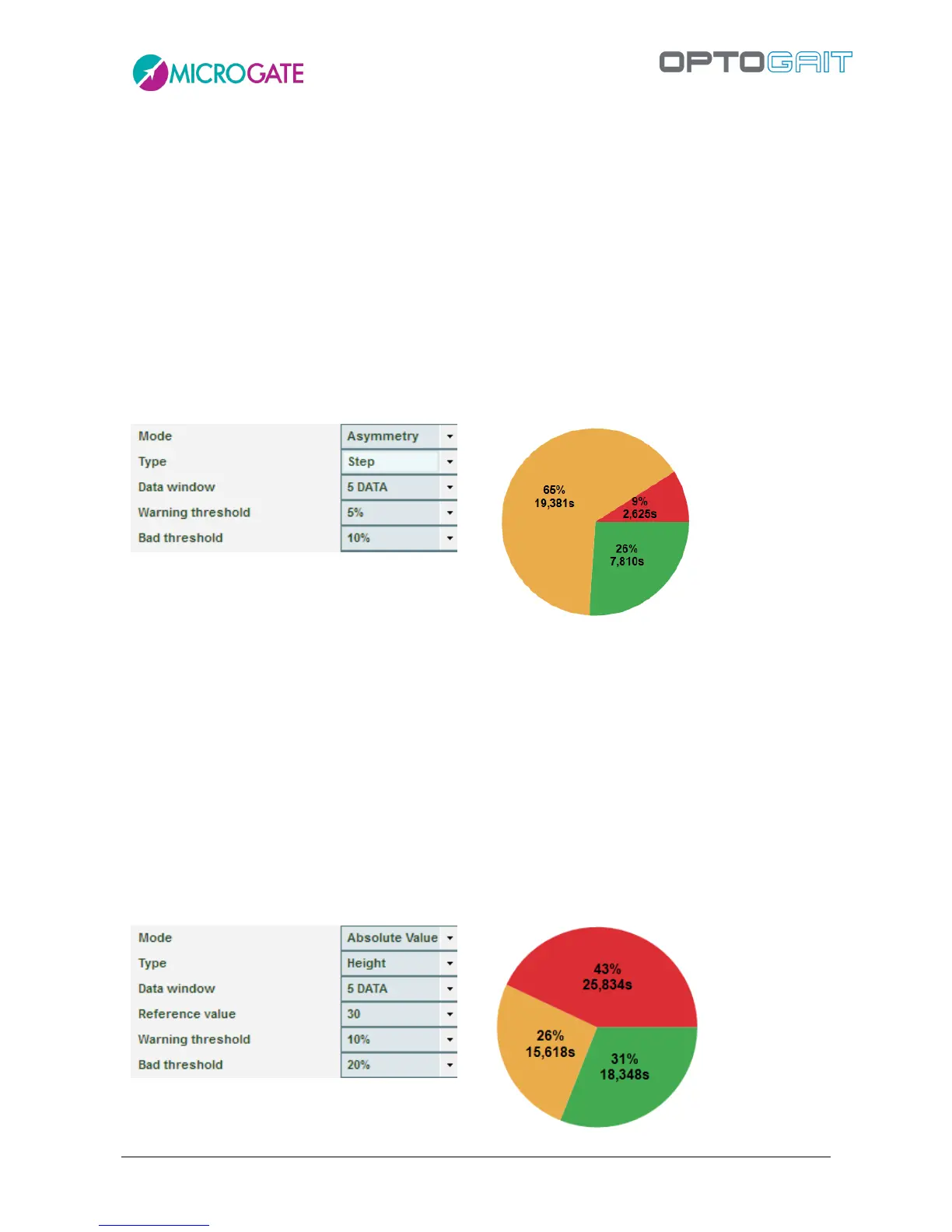
In the example below we want to see how asymmetric (right/left) the patient is during a treadmill
gait test in terms of step length, in relation to the thresholds set:
The statistics chart shows that in a total of approximately 30 seconds testing, 26% (7.8 s) showed
asymmetry under 5%, 65% of the time (19.3 s) it was between 5% and 10%, and just 9% of the time
(2.6 s) asymmetry was over 10%.
The Data Window allows us to decide every how many events a calculation to work out which of the
three bands the patient falls into; e.g. by setting 5 DATA, every 5 steps (or jumps) the average of the
selected measurement is calculated, compared with the reference value and the established
thresholds and assigned to the good, warning or bad category.
In this second example, however, we see the use of 'Absolute Value' mode where, in a 'Jumps 60
seconds' test, the Height value is compared with a reference value of 30 cm: 31% of the time the
patient jumped over 27 cm (30 cm – 10% of the warning threshold), 26% of the time he/she jumped
between 24 and 27 cm, and 43% of the time he/she jumped under 24 cm.



 To Next Page