Installation
98
Mitel 470 as of R4.1
syd-0585/1.2 – R4.1 – 08.2016
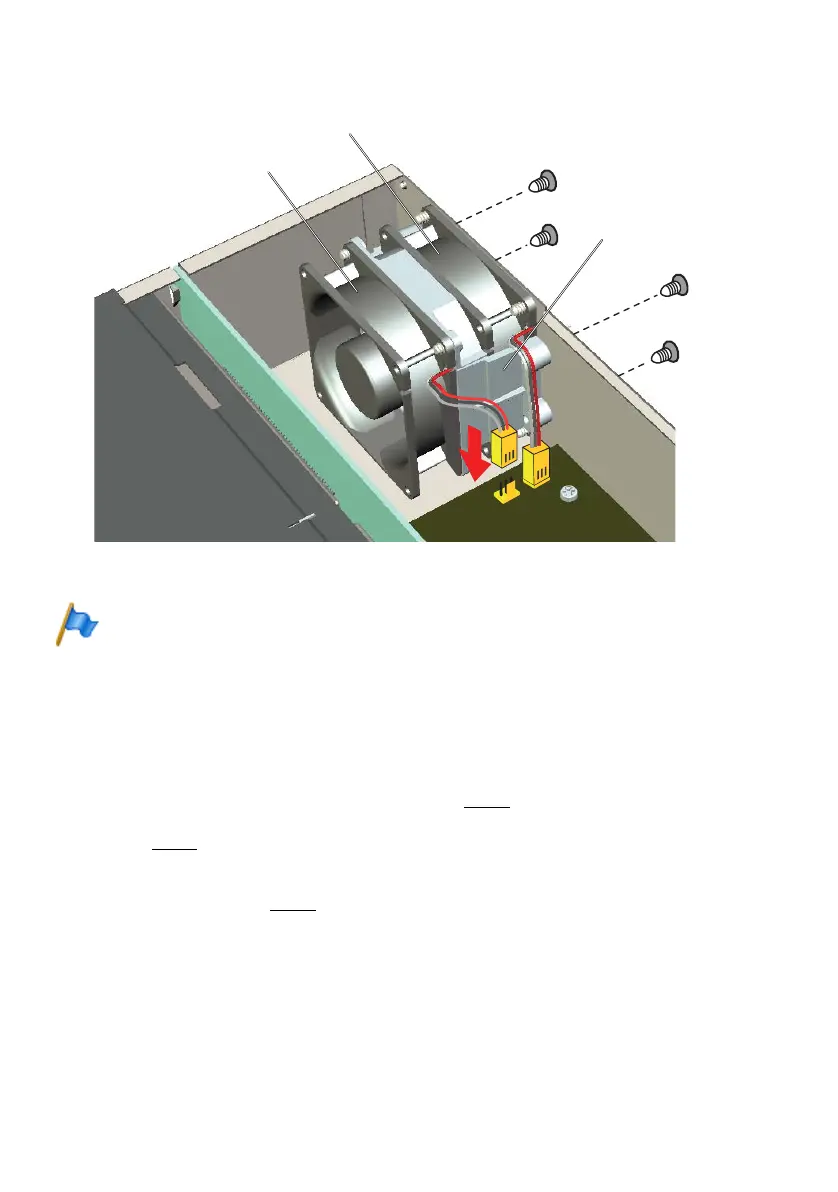
Fig. 19 Fitting the additional fan in Mitel 470
How to make backplane BP2U sit correctly
When the rear housing cover is open (e.g. so an additional fan can be installed), the backplane
can spring out from the lower guide carriages (above all if no card is installed).
Result:
after the assembly, this may not allow cards to be plugged in / make real contact / be detected,
etc.
Remedy:
– Check that the backplane is sitting properly in the 4 lower guide carriages. In any case, you
must press down the backplane slightly since the contact springs create a certain counter-
pressure behind the mounting brackets (see ➀ in Fig. 20
).
– Check whether the backplane does not protrude from the upper part of the housing (see ➁
in Fig. 20).
– While closing the upper rear cover, check that the backplane is sitting correctly in the 4
upper guide carriages. It should be possible to close the cover without strain and without
bending it (see ➂ in Fig. 20
).
FAN 2
FAN 1
Fastening frame
Standard fan
Redundant fan unit



 To Next Page