34
Initial Setup
Chillgard 5000
US
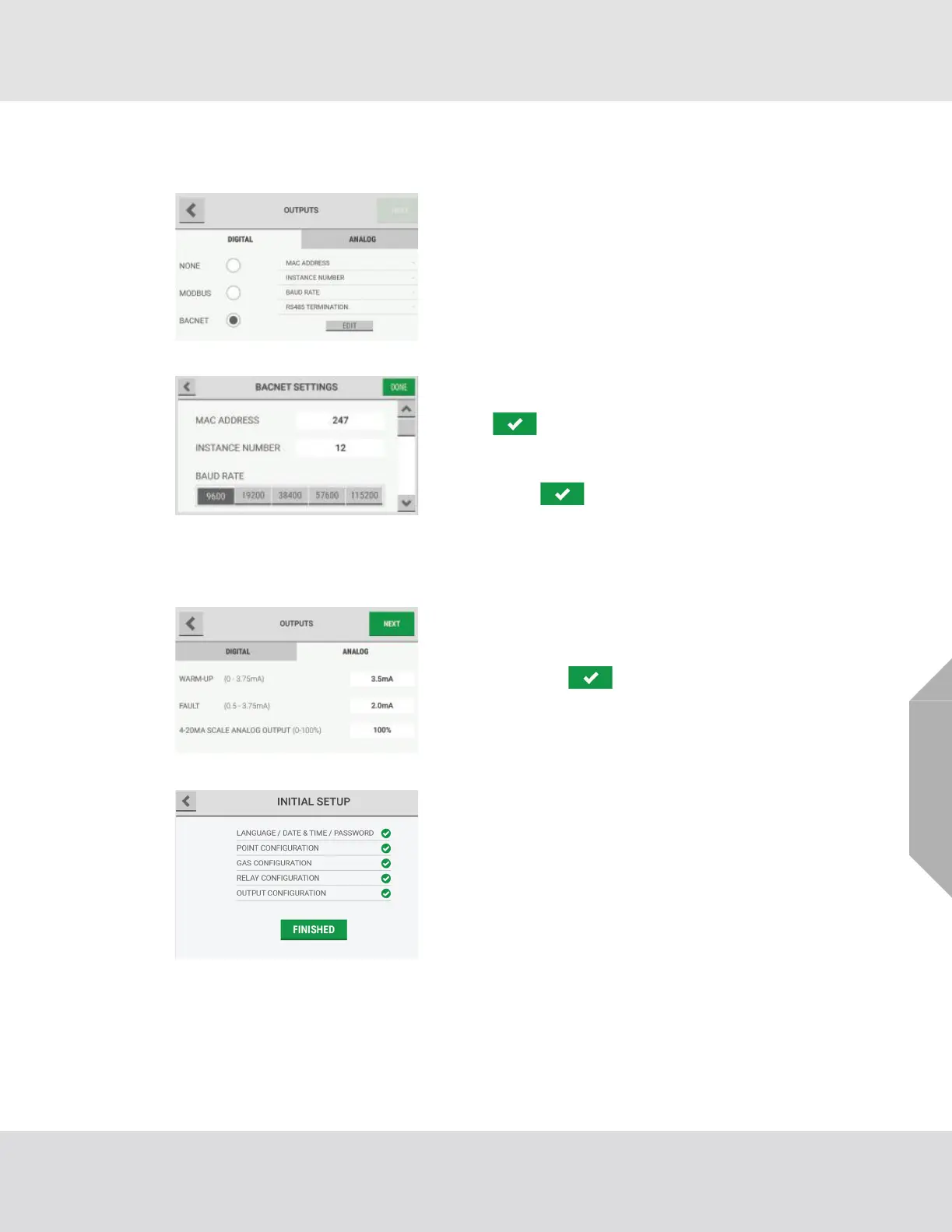
(4) "If "BACnet" is selected, do the following:
a) Select "Edit".
b) Select the "MAC Address" field, and use the alpha-
numeric keypad pop-up to enter a value. Select
to accept the value.
c) Select the "Instance Number" field, and use the
alphanumeric keypad pop-up to enter a value.
Select to accept the value.
d) Select a baud rate for the connection.
Use the scroll bar to move through the list of available
options.
(5) Select the "Analog" tab.
(6) To adjust the default values, select the applicable field,
and use the alphanumeric keypad pop-up to enter a
value. Select to accept the value.
(7) Select "Next".
For a list of default settings, refer to Section 16, "Appendix
C: Default Settings".
(8) The "Initial Setup" screen shows that all initial setup
steps are complete. Select "Finished" to confirm the
configuration settings and move to the "Initial Calibra-
tion" screen.



 To Next Page