59
Diagnostics
Chillgard 5000
US
8 Diagnostics
NOTE: If the date setting is changed after the initial set up configuration, the predictive maintenance
logs will need to be reset on each graph to ensure accuracy.
8.1 Flow Diagnostics
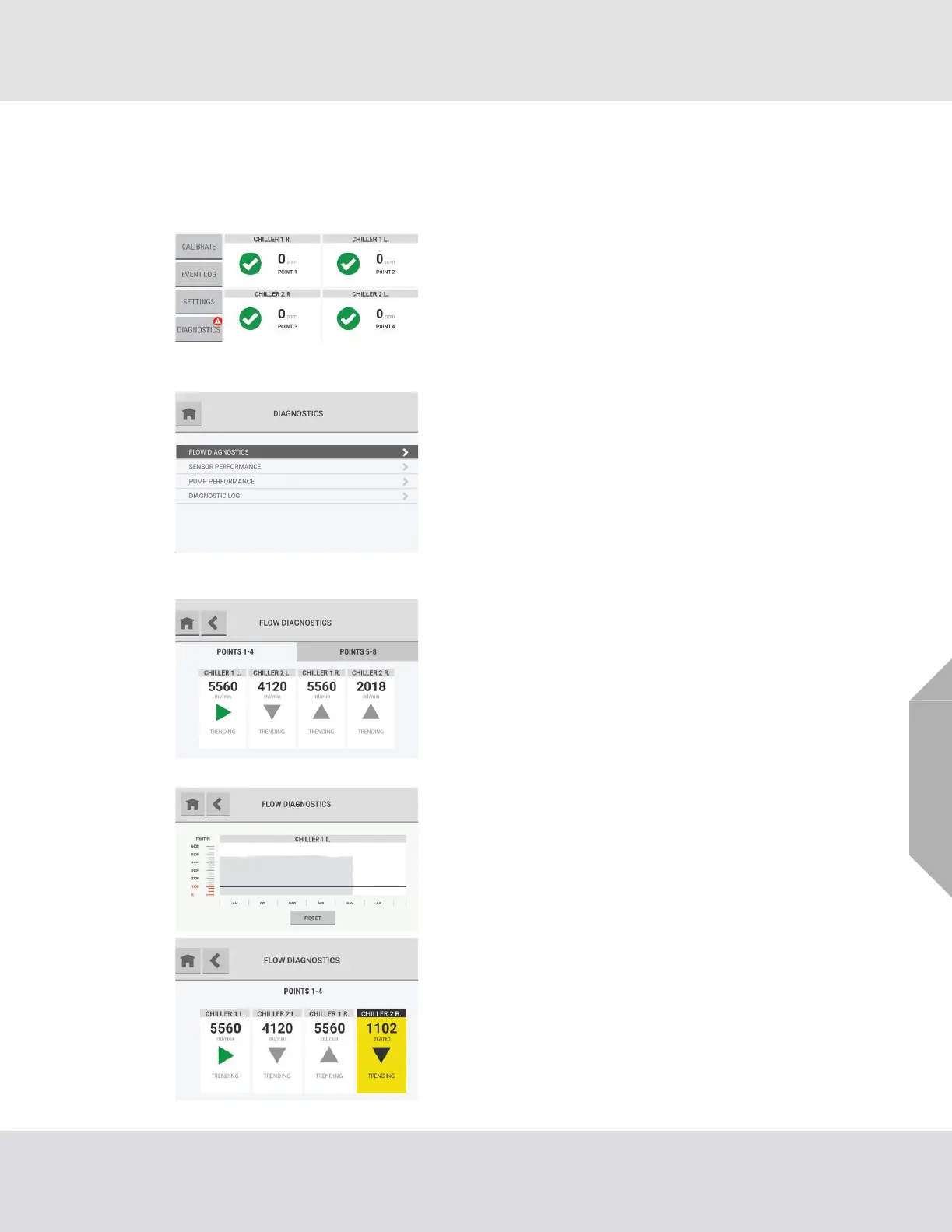
When a predictive warning, fault, or alarm is acknowledged,
a notification shows on the "Diagnostics" button on the
dashboard.
(1) On the dashboard, select the "Diagnostics" button.
(2) On the "Diagnostics" screen, select "Flow Diagnos-
tics".
The "Flow Diagnostics" screen shows data for four points.
If more than four points are enabled, additional tabs show
the points in groups of four.
The flow rate for each point shows below the point name.
A directional arrow indicates the trending behavior of the
flow rate for a point. The arrow is green only when the trend
is static. The arrow is gray in other situations because a
positive or negative trend indicates a change in the system.
To see a detailed graph of the flow data for a point over
time, select the point tile.
The background of point tiles associated with a predictive
warning is yellow.



 To Next Page