28
Initial Setup
Chillgard 5000
US
5.2 Point Configuration
NOTE: At initial setup, all points except Point 1 are disabled
by default and are inactive on the "Point Configuration"
screen. Configuration of Point 1 is required for device initial-
ization.
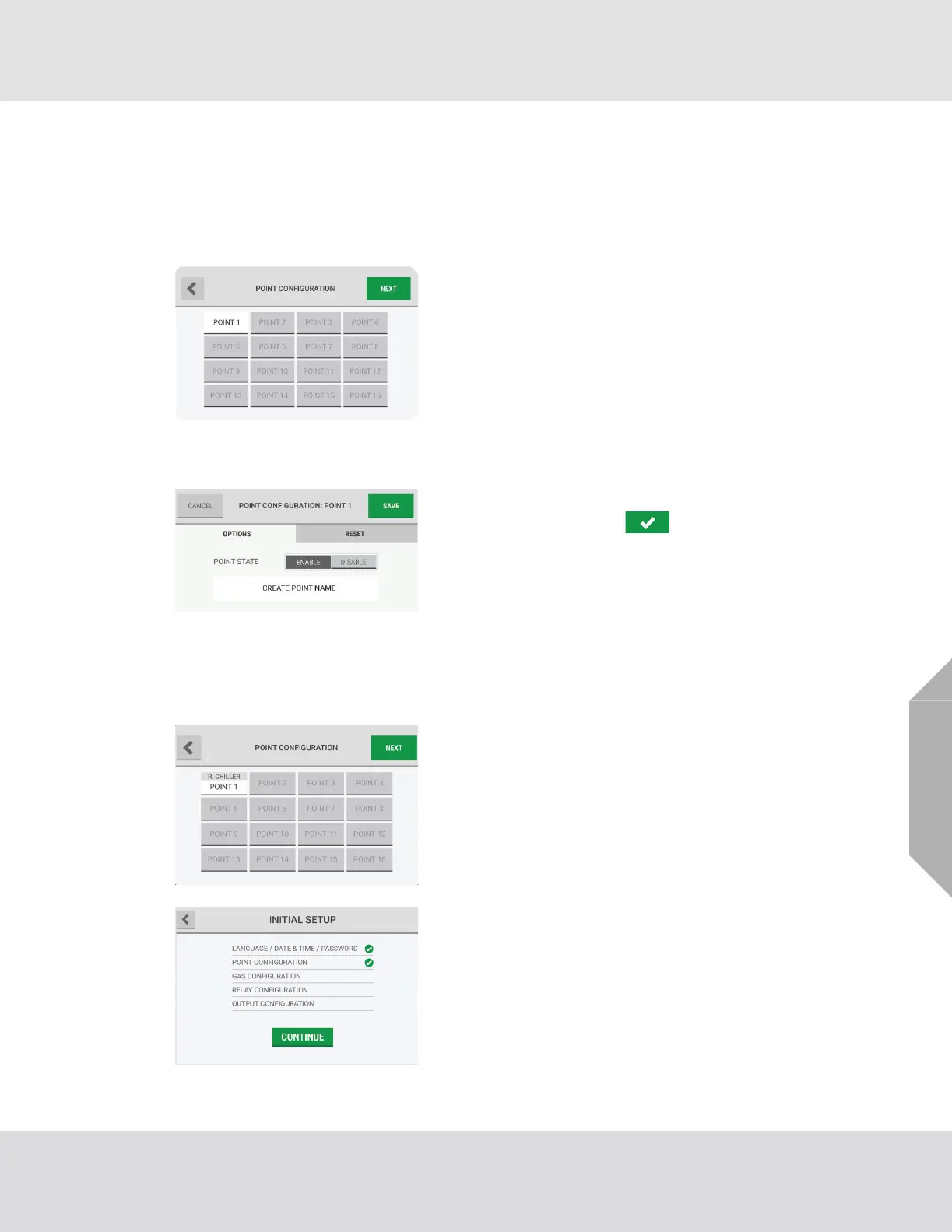
(1) On the "Point Configuration" screen, select "Point 1".
(2) Select "Next".
(3) On the "Point Configuration: Point #" screen, select
"Enable".
(4) Select the Name field, and use the alphanumeric
keypad pop-up to assign a name with up to
18 characters. Select to accept the value.
The entire 18 characters will only show on the "Point Detail"
screen. Only 10 characters will show on the "Point Config-
uration" screen.
(5) Select "Save".
(6) Repeat Steps (1) through (5) until all of the necessary
points have been configured.
(7) On the "Point Configuration" screen, select "Next".
(8) The "Initial Setup" screen shows a check mark beside
the "Point Configuration" step to indicate that it is
complete. Select "Continue" to go to the gas configu-
ration setup.



 To Next Page