57
Routine Operation
Chillgard 5000
US
7.8.5 Communications Output
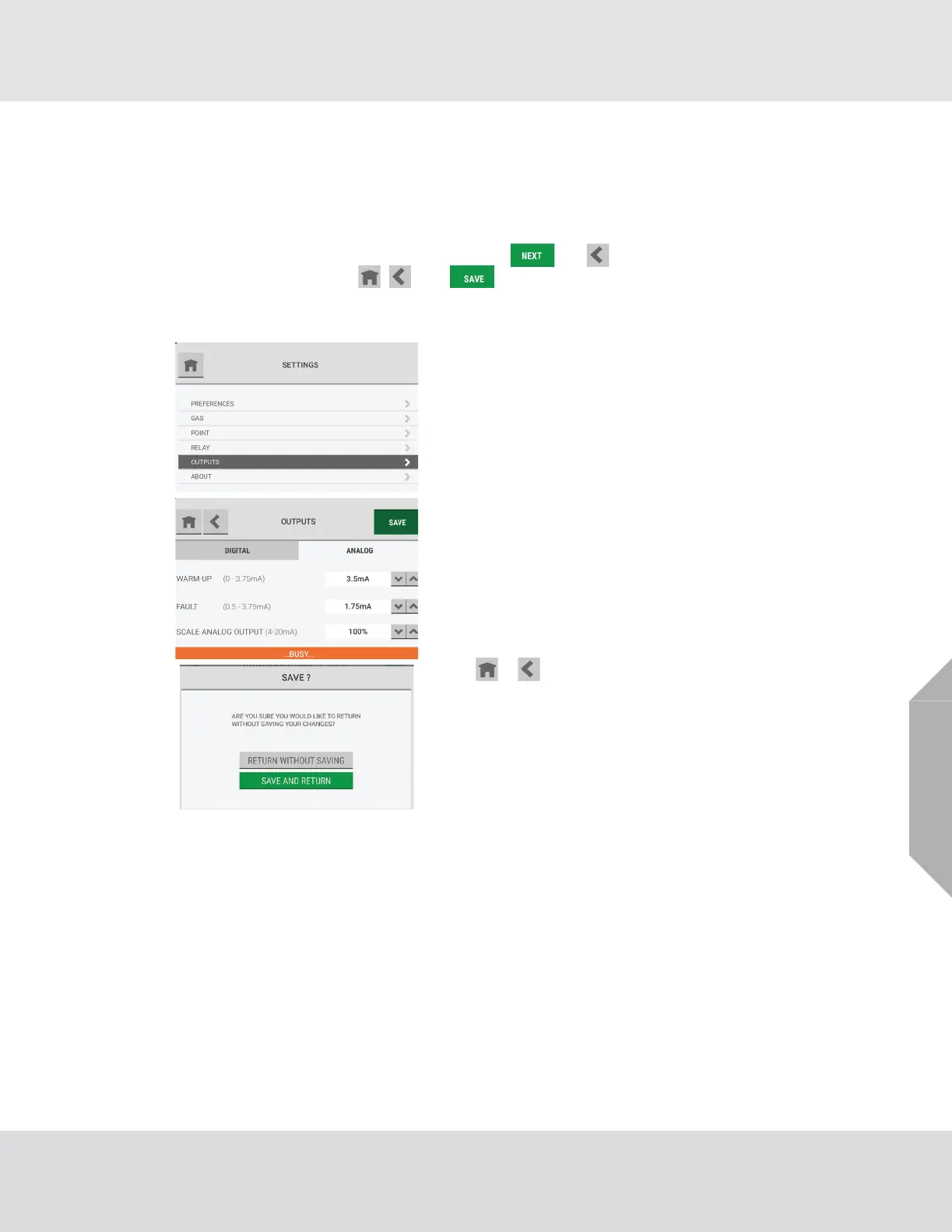
Use the "Outputs" option to change the configuration settings for digital and analog outputs.
Except for the buttons that show in the screen headers, the screens and steps used to change the
output settings are the same as those used during the initial setup.
During the initial setup, the screen headers show the and buttons. During routine operation,
the screen headers show the , , and buttons.
When a change is made to the configuration, the "Save" button becomes active.
When the configuration changes have been saved, the "Settings" screen shows.
On the "Settings" screen, select "Outputs".
To adjust the output configuration settings, go to Section
5.5, "Communications Output", and do Steps (1) to (3).
While the configuration is being updated, a "Busy" message
shows at the bottom of the "Outputs" screen.
If the or button is selected while the "Busy" message
shows, a pop-up asks whether to abandon the configura-
tion changes.
• To return to the "Outputs" screen without saving the
changes, select "Return without Saving".
• To save the changes and return to the "Outputs" screen,
select "Save and Return".



 To Next Page