29
Initial Setup
Chillgard 5000
US
5.3 Gas Configuration
NOTE: When a gas is selected, the "Save" button becomes active. The interface does not automati-
cally move to the "Setpoints" tab.
If "Save" is selected without adjusting the setpoints for cautions, warnings, and alarms, the default
setpoint settings will be used for the selected gas.
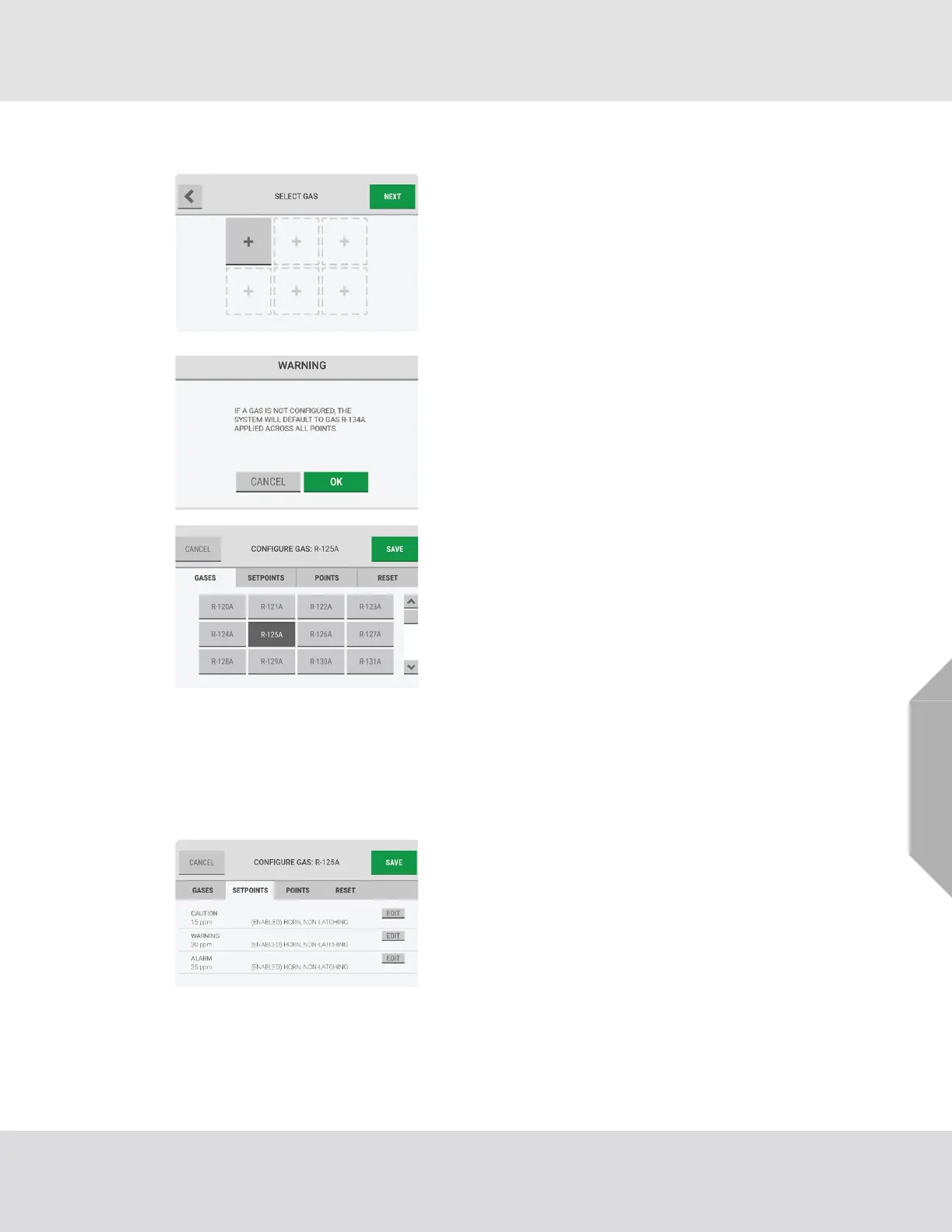
(1) On the "Select Gas" screen, select an empty gas slot.
NOTE: A maximum of six slots or gases can be configured.
NOTE: If "Next" is selected without configuring a gas, a
warning pop-up provides an alert that default settings will
be applied across all points.
To accept the default settings and bypass the gas configu-
ration step, select "OK". Otherwise, select "Cancel" to
return to the "Select Gas" screen and select a gas slot.
(2) On the "Gases" tab of the "Configure Gas" screen,
select from the list of possible configurable gases. The
screen header changes to show the selected gas.
(3) Select the "Setpoints" tab.
(4) Select the "Edit" button for Caution, Warning, or
Alarm, as applicable.
NOTE: If the "Setpoints" tab is selected but a gas has not
been selected, the options on the "Configure Gas" screen
will be inactive.
The options for the configuration settings for cautions,
warnings, and alarms are identical.



 To Next Page