51
Routine Operation
Chillgard 5000
US
7.8 Edit Settings
7.8.1 Preferences
Use the "Preferences" option to change the settings for the language, date and time, password, and
brightness of the device display.
Language, Date and Time, and Password
NOTE: If the date setting is changed after the initial set up configuration, the predictive maintenance
logs will need to be reset on each graph to ensure accuracy.
Except for the buttons that show in the screen headers, the screens and steps used to change the
settings for the language, date and time, and password are the same as those used during the initial
setup.
During the initial setup, the screen headers show the and buttons. During routine operation,
the screen headers show the and buttons.
To adjust the settings for the language, date and time, and password, go to Section 5, "Initial Setup",
and do Steps (2) through (10).
To return to the "Settings" screen, select .
To return to the previous screen, select .
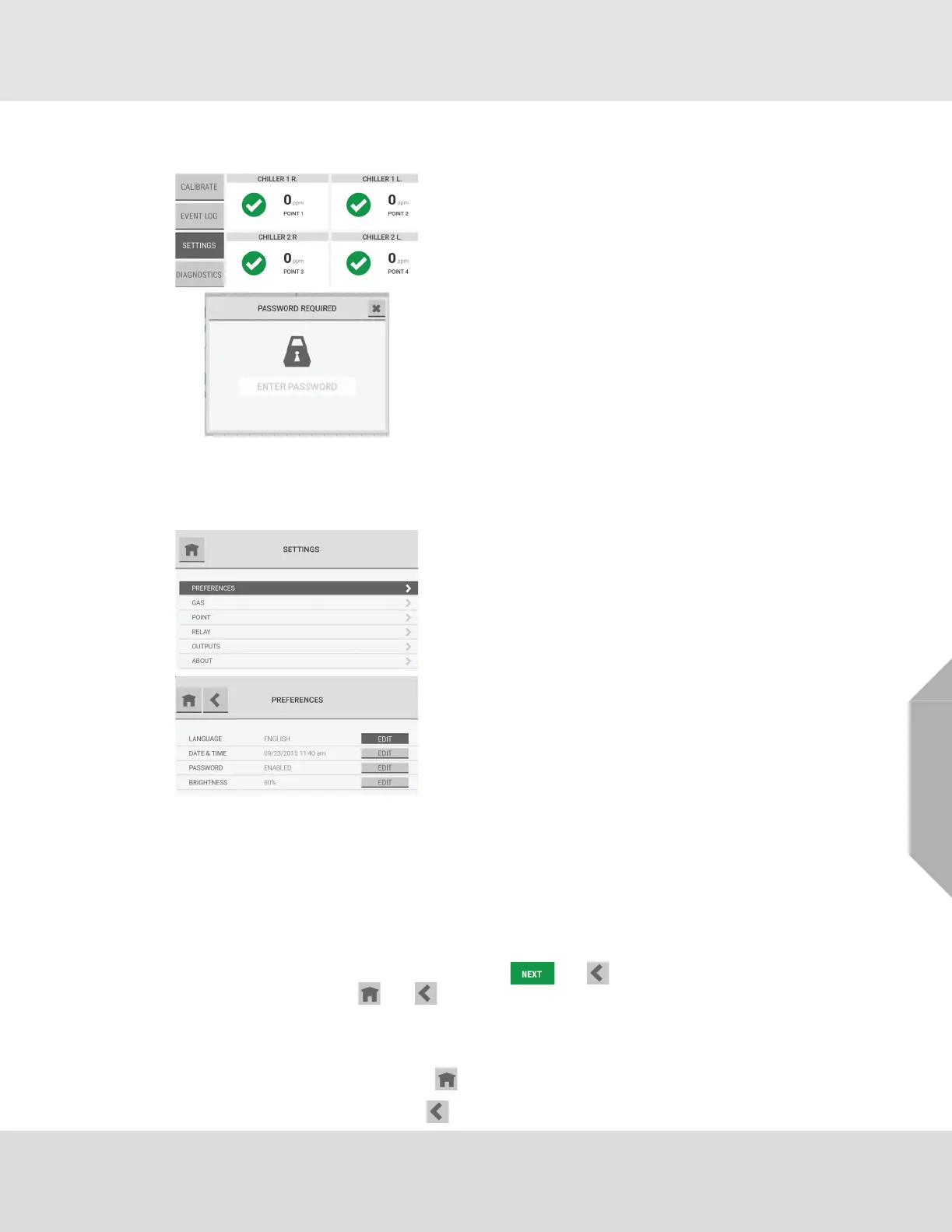
To access and edit the device settings that were assigned
during the initial setup, on the dashboard, select the
"Settings" button.
If password protection was enabled during the initial setup,
on the "Password Required" pop-up, enter the correct
password.
For help with forgotten passwords or password resets,
contact local MSA Customer Service.
On the "Settings" screen, select "Preferences".
The "Preferences" screen shows the current values for the
settings. Select the "Edit" button for the setting to change.



 To Next Page