36
Calibration
Chillgard 5000
US
6.1 Initial Setup
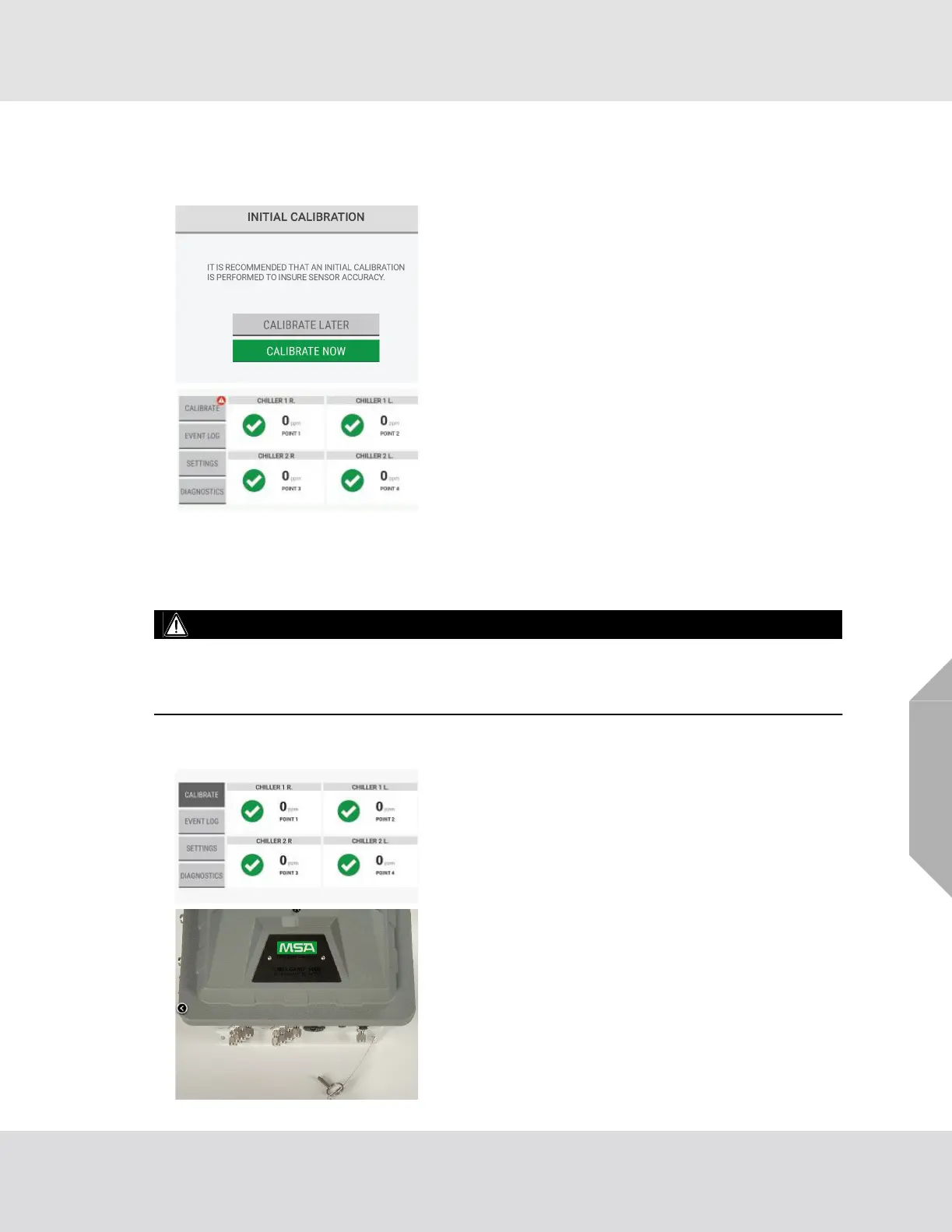
Following the initial setup, an initial calibration must be completed to ensure sensor accuracy.
6.2 Routine Operation
WARNING!
Make sure to remove the cap from the exhaust port before operating the device. Failure to do so will
create back pressure that can result in inaccurate readings and damage to internal components.
Failure to follow these warnings can result in serious bodily injury or death.
6.2.1 Starting Calibration
For a description of the dashboard, refer to Section 7.1,
"Dashboard Overview".
(1) On the "Initial Calibration" screen, select "Calibrate
Now".
(2) Go to Step (2) in Section 6.2, "Routine Operation".
NOTE: If "Calibrate Later" is selected, the dashboard
shows a notification on the "Calibration" button until the
initial calibration is completed.
Select "Calibrate" to re-open the "Initial Calibration" screen
and select "Calibrate Now".
(1) To start the calibration process, on the dashboard,
select "Calibrate".
(2) On the bottom of the device, remove the pin from the
calibration port.



 To Next Page