25
Initial Setup
Chillgard 5000
US
5Initial Setup
WARNING!
Make sure to remove the cap from the exhaust port before operating the device. Failure to do so will
create back pressure that can result in inaccurate readings and damage to internal components.
Failure to follow these warnings can result in serious bodily injury or death.
Remove the protective film from the touchscreen.
5.1 Language/Date & Time/Password
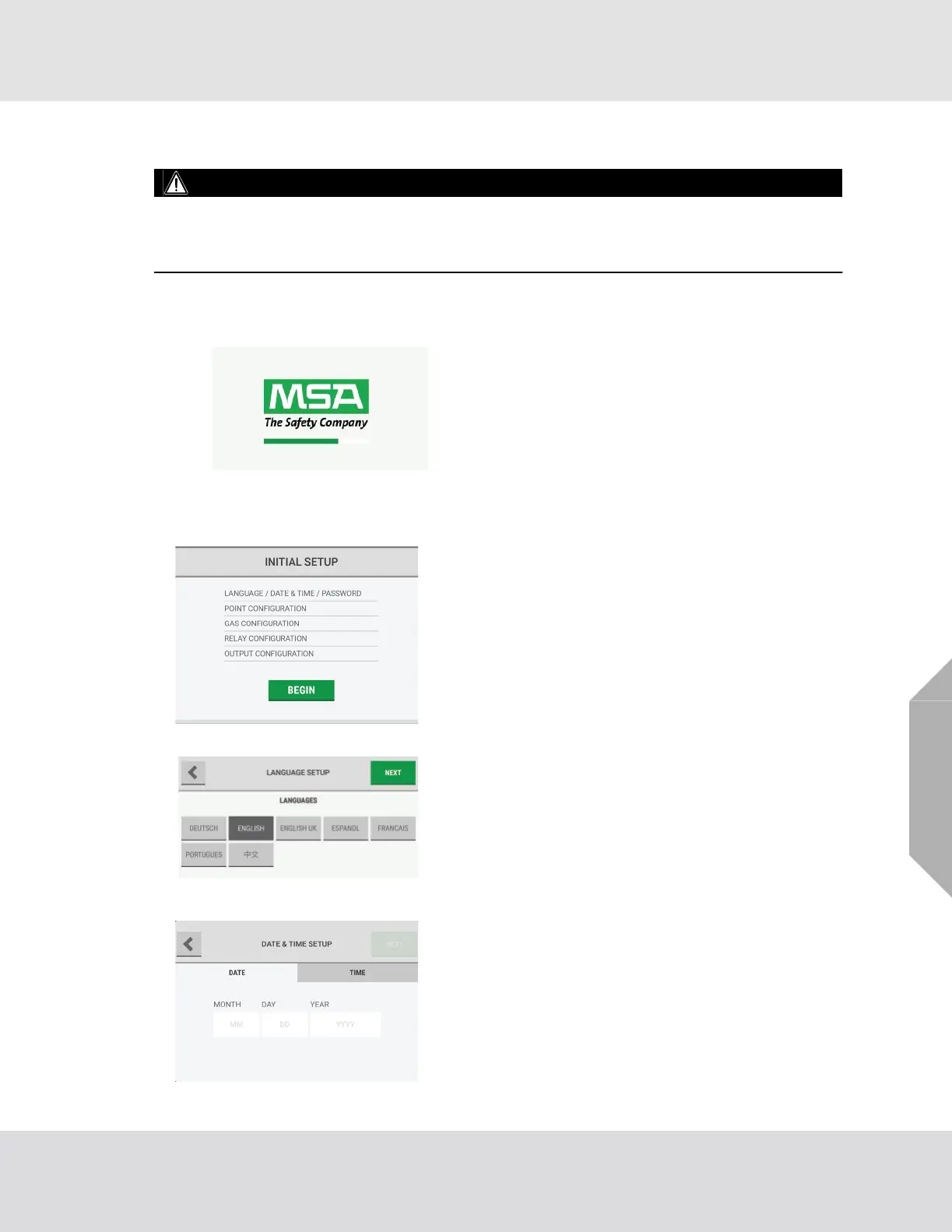
When power is supplied to the device, the green
power indicator LED (Fig. 1) illuminates and the
touchscreen shows a logo and a loading bar. The
loading bar indicates the status of the initializing
process.
If an error occurs during start-up, a pop-up identifies
the specific problem.
(1) On the "Initial Setup" screen, select "Language/Date &
Time/Password".
(2) On the "Language Setup" screen, select the appro-
priate language, then select "Next".
When a language is selected, the change is instantaneous.
(3) On the "Date & Time Setup" screen, select the "Date"
tab.
The date format can be MM/DD/YYYY or DD/MM/YYYY
depending on the language setting.



 To Next Page