33
Initial Setup
Chillgard 5000
US
5.5 Communications Output
There are three options available to support digital outputs.
For a list of the registers that are available for exchange with the Modbus controller, refer to
Section 17, "Appendix D: Modbus Holding Registers".
For a list of the BACnet Objects that are available for exchange with the BACnet controller, refer to
Section 18, "Appendix E: BACnet Objects".
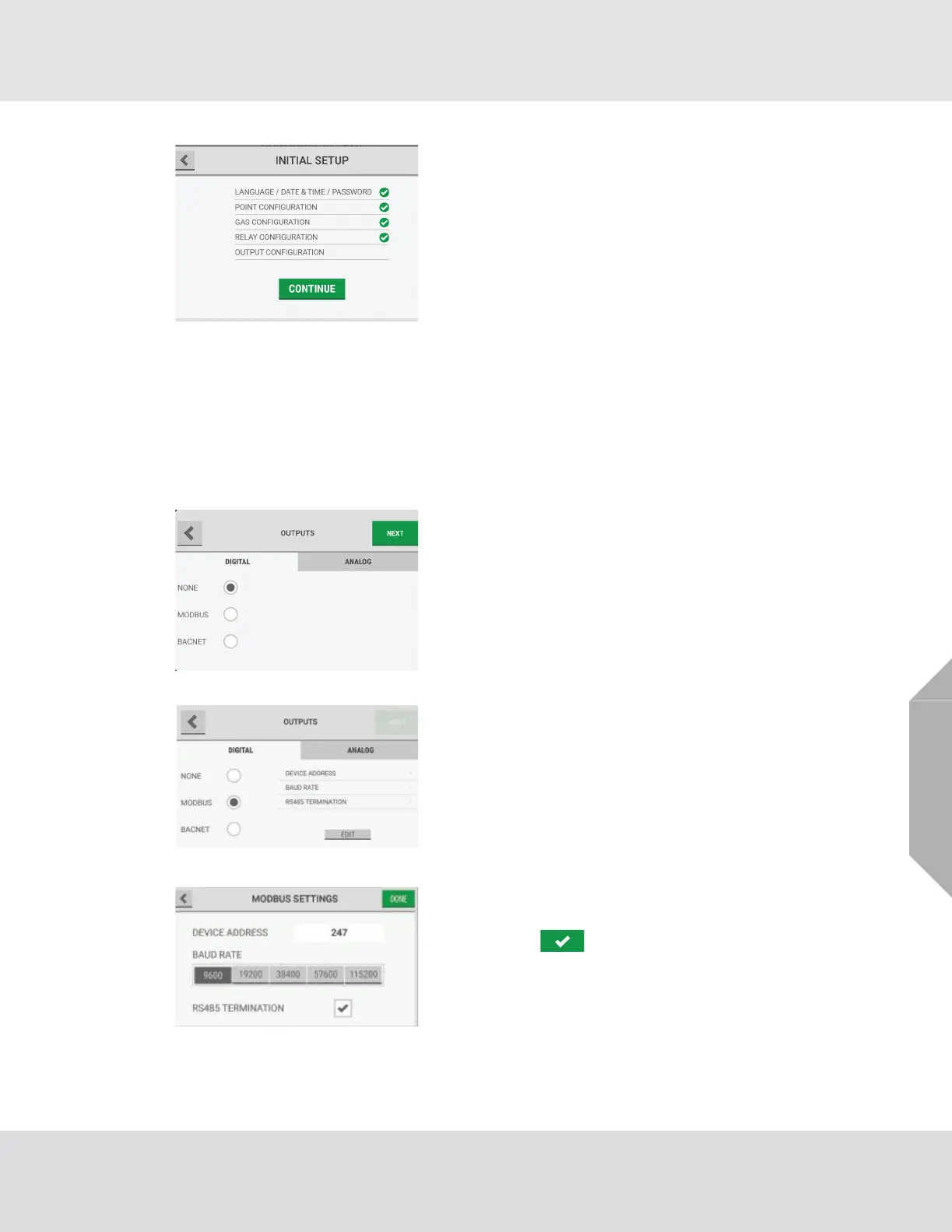
(8) The "Initial Setup" screen shows a check mark beside
the "Relay Configuration" step to indicate that it is
complete. Select "Continue" to go to the output config-
uration setup.
(1) On the "Digital" tab of the "Outputs" screen, select one
of the following:
(2) If "None" is selected, no digital communication is
configured.
(3) If "Modbus" is selected, do the following:
a) Select "Edit".
b) Select the "Device Address" field, and use the
alphanumeric keypad pop-up to enter a value.
Select to accept the value.
c) Select a baud rate for the connection.
d) Select the RS485 Termination check box.
e) Select "Done".



 To Next Page