39
Calibration
Chillgard 5000
US
6.4 Span Gas Calibration
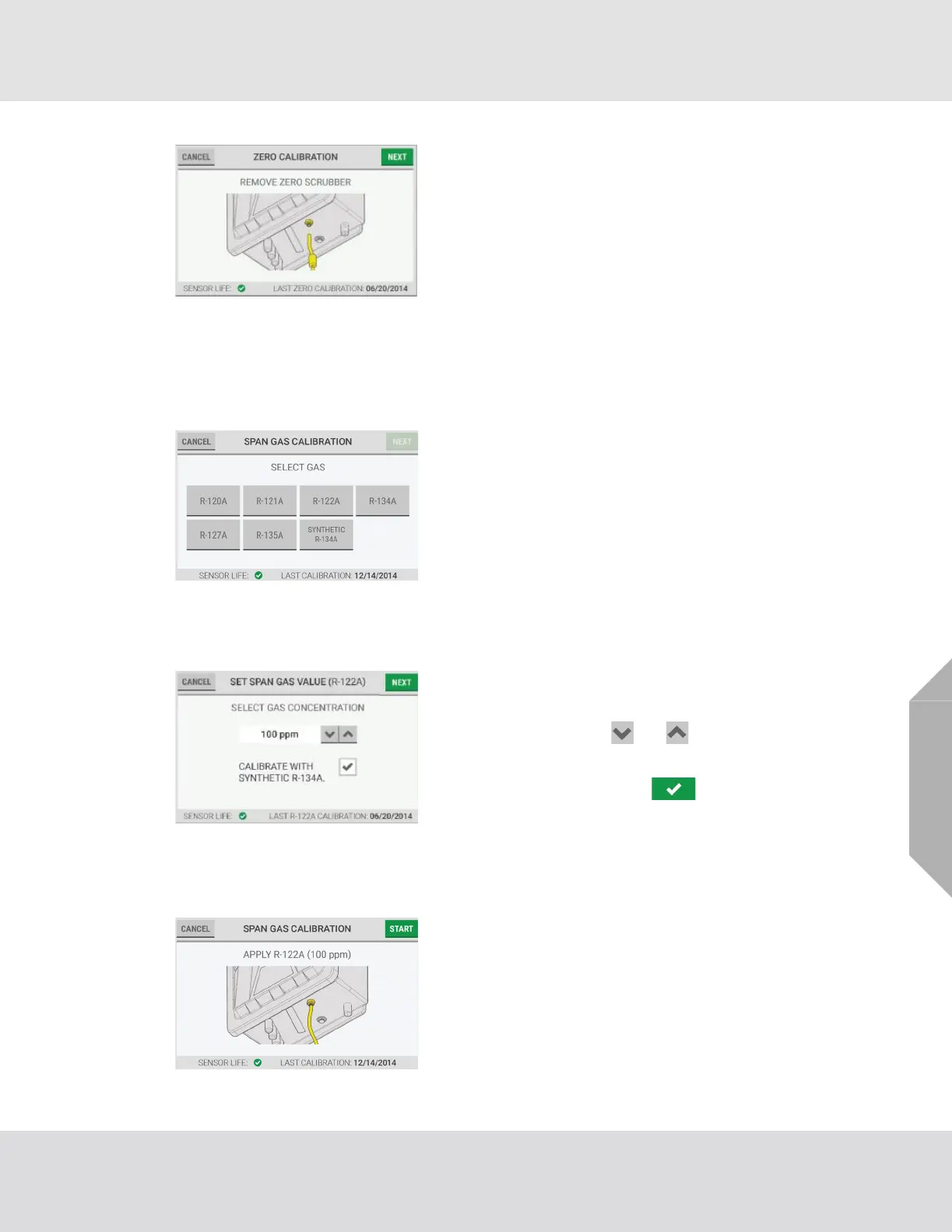
(7) Disconnect the zero-gas scrubber tubing from the cali-
bration port.
(8) On the device touchscreen, select "Next".
NOTE: To prevent zero-gas contamination, MSA recom-
mends using different regulators to do zero gas calibration
and span gas calibration.
(1) Close the cylinder valve.
(2) If applicable, remove the zero-gas cylinder or zero-
gas scrubber tubing from the calibration port.
(3) On the "Span Gas Calibration" screen, select the
applicable span gas.
NOTE: A maximum of seven gases show on the "Select
Gas" screen: six user-selected gases and one universal
gas (Synthetic R-134A).
(4) On the gas cylinder label, find the concentration for the
gas.
(5) On the "Set Span Gas Value" screen, to adjust the
concentration value to the value on the gas cylinder
label, either use the and buttons to increase or
decrease the value in 1 ppm increments, or select the
value field and use the alphanumeric keypad pop-up
to enter the value. Select to accept the value.
(6) To do the calibration with synthetic R-134A, select the
check box.
(7) Select "Next".
NOTE: The concentration value can be set between 50 and
500 ppm.
(8) Attach the span-gas cylinder tubing to the calibration
port.
(9) Open the span-gas cylinder valve.
(10) On the "Span Gas Calibration" screen, select "Start".



 To Next Page