66
Maintenance
Chillgard 5000
US
9.1.2 Examine and Replace Internal Inline Filters
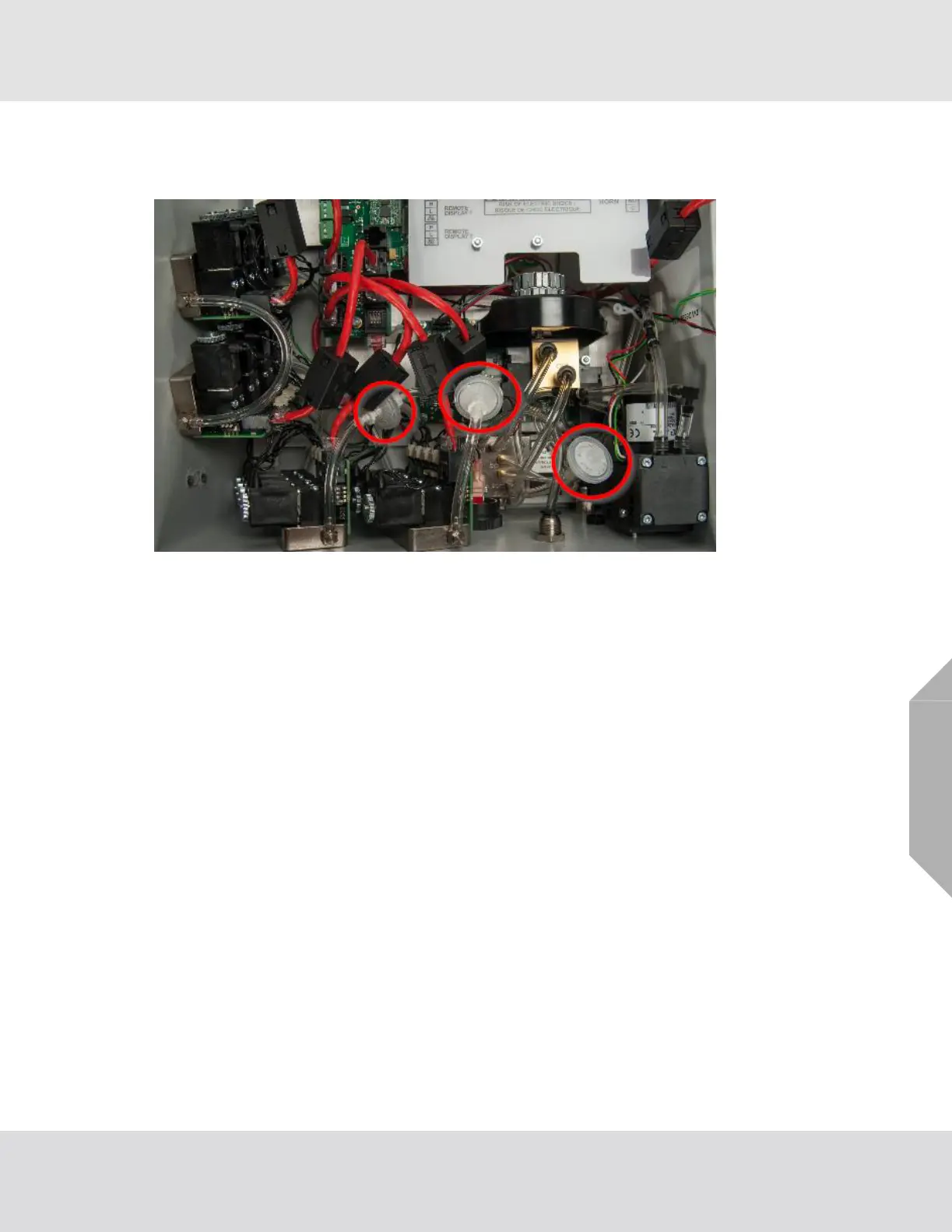
Inline filters are installed inside the device enclosure (Fig. 13).
Fig. 13 Location of inline filters
Periodically examine the inline filters inside the device enclosure for dirt and particulate buildup.
If the inline filters become severely clogged with particles or moisture, the flow rate for the device will
decrease and eventually cause a flow fault.
Replace dirty filters when necessary to prevent damage to internal components. For a list of approved
parts and how to order them, refer to Section 13, "Ordering Information".
Do the following procedure to replace the inline filters:
(1) Disconnect electrical power to the device.
(2) If applicable, remove the locking mechanism.
(3) Release the two latches on the left side of the device.
(4) Open the enclosure.
(5) Attach the ESD wrist strap to the ESD connection point inside the enclosure.
(6) Twist the Luer locks on both ends of the inline filter to release the filter from the tubing.
(7) Discard the dirty filter.
(8) Remove the new inline filter from the bag.
(9) Install one end of the new filter into the Luer lock and twist to lock the filter in position.
(10) Twist the free end of tubing slightly so that it will be straight when it's connected to the filter.
(11) Install the free end of the new filter into the Luer lock on the free end of tubing and twist to lock
the filter in position.
(12) Make sure the new filter fits snugly into both ends of the tubing.



 To Next Page