118 Performing Daily Maintenance
[4]
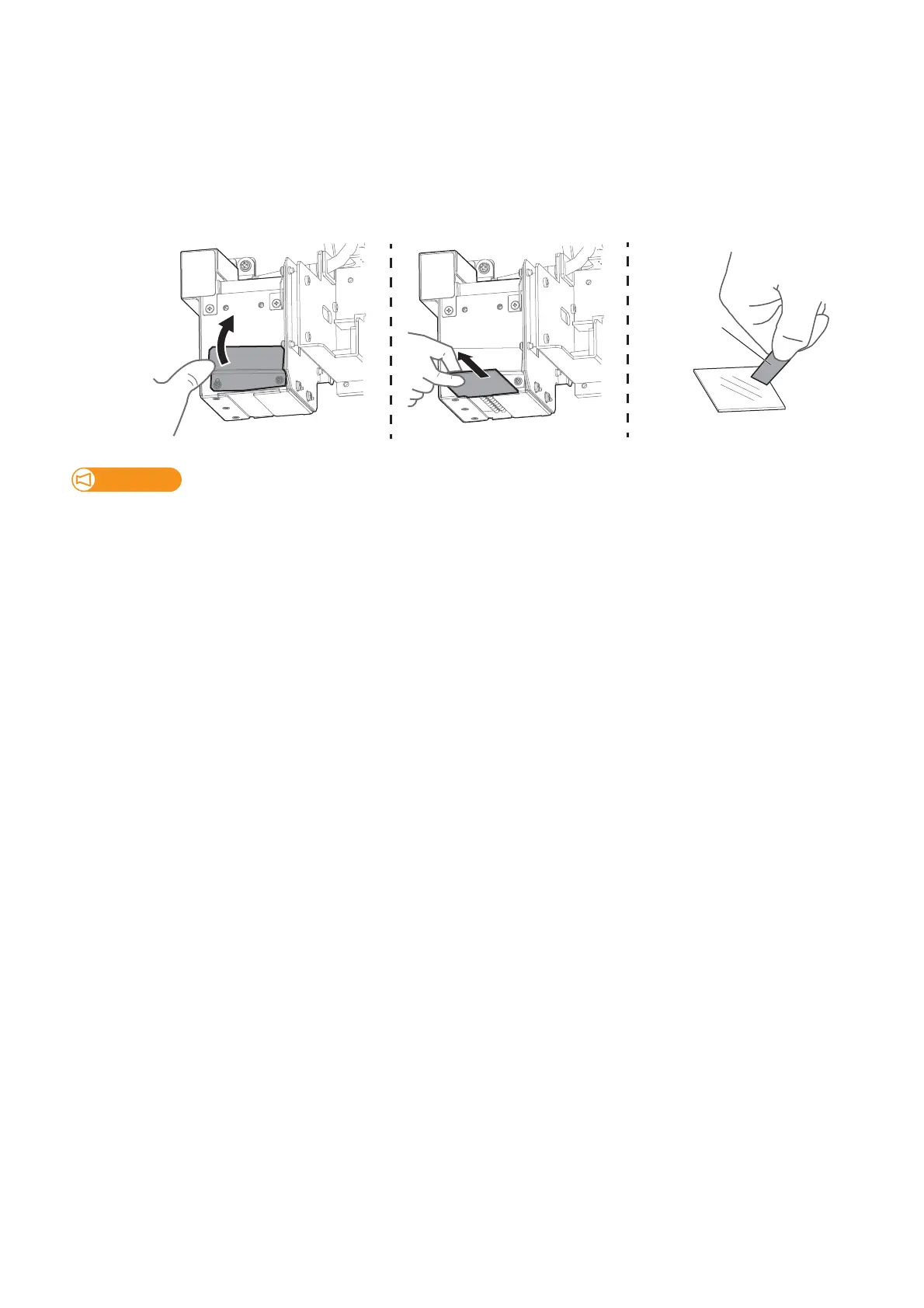
If the ink cannot be removed completely, remove the emitting window glass from the lamp and use the supplied
scraper to clean it off.
• Slide up the left side of the exhaust fan cover. The right side screw serves as a fulcrum.
• Slide the glass on the bottom of the lamp towards the front to remove it.
• Press the scraper on the ink deposits with a slight angle and scrape it off.
• Use the paper towel to clean the ink scraped from the glass.
• Put the glass back on the lamp.
Important!
• Make sure to use the scraper supplied with the printer.
• Do not press the edge of the scraper too hard. This will cause damage to the glass.
• Make sure to put the glass back on the UV-LED lamp after cleaning. Using the printer without the glass will reduce the
intensity of the lamp and will cause damage to the lamp.
[5]
Next moisten the surface of print head nozzles.














 To Next Page