66 Set1: User Type
Confirm pattern
• Tap [Enter] to carry out printing.
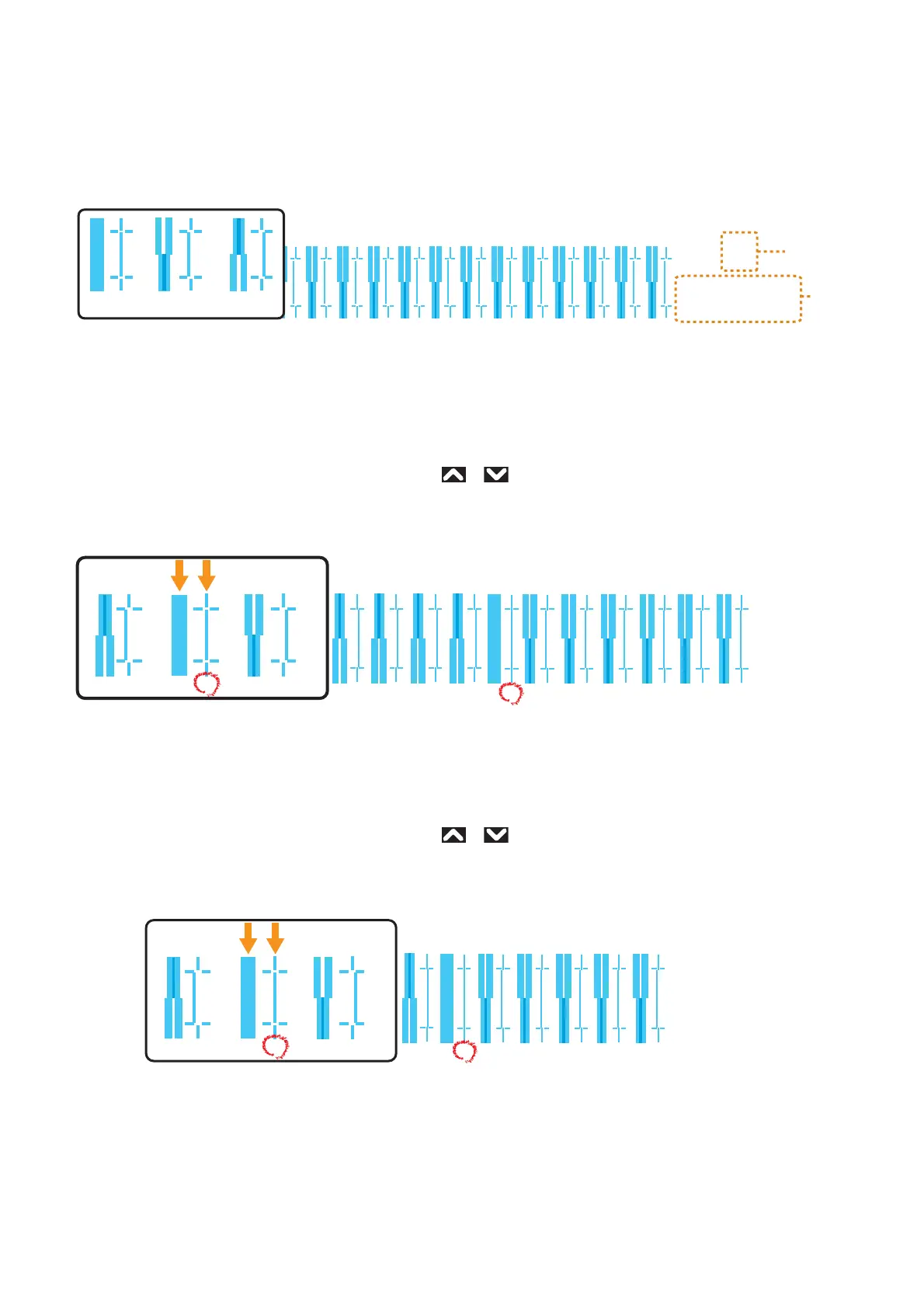
• Check the pattern print. If there are misalignments, proceed to rough adjustment pattern printing.
• In the picture below, there are misalignments.
Rough adjustment pattern
• Tap [Enter] to carry out printing.
• Look for and mark a number printed under a pattern that has least misalignment.
• “Pattern B: 6” or similar will appear in the display. Use
or to enter in the display the number that you marked, and
tap [Enter].
• In the case of the picture below, enter “7”, so that the display reads “Pattern B: 7”.
Fine adjustment pattern
• Tap [Enter] to carry out printing.
• Look for and mark a number printed under a pattern that has least misalignment.
• “Pattern B: 4” or similar will appear in the display. Use
or to enter in the display the number that you marked, and
tap [Enter].
• In the case of the picture below, enter “6”, so that the display reads “Pattern B: 6”.
B
Pattern name
Printing
settings
Bi-dir
normal speed
medium drop family
Good Not Good Not Good
1234567891011
B
678
Bi-dir
normal speed
medium drop family
1234567
B
567
Bi-dir
normal speed
medium drop family














 To Next Page