42 Introduction/Features
BACKUP CAMERA
Your MV-1 may be equipped with Rosco Inc. CMOS backup
camera to aid in increasing your field of vision when backing
up your vehicle.
DO NOT rely only on the Backup Camera when backing up a
vehicle.
REASON: The Backup Camera is a supplemental
reverse aid device and should always be used in conjunction
with direct line-of-sight, the rearview mirror and side mirrors
to provide maximum visibility.
The camera is mounted under the liftgate handle to the right of
the liftgate release button. When the vehicle is shifted into
reverse, the image from the camera will display on the screen
of the audio system. The camera field of view extends beyond
the corners and all areas of the rear bumper by a foot.
NOTE:
For Backup Camera image controls, like
brightness, consult the Pana-Pacific Touch Screen Audio
System user’s guide.
When the vehicle is shifted into reverse, the rear camera will
automatically display an image on the screen, even if the audio
system is turned off. If the audio system is on when the rear
backup camera is activated, the audio will mute while the
vehicle is in reverse.
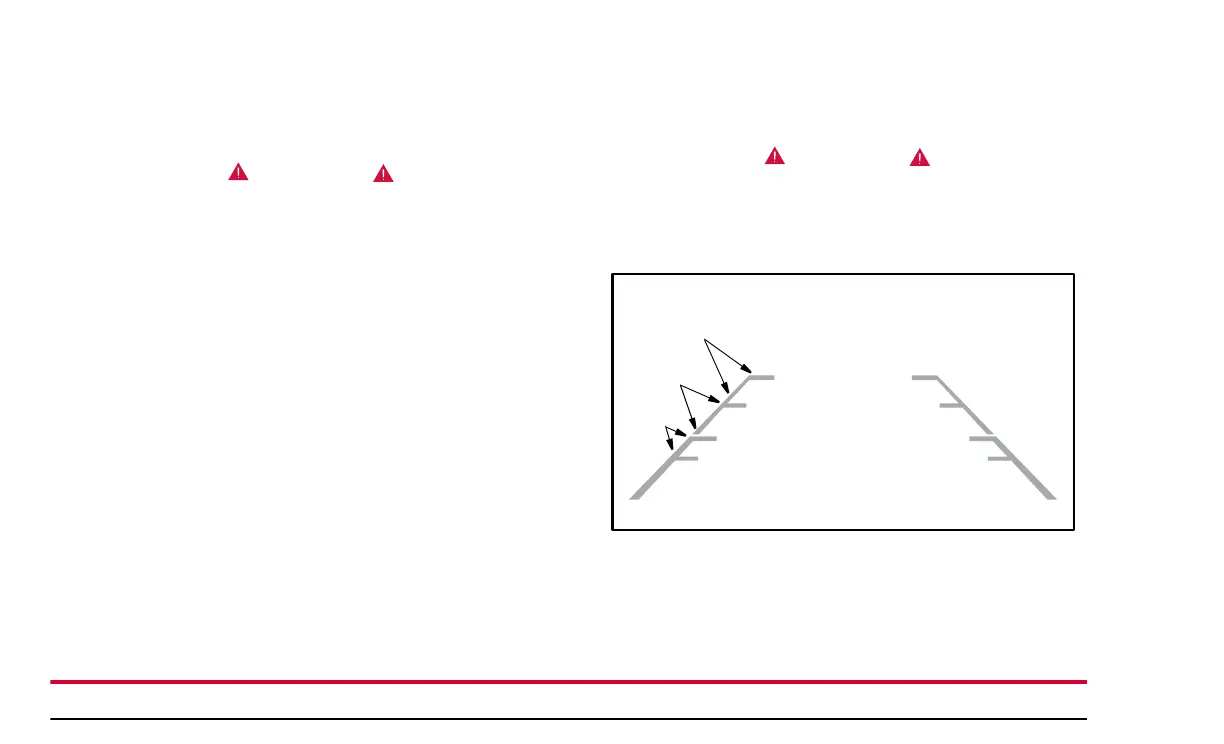
The Backup Camera display has three zones indicated on it, which
will give you an idea of how far away objects are from the rear of
your MV-1. Objects are closest to your vehicle when they are in
the red zone and furthest away when they are in the green zone.
There are limits to the Backup Camera coverage area.
REASON: Objects that are close to either corner of the
bumper or under the bumper might not be seen on the
screen.
.
As you back up, objects are getting closer to your vehicle as
they move from the Green Zone to the Yellow and Red Zones.
If an object is in the Red Zone it is approximately two feet or
less from the rear of your vehicle.
Green
Zone
Yellow
Zone
Red
Zone
Rear of Vehicle


 To Next Page