Vehicle Controls 65
DOOR AND WINDOW CONTROLS
Door Locks
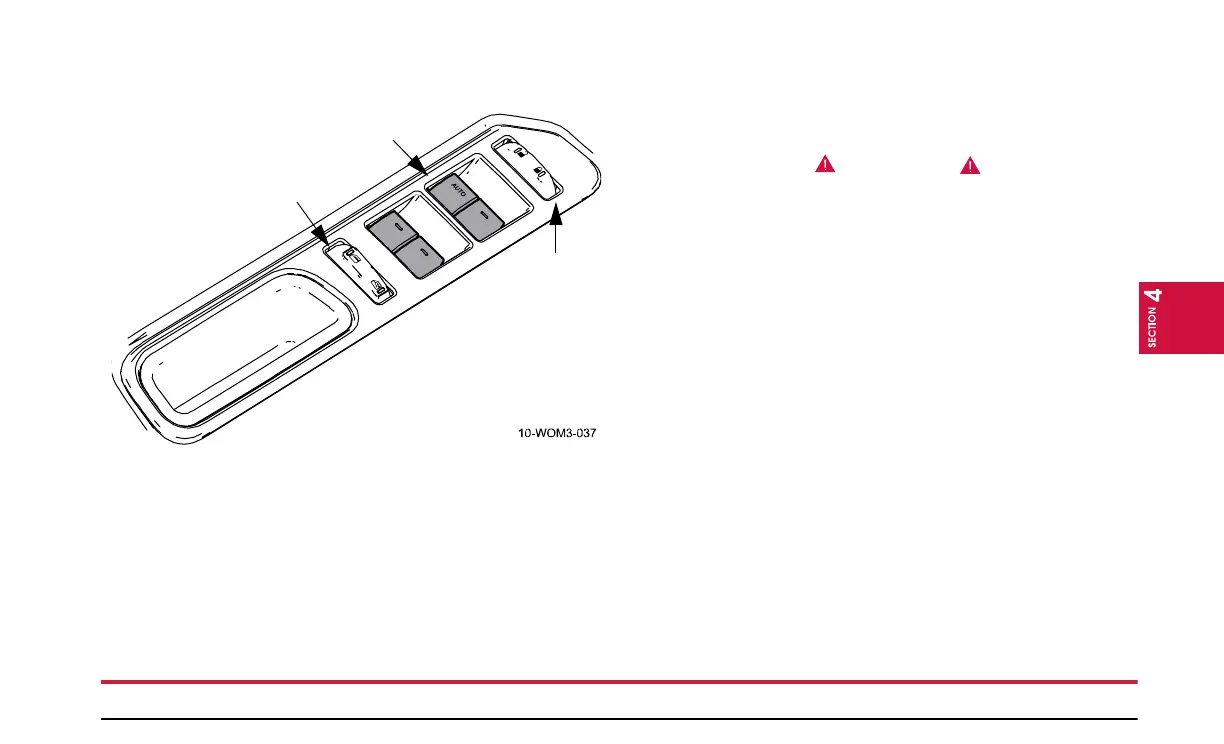
The driver’s and front passenger’s door both have a door lock
switch. To open all of the doors, (including the rear hatch)
press the left side of the door lock switch. Press the right side
of the switch to lock all of the doors. Any of the doors can be
manually locked or unlocked by pushing down or pulling up
on the door lock rod.
Window Operation
To open any of the windows, push down and hold the switch to
open the window. To close, pull up on the switch. There is also
a window switch on each of the passenger doors.
Before closing the power windows, you should verify they
are free of obstructions and ensure that children and/or pets
are not in the proximity of the window openings.
REASON: Children and/or pets could get trapped
between the window and the door frame as the window
closes, causing serious bodily injury or death.
One Touch Down
Allows the driver’s window to open fully without holding the con-
trol down. Press the switch completely down to the second detent
and release quickly. The window will open fully. Momentarily
press the switch to any position to stop the window operation.
Window Lock
The window lock feature allows only the driver to operate the
power windows from the controls on the driver’s door.
To lock out all the window controls (except for the driver’s)
press the right side of the switch. Press the left side of the
switch to restore all the window controls.
NOTE:
The rear window switches will not illuminate when
the window control is in the locked position.
Door
Lock
Switch
Driver’s
Window
Switch
Window
Lock
Switch


 To Next Page